‘> 3 seconds’
START
ENTER
SELECT
STOP
-
32
-
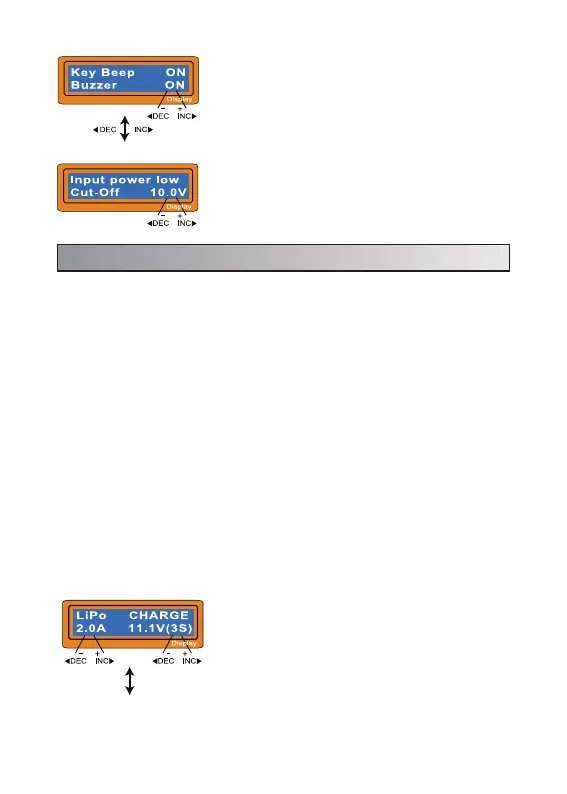
The left side of the first line shows the type of
battery you select at the users setting. The value on
the left side of second line sets a charge current and
the value on the right side of second line sets the
voltage of the battery pack.
After setting the current and voltage press
START/ENTER key for more than 3 seconds to start
the process.
(Charge current: 0.1~6.0A, Voltage: 1~6 series)
6. Lithium Battery (LiIo/LiPo/LiFe/LiHv) program
Use these programs only when charging a lithium battery (Lilo/LiPo/LiHV/LiFe)
with a nominal voltage of 3.6V, 3.7V, 3.8V or 3.3V per cell, respectively. The
charge current going into the battery will vary depending on the chemistry type
so it is VERY IMPORTANT that you select the correct type for your battery. The
ending voltage of the charge is also important as it varies for all four types: 4.1V
for Lilo, 4.2V for LiPo, 4.35V for LiHV and 3.6V for LiFe. The charge current (how
many Amps you are putting into the pack) and nominal voltage (Proper voltage
for the cell count of the battery you are charging) must be correct for the battery
to be charged. To change these settings, press the START/ENTER key to make
the selected value blink. Using the increase and decrease buttons, set you
desired amperage, then press START/ENTER to save the setting. You will then
be asked to select your nominal voltage/cell count. Again, use the increase/de-
crease buttons to reach your desired setting and press the START/ENTER
button to confirm and save.
When you are willing to alter the parameter value in the program, press
START/ENTER key to make it blink then change the value with INC or DEC key.
The value will be stored by pressing START/ENTER key once.
6.1 Charging Lithium Battery
The beep sounds at every time pressing the
buttons to confirm your action. The beep or melody
sounded at various times during operation to alert
different mode changes. These audible sounds can
be on or off.
This program monitors the voltage of input battery.
If the voltage drops below the value you set the
operation forcibly terminated to protect the input
battery.


 To Next Page