‘> 3 seconds’
START
ENTER
SELECT
STOP
START
ENTER
-
35
-
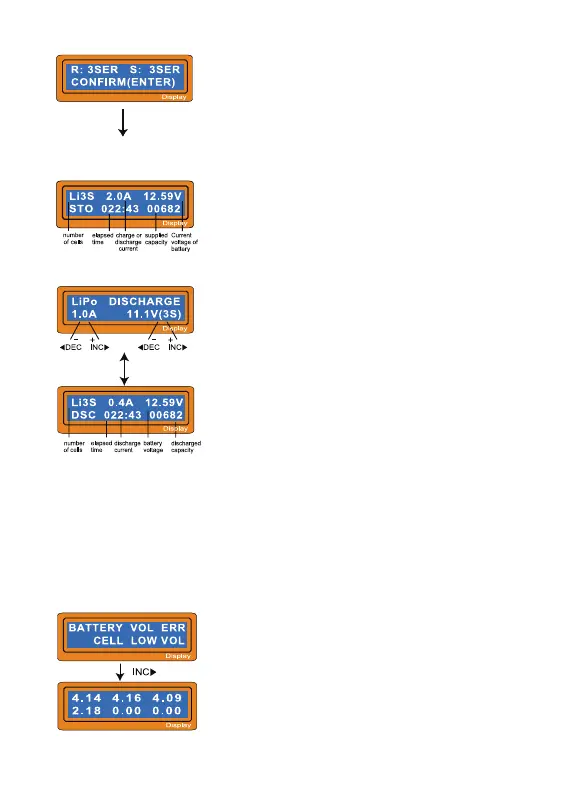
The processor found that the voltage of one of the
cell in the Lithium battery pack is too low.
In this case, the 4th cell is bad. If there happens the
connection-break of th cable or plug, the voltage
value may show 2.18.
6.6 Voltage balancing and monitoring during the discharge
The processor monitors the voltage of individual cells during 'storage-mode'
and 'discharge' of Lithium battery pack. It tries to normalise the voltages to be
equal. For this feature, the individual plug of the battry pack should be connected
to the individual port of the charger. If the voltage of any one or more cells varies
abnormally during the procedure, It terminates the process forcibly with the error
massage. If this happens, the battery pack contains the bad cell, or the bad
connection of the cable plug. You can easily know which one cell is bad by
pressing INC button at time of showing the error message.
The value of discharge current on the left side of
screen may not exceed 1C for a maximum safety
and the final voltage on the right should not be under
the voltage level that is recommended by the battery
manufacturer to avoid deep discharging. To start to
discharge, press START/ENTER key for more than
3 seconds.
This shows the present state of discharge. To stop
discharging press SELECT/STOP key once.
This shows the number of cells you set up and the
processor detects.' R: ' shows the number of cells
found by the charger and ' S:' is the number of cells
selected by you at the previous screen. If both
numbers are identical you can start charging by
press START/ENTER button. If not, press
SELECT/STOP button to go back to previous
screen. Then carefully check the number of cells of
the battery pack to charge again.
The screen shows the present situation during
charge process. To stop charging press
SELECT/STOP key once.
6.5 Discharging Lithium battery


 To Next Page