‘> 3 seconds’
START
ENTER
SELECT
STOP
‘> 3 seconds’
START
ENTER
SELECT
STOP
-
36
-
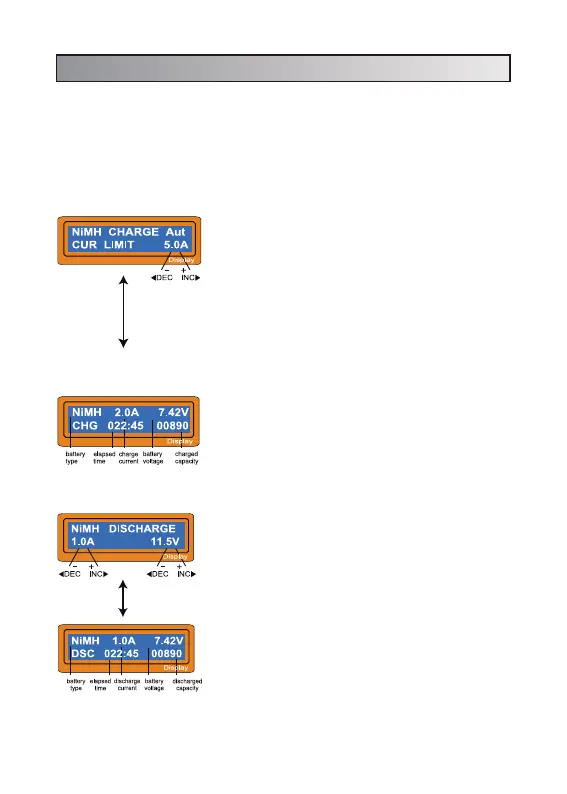
Set discharge current on the left and final voltage
on the right. The discharge current ranges from 0.1
to 1.0A and the final voltage ranges from 0.1 to
25.0V). To start the process, press START/ENTER
key more than 3 seconds.
The screen displays the current state of discharge.
You can alter the discharge current by pressing
START/ENTER key during the process. Once you
change the current value, store it by pressing
START/ENTER button again. To stop discharging
press SELECT/STOP key once. The audible sound
indicated you at the end of process.
7.2 Discharging NiMH/NiCd battery
This program simply charge the battery using the
current you set. In 'Aut' mode, you need to set the
upper limit of charge current to avoid from higher
feeding current that may damage the battery.
Because some batteries of low impedance and
small capacity can lead to the higher charge current
by the processor at automatic charge mode. But in
'Man' mode, it will charge the battery with the charge
current you set at the display. Each mode can be
switched by pressing INC and DEC button
simultaneously when the current field is blinking.
The screen displays the current state of charging.
To stop the process, press SELECT/STOP key
once. The audible sound indicates you the end of
process.
7. NiMH/NiCd battery program
These programs are for charging or discharging NiMH (Nickel-Metal-Hydride)
or NiCd (Nickel-Cadmium) battery commonly used for R/C model aplications. To
alter the value at the display, press START/ENTER to make it blink then change
the value using INC or DEC key. The value will be stored by pressing
START/ENTER key once. To start, press START/ENTER button for more than 3
seconds.
7.1 Charging NiMH/NiCd battery


 To Next Page