START
ENTER
‘> 3 seconds’
START
ENTER
SELECT
STOP
‘> 3 seconds’
START
ENTER
-
39
-
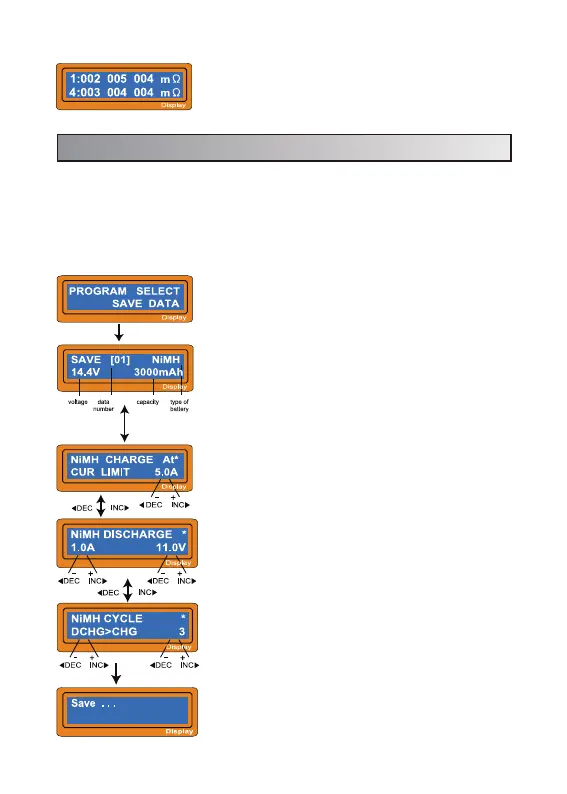
Program select.
The parameter value setting up in this screen does
not affect charge or discharge process. They only
represent the specification of the battery. The
following screens will automatically be displayed
exactly matched battery type you set up. The
example shows the battery pack of NiMH, 12cells
and 3000mAh of capacity.
Set up the charge current for manual charge mode,
or the current limit for automatic charge mode. Each
mode can be switched by pressing INC and DEC
button at the same time when the current field is
blinking.
Set up discharge current and final voltage.
Set up the sequence of charge and discharge, and
the cycling number.
Saving the data.
10. Save data program
It has a data storage and load program for your convenience. This feature can
store up to 5 battery data by number that represent the individual specification of
batteries you are using. They can be called back for the process of charging or
discharging without setting up the program again. To set up the parameter value
in the program, press START/ENTER key to make it blink then change the value
with INC or DEC key.
Press ‘INC’ to check the total data of the Battery Pack
IR (Press ‘INC’ again to back to show the data of the
single cell IR.)


 To Next Page