-
37
-
‘> 3 seconds’
START
ENTER
SELECT
STOP
‘> 3 seconds’
START
ENTER
SELECT
STOP
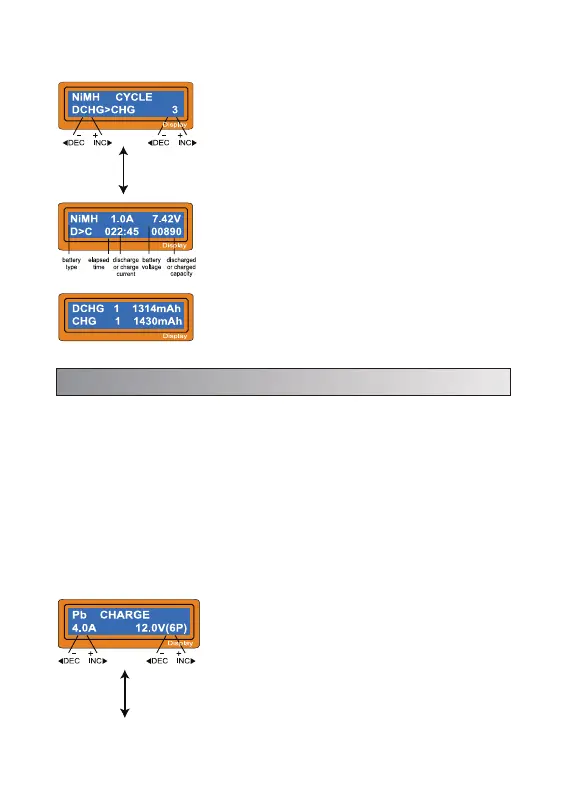
Set up the charge current on the left and the
nominal voltage of the battery on the right. The
charge current ranges from 0.1 to 7.0A and the
voltage should be matched with the battery being
charged.
Start the charge process by pressing
START/ENTER key for more than 3 seconds.
8. Pb (lead-sulphuric acid) battery program
This is programmed for charging Pb (lead-sulphuric acid) battery with nominal
voltage from 2 to 20V. Pb batteries are totally different from NiCd or NiMH
batteries. They can only deliver relatievely lower current compare to their
capacity, and similar restrictions definitely apply to charge. So the optimal
charge current will be 1/10 of the capacity. Pb batteries must not be charged
rapidly. Always follow the instruction is supplied by the manufacturer of battery.
When you are willing to alter the parameter value in the program, press
START/ENTER key to make it blink then change the value with INC or DEC key.
The value will be stored by pressing START/ENTER key once.
8.1 Charging Pb Battery
Set the sequence on the left and the number of
cycle on the right. You can use this function for
balancing, refreshing and break-in the battery. To
avoid rising temperture of the battery, there will a
brief cool-off period that already fixed at 'User
setting' after each charge and discharge process.
The cycling number ranges from 1 to 5.
To stop the process, press SELECT/STOP key
once. You can change the discharge or charge
current by pressing START/ENTER key once during
the process. The audible sound indicates you the
end of process.
At the end of the process, you can see charged or
discharged electric capacities of the battery at each
cyclic process. By pressing INC or DEC button, the
screen shows the result of each cycle in order.
7.3 Charge-to-discharge & discharge-to-charge cycle NiMH/NiCd battery


 To Next Page