Introduction - 8
Robomow RL555, RL855, RL2000
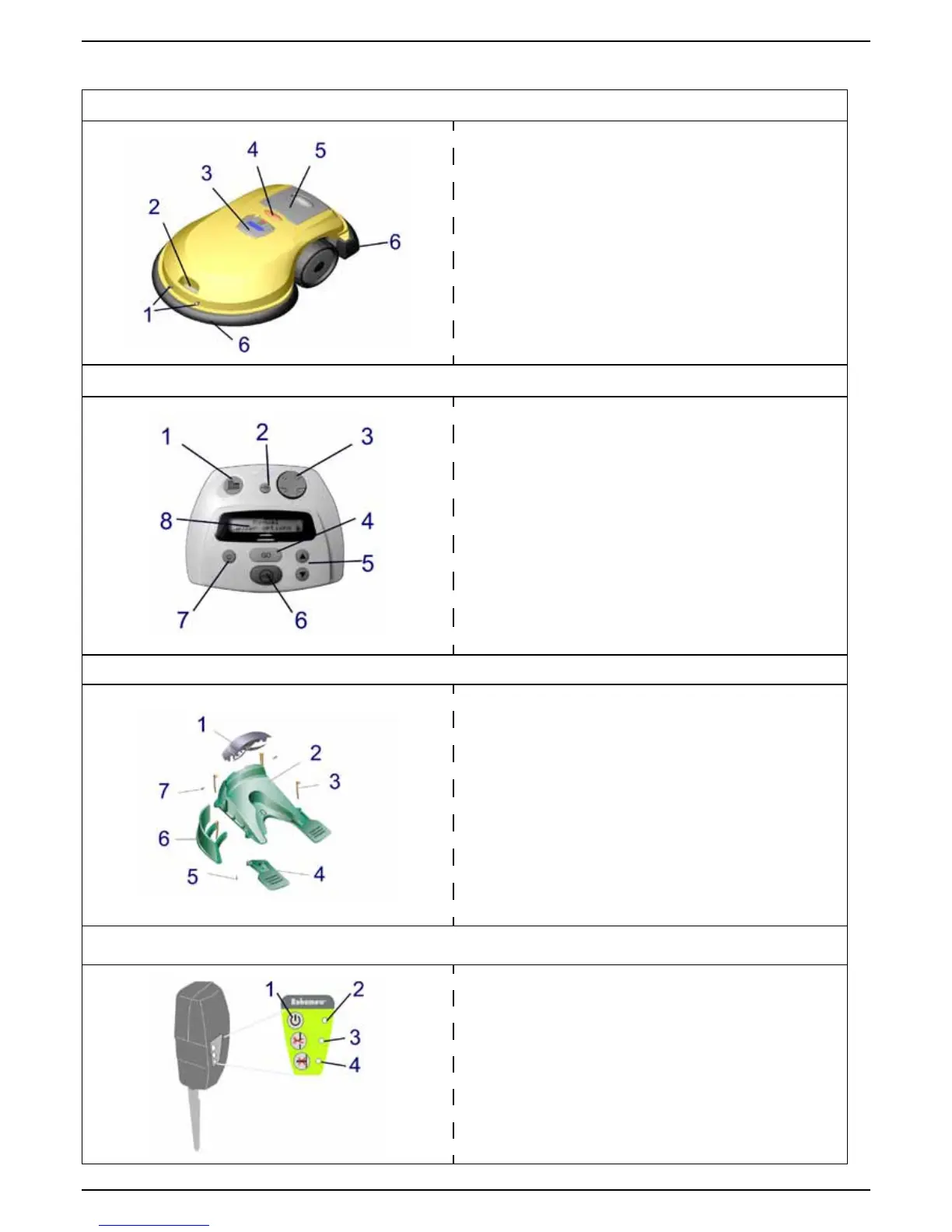
Name of the Parts
Robomow
®
1. Charging Contact Pins
2. Carrying handle
3. Manual Controller
4. Operating Lamp
5. Power Pack
6. Bumpers with touch sensitive sensors
Manual Controller Panel
1. Manual blade engagement button
2. Manual drive speed control – fast/slow
3. Navigator button
4. GO button
5. Scroll arrows for menu selection
6. Stop button
7. Clear/cancel button
8. LCD display window
Base Station
1. Cover
2. Base
3. Stakes (x5)
4. Drive wheels support
5. Screws (x2)
6. Fence
7. Screws (x2)
Perimeter Switch
1. ON/OFF button
2. Flashing light indicates the system is on
3. Indicates a disconnected/broken wire
4. Indicates poor splicing of perimeter wires
or perimeter wire, which is too long


 To Next Page