Robotiq Hand-E Gripper Instruction Manual
3.5.3. Coupling to Controller
To connect a gripper to a network or robot controller via fieldbus communication, you can use the Robotiq Universal Controller .
For details on the Robotiq Universal Controller, see its Instruction Manual on robotiq.com/support.
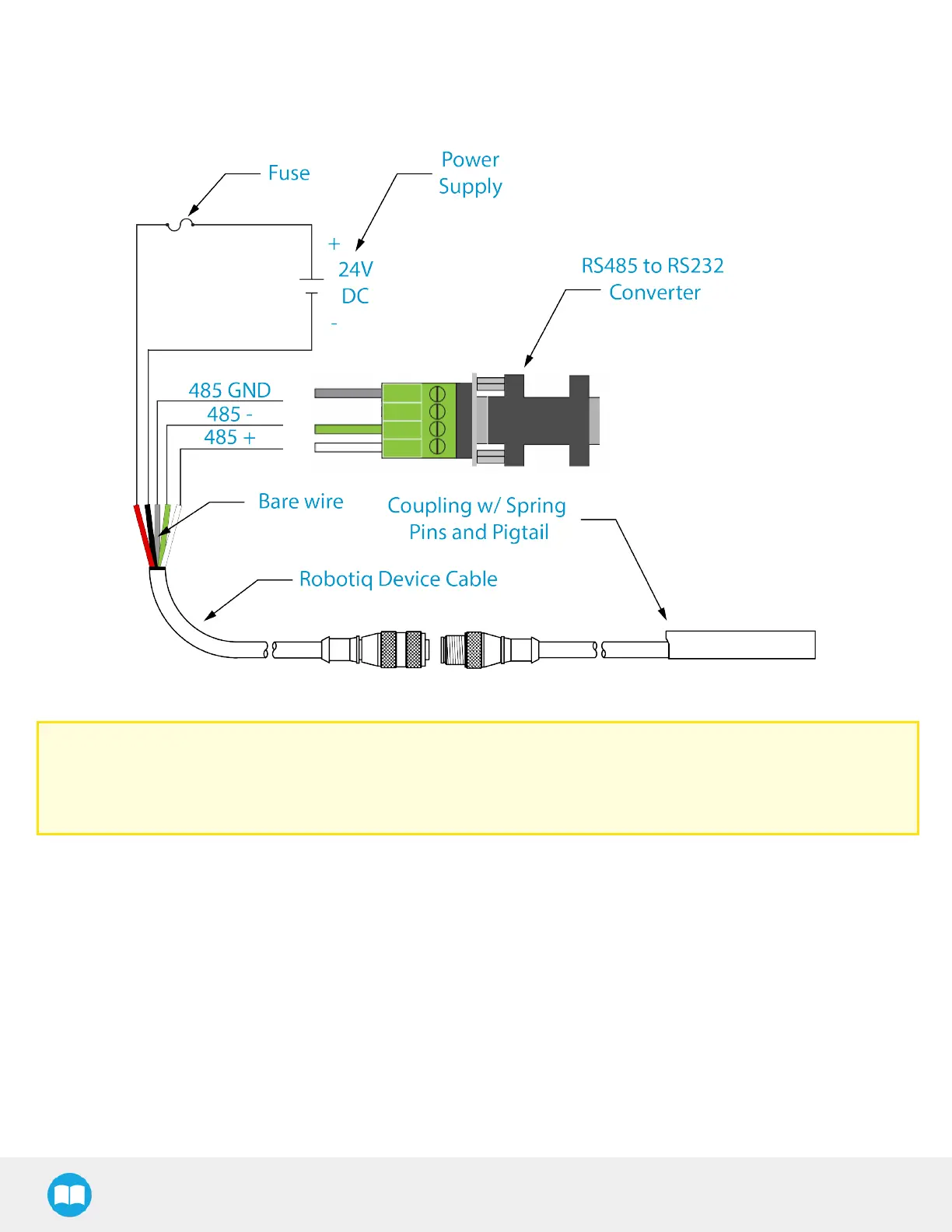
Fig. 3-9: Wiring diagram of Hand-Efor robots requiring a RS485 to RS232 converter. Includes a device cable, power supply, fuse and
ground.
Caution
Use proper cabling management. Make sure to leave enough slack in the cabling to allow movement of the gripper
along all axes without pulling out the connectors. Always protect the controller side (robot side) connector of the cable
with a strain relief cable clamp.
The figure below illustrates the Hand-E Gripper pigtail connector from the coupling (GRP-CPL-062 or AGC-CPL-XXX-002), the
device cable on the robot side (CBL-COM-2065-10-HF) and their associated pinout.
27



 To Next Page