B-2 HIM Overview
To use an ALT function, press the ALT key, release it, then press the
programming key associated with one of the following functions:
The HIM can be removed while the drive is powered. Normally, the
drive issues a fault when the HIM is removed because it detects that a
device is missing.
Important: HIM removal is only permissible in Auto mode. If the HIM
is removed while in Manual mode or the HIM is the only
remaining control device, a fault will occur.
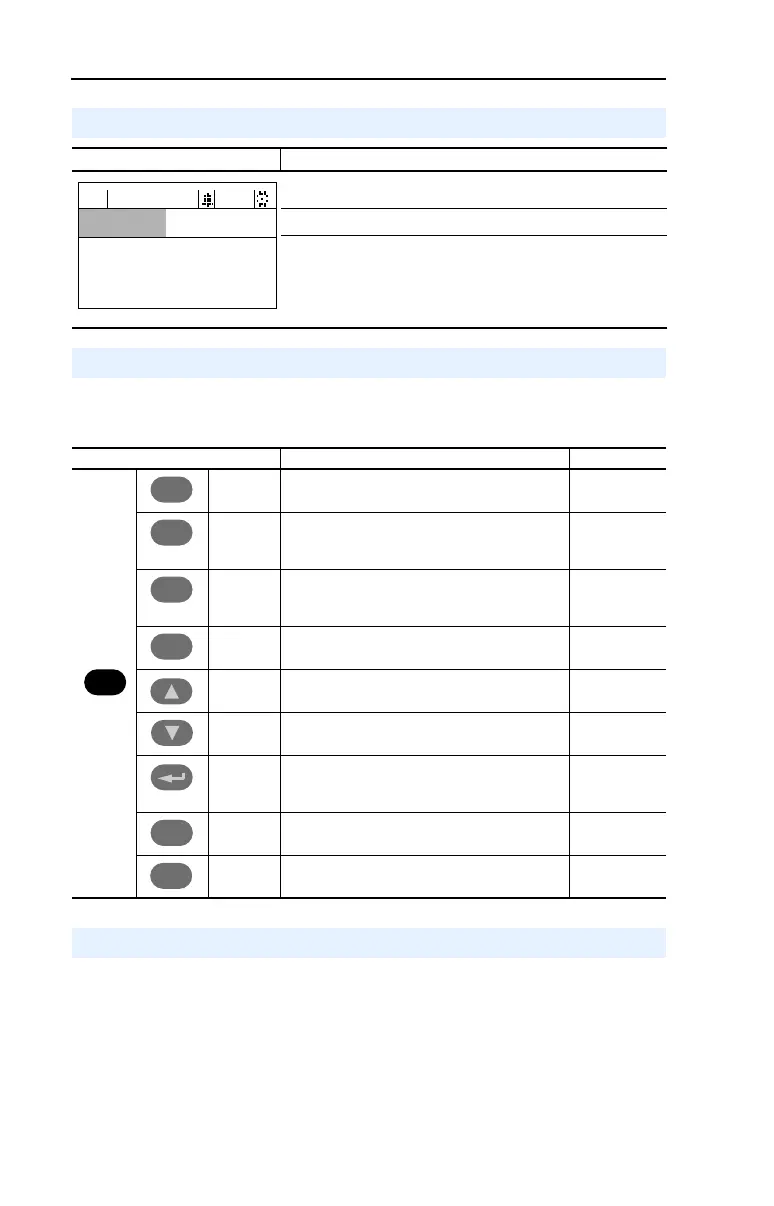
LCD Display Elements
Display Description
Direction Drive Status Alarm Auto/Man Information
Commanded or Output Frequency
Programming / Monitoring / Troubleshooting
ALT Functions
F-> Power Loss Auto
0.0
Hz
Main Menu:
Diagnostics
Parameter
Device Select
ALT Key and then … Performs this function … HIM Type
S.M.A.R.T. Displays the S.M.A.R.T. screen. LCD only
Log In/Out Log in to change parameter settings.
Log out to protect parameter settings.
Change a password.
LED only
View Allows the selection of how parameters will be
viewed or detailed information about a
parameter or component.
LCD only
Device Select a connected adapter for editing. LED only
Lang Displays the language selection screen. LCD only
Auto / Man Switches between Auto and Manual Modes. LCD and LED
Remove Allows HIM removal without causing a fault if the
HIM is not the last controlling device and does
not have Manual control of the drive.
LCD and LED
Exp Allows value to be entered as an exponent.
(Not available on PowerFlex 70.)
LCD only
Param # Allows entry of a parameter number for viewing/
editing.
LCD only
ALT
Esc
Esc
Sel
Sel
.
.
+/–
Removing the HIM



 To Next Page