Programming and Parameters 3-59
Applications File (File K)
File K
Group
No.
Parameter Name & Description
See page 3-2 for symbol descriptions
Values
Related
APPLICATIONS (File K)
Fiber Functions
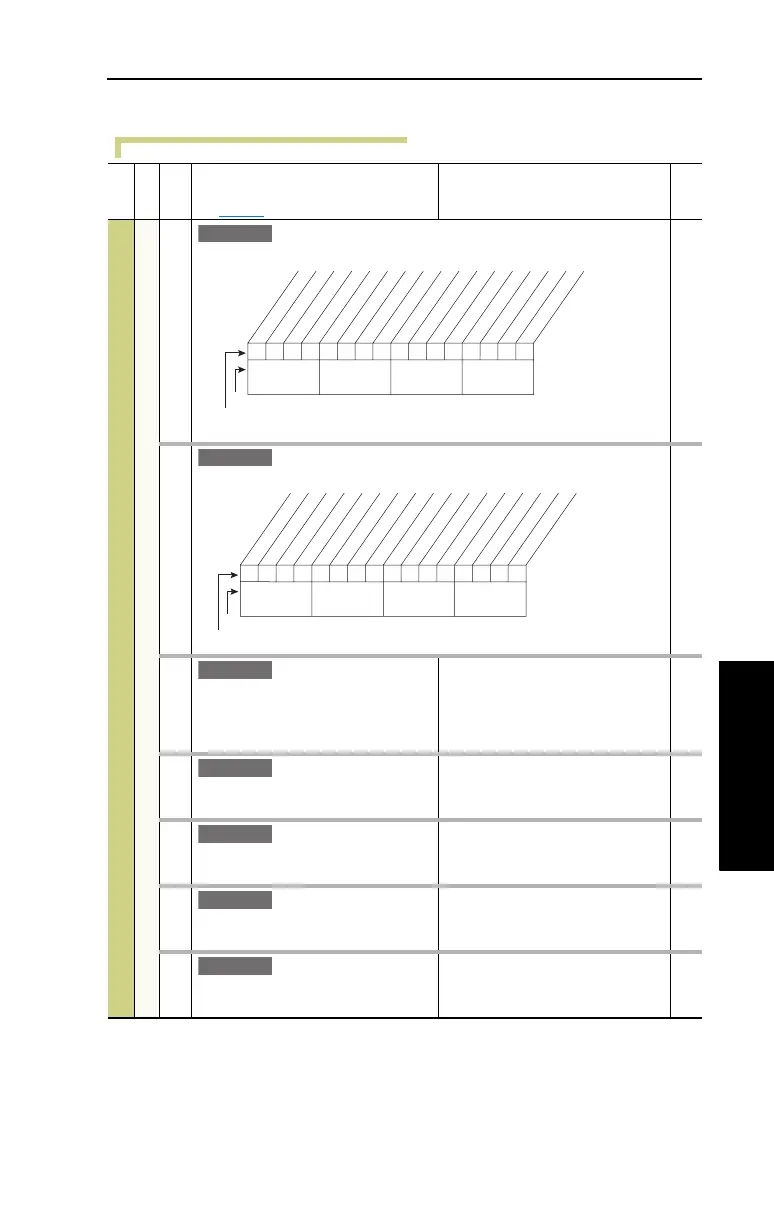
620 [Fiber Control]
Controls the Sync and Traverse functions.
621 [Fiber Status]
Status of Sync and Traverse functions.
Read Only
622 [Sync Time]
The time to ramp from the “held speed
reference” to the current speed
reference, after the Sync input is
de-energized.
Default:
Min/Max:
Units:
0.0 Secs
0.0/3600.0 Secs
0.1 Secs
623 [Traverse Inc]
Sets the time period of increasing
frequency.
Default:
Min/Max:
Units:
0.00 Secs
0.00/30.00 Secs
0.01 Secs
624 [Traverse Dec]
Sets the time period of decreasing
frequency.
Default:
Min/Max:
Units:
0.00 Secs
0.00/30.00 Secs
0.01 Secs
625 [Max Traverse]
Sets the amplitude of the triangle wave
speed modulation.
Default:
Min/Max:
Units:
0.00 Hz
0.00/Maximum Speed
0.01 Hz
626 [P Jump]
Sets the amplitude of the square wave
speed modulation.
Default:
Min/Max:
Units:
0.00 Hz
0.00/Maximum Speed
0.01 Hz
E C v3
0xx 0xxxxxxxxxxxx
10 01234567891112131415
1 = Enabled
0 = Disabled
x = Reserved
Bit #
Factory Default Bit Values
Sync Enable
Traverse Ena
Nibble 1Nibble 2Nibble 3Nibble 4
E C v3
0000xxxxxxxxxxxx
10 01234567891112131415
1 = Condition True
0 = Condition False
x = Reserved
Bit #
Factory Default Bit Values
Sync Hold
Sync Ramp
Traverse On
Tra verse Dec
Nibble 1Nibble 2Nibble 3Nibble 4
E C v3
E C v3
E C v3
E C v3
E C v3



 To Next Page