EasyManua.ls Logo

Roland SUPER JX - Page 15

Roland SUPER JX
88 pages
Print Icon
To Next Page IconTo Next Page
To Previous Page IconTo Previous Page
Loading...
¥
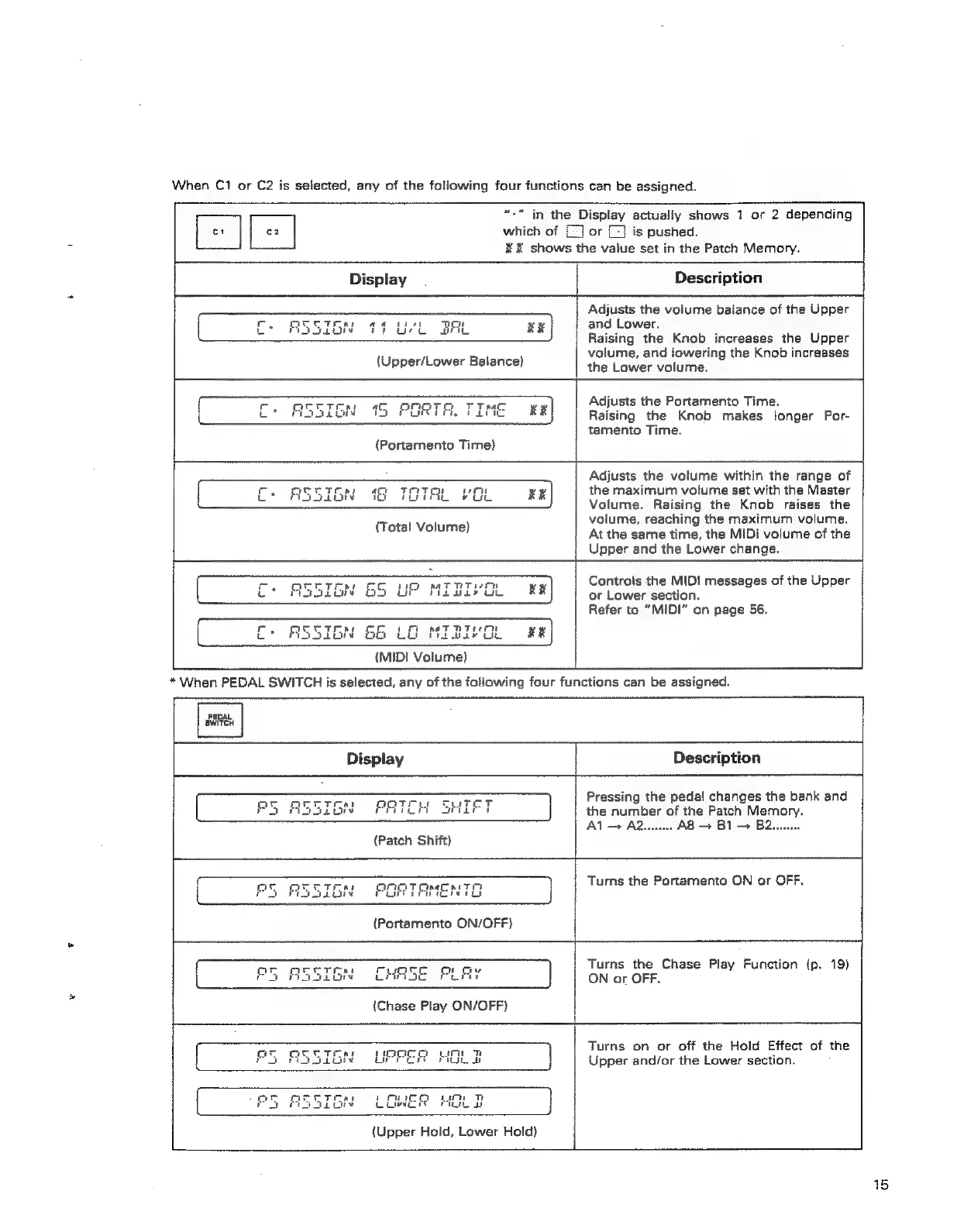
When
C1
or
C2
is
selected,
any
of
the
following
four
functions
can
be
assigned.
*"
in
the
Display
actually
shows
1
or
2
depending
o1
[=
|
which
of
£]
or
(7)
is
pushed.
KX
shows
the
vaiue
set
in
the
Patch
Memory.
ss
Display
Description
Adjusts
the
volume
balance
of
the
Upper
AP
a
tit
TH
and
Lower,
:
inti
RE
a
:
:
eet
xr)
Raising
the
Knob
increases
the
Upper
volume,
and
lowering
the
Knob
increases
(Upper/Lower
Balance)
the
Lower
volume.
fy
oa
Adjusts
the
Portamento
Time.
SN
9G,
GOT
TT
nace
xx
Us
om
1
PU
FEE
Raising
the
Knob
makes
longer
Por-
tamento
Time.
m=
C+
ASSIGN
65
LG
{MIDI
Volume)
Adjusts
the
volume
within
the
range
of
the
maximum
volume
set
with
the
Master
Volume.
Raising
the
Knob
raises
the
volume,
reaching
the
maximum
volume.
At
the
same
time,
the
MIDI
volume
of
the
Upper
and
the
Lower
change.
Controls
the
MIDI
messages
of
the
Upper
or
Lower
section.
Refer
to
“MIDI”
on
page
56.
Pi
switeH
*
When
PEDAL
SWITCH
is
selected,
any
of
the
following
four
functions
can
be
assigned.
Description
ae
i]
Pressing
the
pedal
changes
the
bank
and
the
number
of
the
Patch
Memory.
Al
—
A2uu...
A8
>
B1
>
B2........
Display
4
PATEM
STE
]
(Patch
Shift)
SN
POR
TAMENTD
]
(Portamento
ON/OFF)
Turns
the
Portamento
ON
or
OFF.
Turns
the
Chase
Play
Function
{p.
19)
ON
or
OFF.
it
ct
YO
URRER
MOLD
|
TAI
1
Pum
aoe
Th
}
v
Lire
ro
{Upper
Hold,
Lower
Hold}
Turns
on
or
off
the
Hold
Effect
of
the
Upper
and/or
the
Lower
section.
15