EasyManua.ls Logo

Roland SUPER JX - Table of Contents; Important Notes

Roland SUPER JX
88 pages
Print Icon
To Next Page IconTo Next Page
To Previous Page IconTo Previous Page
Loading...
The
Roland
JX-10
is
fully
programmable
12
voice
polyphonic
synthesizer,
Various
sounds
and
performance
control
functions
can
be
stored
ready
to
be
used.
®
The
JX-10
features
the
memory
capacity
that
can
retain
up
to
64
different
programs
(=
Patch
Memory)
which
are
the
combinations
of
sounds
and
performance
control
functions.
e@
Any
of
the
Patch
Memory
can
be
called
just
by
~
pushing
appropriate
buttons.
@
The
Patch
Memory
you
have
written
into
memory
can
be
easily
edited
whennever
you
®
The
JX-10
containes
the
sequencer
which
can
record
and
playback
what
you
play
on
the
keyboard.
®
Using
the
Memory
Cartridges,
it
is
possible
to
expand
the
memory
capacity
and
to
save
the
sequencer
data.
7
®
The
76
key
keyboard
and
MID!
functions
make
the
JX-10
an
excellect
mother
keyboard.
be
like.
CONTENTS
IMPORTANT
NOTES
{@)
PANEL
DESCRIPTION
..
3
e
The
appropriate
power
supply
for
this
unit
is
shown
on
its
name
plate.
Please
make
sure
that
[2]
CONNECTIONS
........ccccsessescsscsesesersesersesesessene
6
the
line
voltage
in
your
country
meets
the
requirement.
[3]
OUTLINE
OF
THE
JX-10
o.nsnssereestsenenesnen
:
®
Please
do
not
use
the
same
socket
used
for
any
(4)
OPERATION
..
1,
Selecting
a
Patch
Memory
2.
Functions
of
the
Control
Knobs
.
3.
Control
Assign
4,
Quick
Editing
of
Patch
Memory
a.
Key
Mode
b.
Tone
Number
c.
Chase
Play
.
5.
Sequencer
...
a.
Recording
Sequencer
Data
b.
Playing
the
Recorded
Data
6.
Edit
..
a,
Editing
a
Patch
Memory
b,
Editing
a
Tone
.....
c.
Recalling
a
Tone
.
7.
Writing
into
Memory
a.
Writing
a
Patch
Memory
b.
Writing
a
Tone
c.
Naming
«0
43
d.
Writing
the
Whole
Data
we
46
8.
Memory
Cartridge
....
saveveonnresesssasaanesoves
47
a,
Copying
the
Entire
Data
(All
Patch
Memories
and
50
Tones)
...
47
b.
Copying
a
Patch
Memory
eee
c.
Copying
a
Tone
9.
Other
Useful
Functions
a.
Tuning
b.
Function
Display
c.
Error
Messages
....
10.
MIDI
a.
Receiving
and
Transmiting
MIDI
.
b.
MIDI
Functions
available
for
&
Patch
MeOMory
.i.sssscsesescssessesencessserees
60
a
[5]
SPECIFICATIONS
.
noise
generating
device
(such
as
motor,
variable
lighting
system).
@
This
unit
might
not
work
properly
if
turned
on
immediately
after
turned
off.
If
this
happens,
simply
turn
it
off
and
turn
it
on
again
a
few
seconds
later.
©
Before
setting
up
this
unit
with
other
devices,
turn
all
of
them
off.
®
This
unit
might
generate
slight
heat
while
operating,
but
there
is
no
need
to
worry
about
it.
e
Use
a
soft
cloth
and
clean
only
with
a
mild
detergent.
@
Do
not
use
soivents
such
as
paint
thinner.
©
Avoid
using
this
unit
in
excessive
heat
or
humidity
or
where
it
may
be
affected
by
direct
sunlight
or
dust.
@
Save
the
necessary
data
on
a
cartridge
or
make
data
memo
before
having
the
JX-10
repaired,
in
case
it
should
happen
to
be
accidentally
erased.
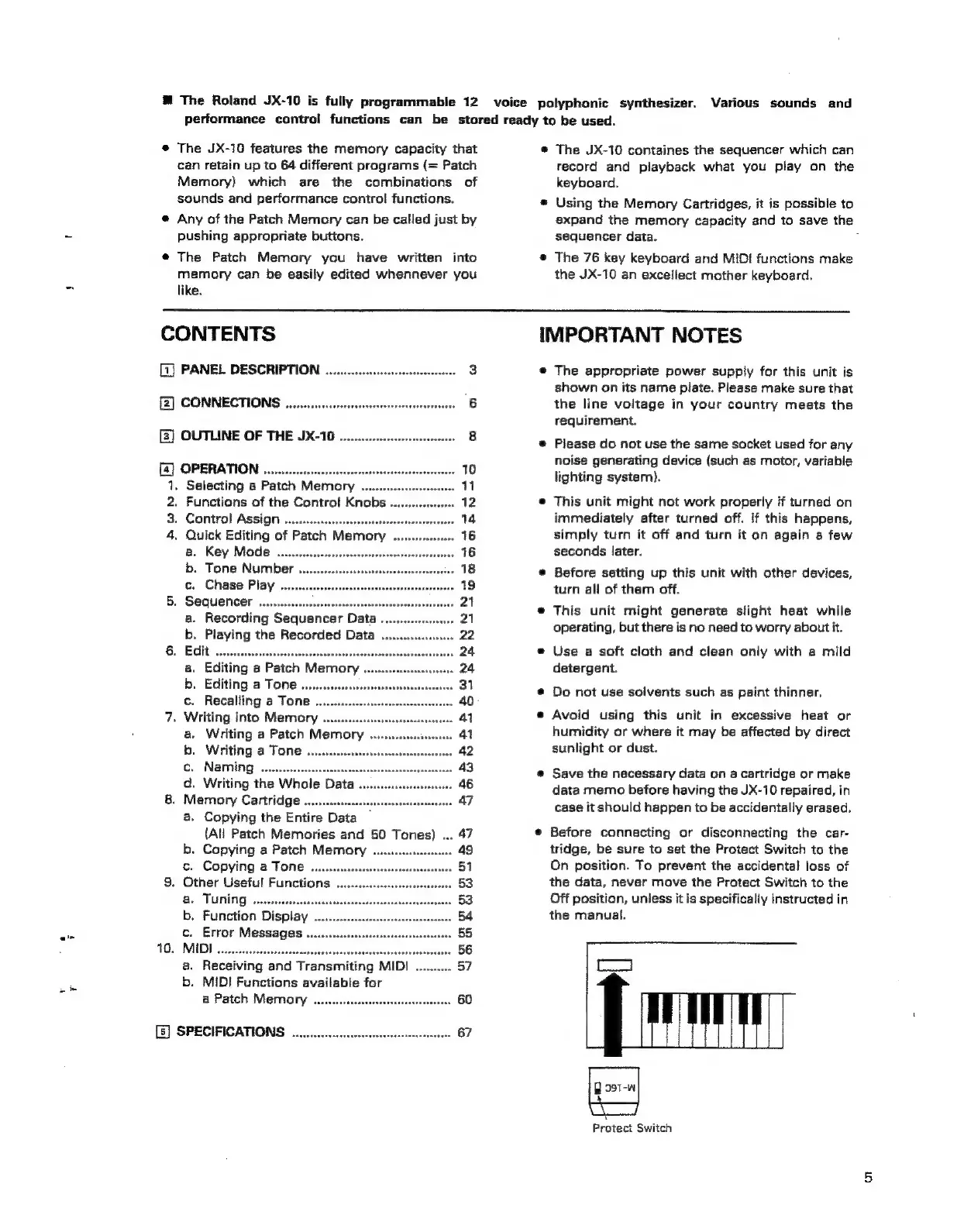
©
Before
connecting
or
disconnecting
the
car-
tridge,
be
sure
to
set
the
Protect
Switch
to
the
On
position.
To
prevent
the
accidental
loss
of
the
data,
never
move
the
Protect
Switch
to
the
Off
position,
unless
it
is
specifically
instructed
in
the
manual.
C4
Protect
Switch

Related product manuals