EasyManua.ls Logo

Roland SUPER JX - Parameter Display

Roland SUPER JX
88 pages
Print Icon
To Next Page IconTo Next Page
To Previous Page IconTo Previous Page
Loading...
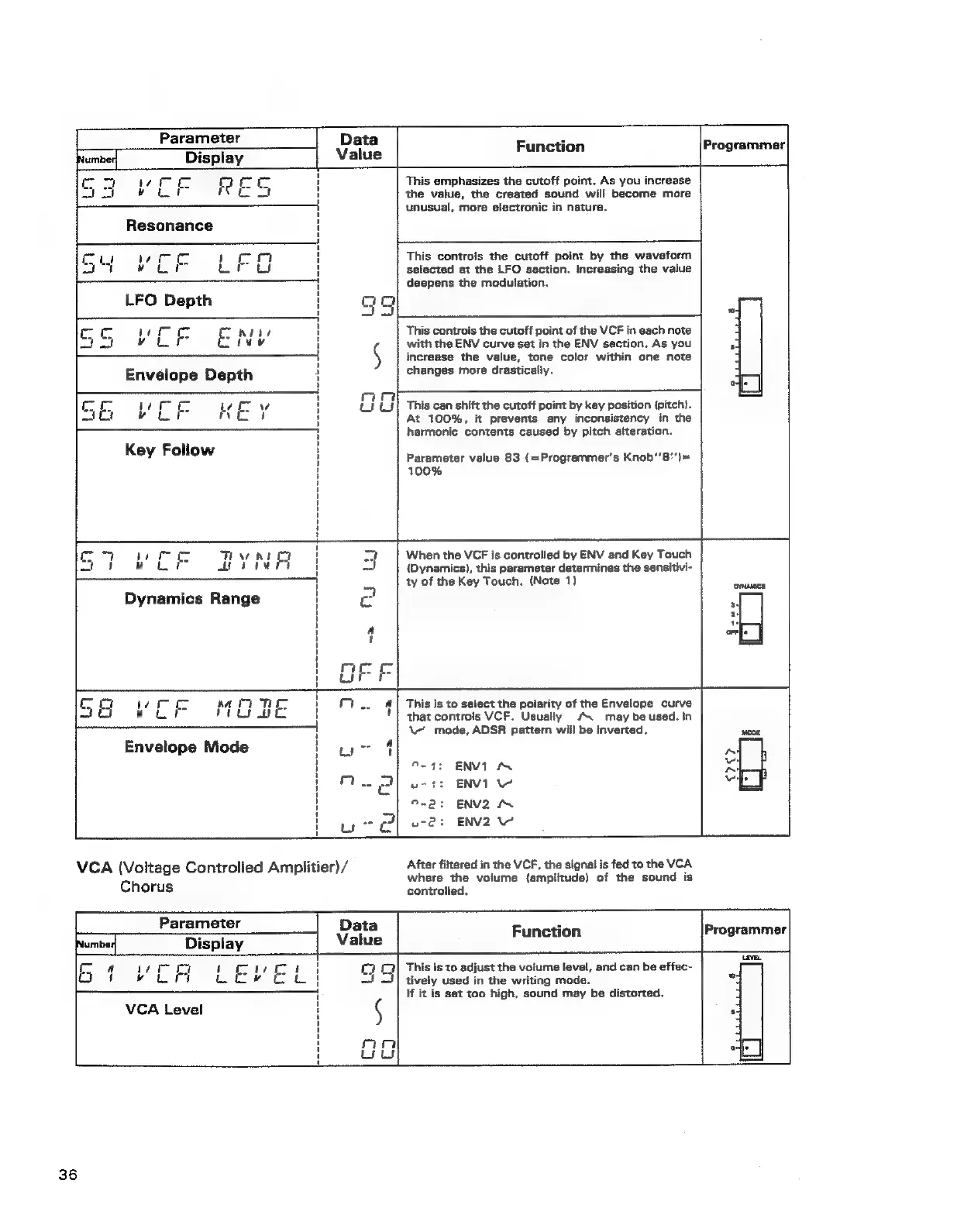
Parameter
|
Data
+
Function
Programmer
frumner
Display
Value
mc
om
te
7
fa
cr
!
This
emphasizes
the
cutoff
point.
As
you
increase
aa
vue
ree
ot
i
the
value,
the
created
sound
will
become
more
——
unusual,
more
electronic
in
nature.
Resonance
f
1
Dae
ie
i
rc
i
|
This
controis
the
cutoff
point
by
the
waveform
Ad
wu
rus
'
selected
at
the
LFO
section.
Increasing
the
value
1
deepens
the
modulation.
LFO
Depth
qa
F
{
ait
*
cro
wren
T
AHL
This
controls
the
cutoff
point
of
the
VCF
in
each
note
a
BSL
uv
increase
the
value,
tone
color
within
one
note
Envelope
Depth
changes
more
drasticaliy.
°
mar
co
“
cw
{
Hy
tJ!
This
can
shift
the
cutoff
point
by
key
position
(pitch).
4
!
¢
with
the
ENV
curve
set
in
the
ENV
saction.
As
you
é
oes
oe
ee
pa
veut
eu
At
100%,
it
prevents
any
inconsistency
in
the
1
harmonic
contents
caused
by
pitch
alteration.
i
Key
Follow
|
Parameter
value
83
(=Programmer’s
Knob‘'8')=
H
100%
i
i
i
i
1
ct
mmo
Tew
hi
oy
t
a]
When
the
VCF
is
controlled
by
ENV
and
Key
Touch
af
ke
ue
apie
i
(Dynamics),
this
parameter
determines
the
sensitivi-
[per
pee
-
ty
of
the
Key
Touch.
(Note
1)
tune
Dynamics
Range
c
.
4
c
‘
orr|
rity
a)
Co
er
ee
aa
7
TH
|
7...
&]
This
is
to
select
the
polarity
of
the
Envelope
curve
Sto
ow
ut
rea
ge
'
|
that
controls
VCF.
Usually
‘\
may
be
used.
In
|
aa
a
mS
|
\
mode,
ADSR
pattern
will
be
inverted.
1
Envelope
Mode
too
4
'
9-4:
ENVIN
,
ow
:
ENVI
1
i
ENV2
AN
‘
ous
ENV2
1
VCA
(Voltage
Controlled
Amplitier)
/
After
filtered
in
the
VCF,
the
signal
is
fed
to
the
VCA
where
the
volume
(amplitude)
of
the
sound
is
Chorus
controlled,
Parameter
Display
Data
Function
Programmer
This
is
to
adjust
the
voiume
level,
and
can
be
effec-
tively
used
in
the
writing
mode.
If
it
is
set
too
high,
sound
may
be
distorted.
VCA
Level
36