EasyManua.ls Logo

Roland SUPER JX - Tone Number

Roland SUPER JX
88 pages
Print Icon
To Next Page IconTo Next Page
To Previous Page IconTo Previous Page
Loading...
18
b.
Tone
Number
To
change
the
Tones
in
a
Patch
Memory,
simply
assign
the
Tone
Number
of
the
relevant
Tone
by
using
the
Ten
Keys.
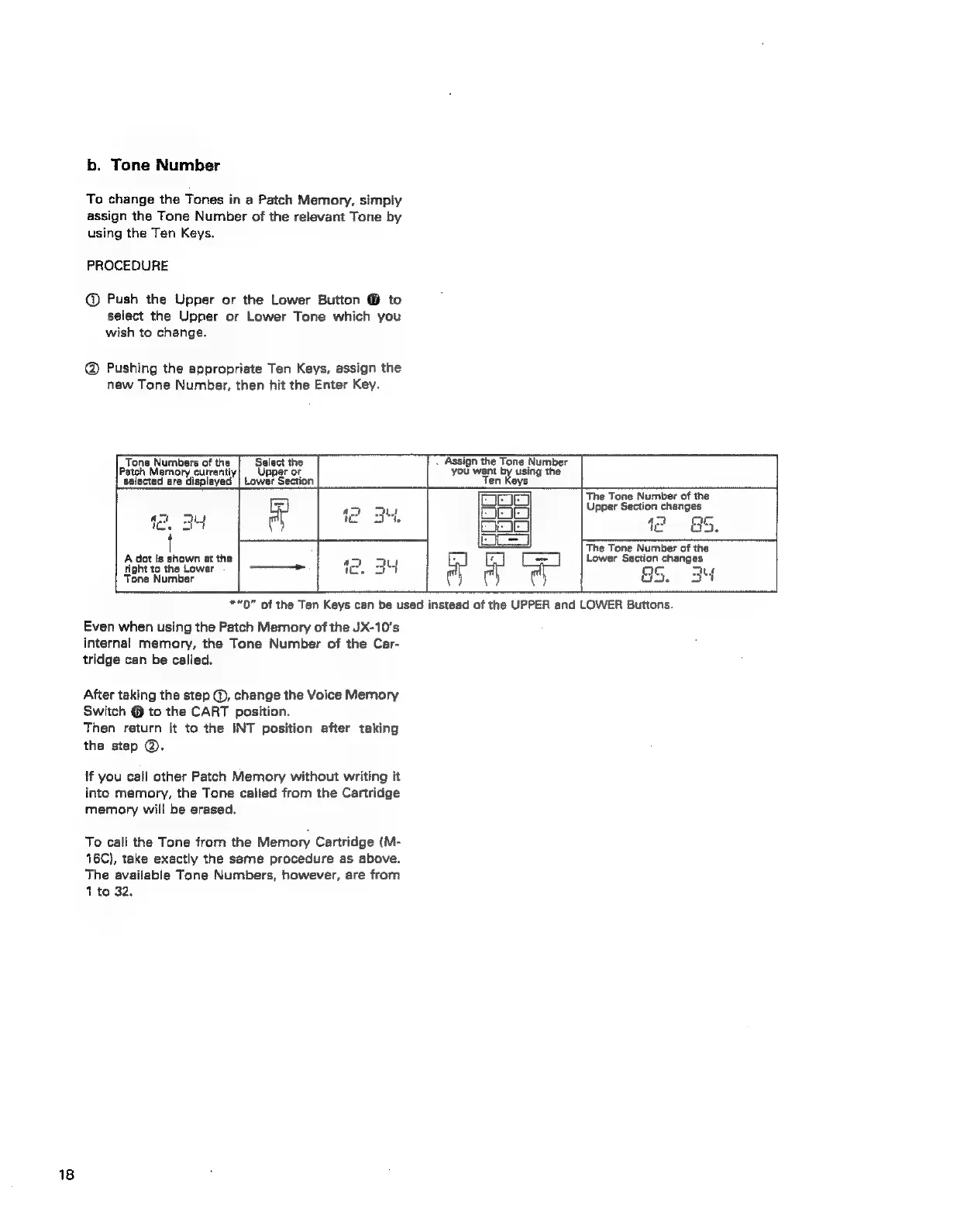
PROCEDURE
@
Push
the
Upper
or
the
Lower
Button
@
to
select
the
Upper
or
Lower
Tone
which
you
wish
to
change.
@
Pushing
the
appropriate
Ten
Keys,
assign
the
new
Tone
Number,
then
hit
the
Enter
Key.
Tone
Numbers
of
the
Select
the
Patch
Memory
currantiy|
Upper
or
selected
are
displayed
|
Lower
Section
-
Assign
the
Tone
Number
you
want
using
the
Ten
Keys
A
dot
is
shown
at
the
right
to
the
Lower
Tone
Number
The
Tone
Number
of
the
Upper
Section
changes
any
m
i?
BS,
The
Tone
Number
of
the
Lower
Section
changes
THs
&.
aM
*"0”
of
the
Ten
Keys
can
be
used
instead
of
the
UPPER
and
LOWER
Buttons.
Even
when
using
the
Patch
Memory
of
the
JX-10’s
internal
memory,
the
Tone
Number
of
the
Car-
tridge
can
be
called.
After
taking
the
step
@,
change
the
Voice
Memory
Switch
@
to
the
CART
position.
Then
return
it
to
the
INT
position
after
taking
the
step
@.
tf
you
call
other
Patch
Memory
without
writing
it
into
memory,
the
Tone
called
from
the
Cartridge
memory
will
be
erased.
To
call
the
Tone
from
the
Memory
Cartridge
(M-
16C)},
take
exactly
the
same
procedure
as
above.
The
available
Tone
Numbers,
however,
are
from
1
to
32.