EasyManua.ls Logo

Roland SUPER JX - Page 25

Roland SUPER JX
88 pages
Print Icon
To Next Page IconTo Next Page
To Previous Page IconTo Previous Page
Loading...
suns]
KEY
MOTE
ERHRRE
RS)
UP
WHOLE
LO
WHOLE
DUAL
SPLIT
T.
VOICE
X-FADE
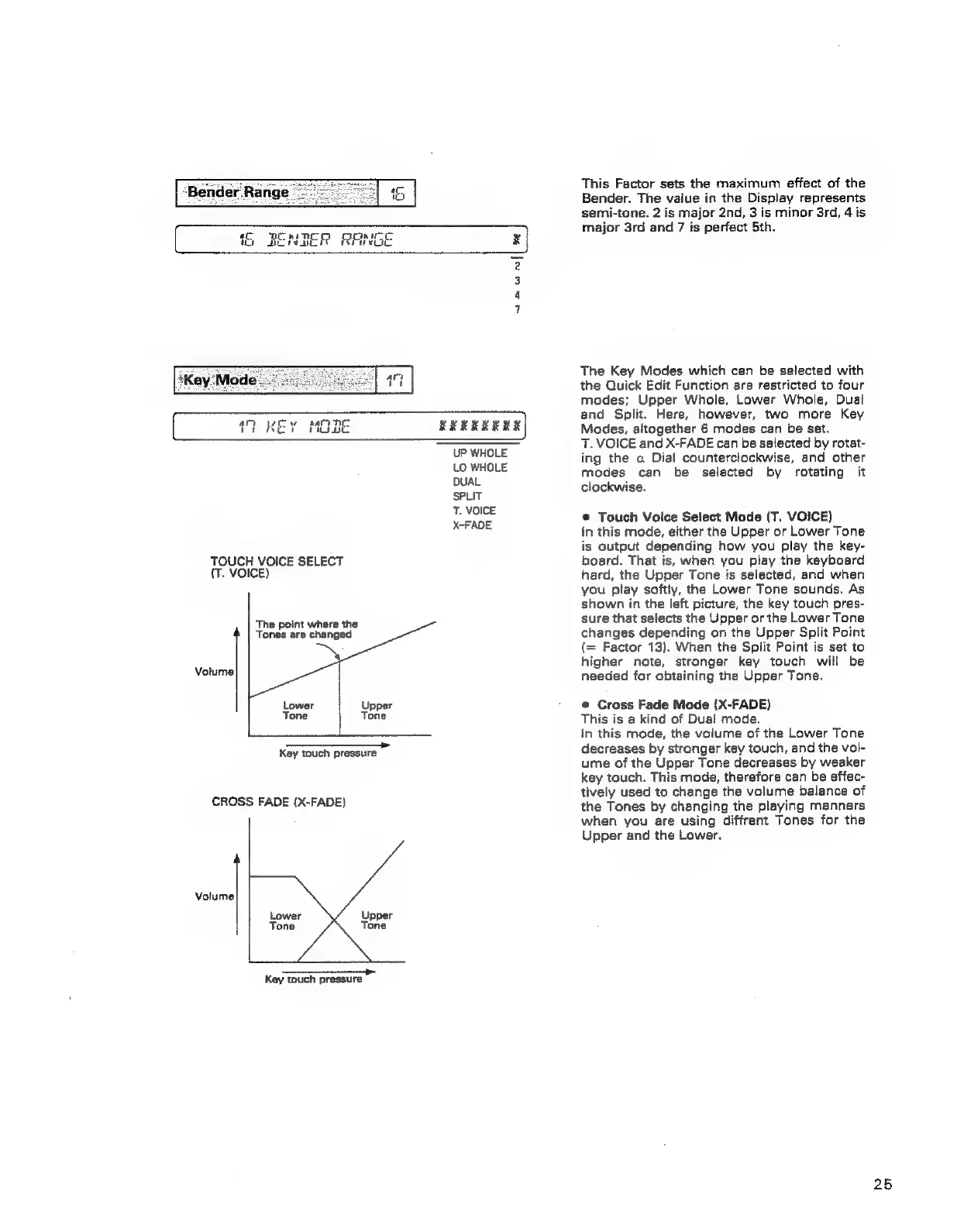
TOUCH
VOICE
SELECT
{T.
VOICE)
The
point
where
the
Tones
are
changed
Volume
———
Key
touch
pressure
CROSS
FADE
(X-FADE)
Volume
Lower
Upper
Tone
‘
Tone
—
Key
touch
pressure
This
Factor
sets
the
maximum
effect
of
the
Bender.
The
value
in
the
Display
represents
semi-tone.
2
is
major
2nd,
3
is
minor
3rd,
4
is
major
3rd
and
7
is
perfect
5th.
The
Key
Modes
which
can
be
selected
with
the
Quick
Edit
Function
are
restricted
to
four
modes;
Upper
Whole,
Lower
Whole,
Dual
and
Split.
Here,
however,
two
more
Key
Modes,
altogether
6
modes
can
be
set.
T.
VOICE
and
X-FADE
can
be
selected
by
rotat-
ing
the
a
Dial
counterclockwise,
and
other
modes
can
be
selected
by
rotating
it
clockwise.
®
Touch
Voice
Select
Mode
(T.
VOICE)
In
this
mode,
either
the
Upper
or
Lower
Tone
is
output
depending
how
you
play
the
key-
board.
That
is,
when
you
play
the
keyboard
hard,
the
Upper
Tone
is
selected,
and
when
you
play
softly,
the
Lower
Tone
sounds.
As
shown
in
the
left
picture,
the
key
touch
pres-
sure
that
selects
the
Upper
or
the
Lower
Tone
changes
depending
on
the
Upper
Split
Point
(=
Factor
13).
When
the
Split
Point
is
set
to
higher
note,
stronger
key
touch
will
be
needed
for
obtaining
the
Upper
Tone.
©
Cross
Fade
Mode
(X-FADE)
This
is
a
kind
of
Dual
mode.
in
this
mode,
the
volume
of
the
Lower
Tone
decreases
by
stronger
key
touch,
and
the
vol-
ume
of
the
Upper
Tone
decreases
by
weaker
key
touch.
This
mode,
therefore
can
be
effec-
tively
used
to
change
the
volume
balance
of
the
Tones
by
changing
the
playing
manners
when
you
are
using
diffrent
Tones
for
the
Upper
and
the
Lower,
25