EasyManua.ls Logo

Roland SUPER JX - Page 27

Roland SUPER JX
88 pages
Print Icon
To Next Page IconTo Next Page
To Previous Page IconTo Previous Page
Loading...
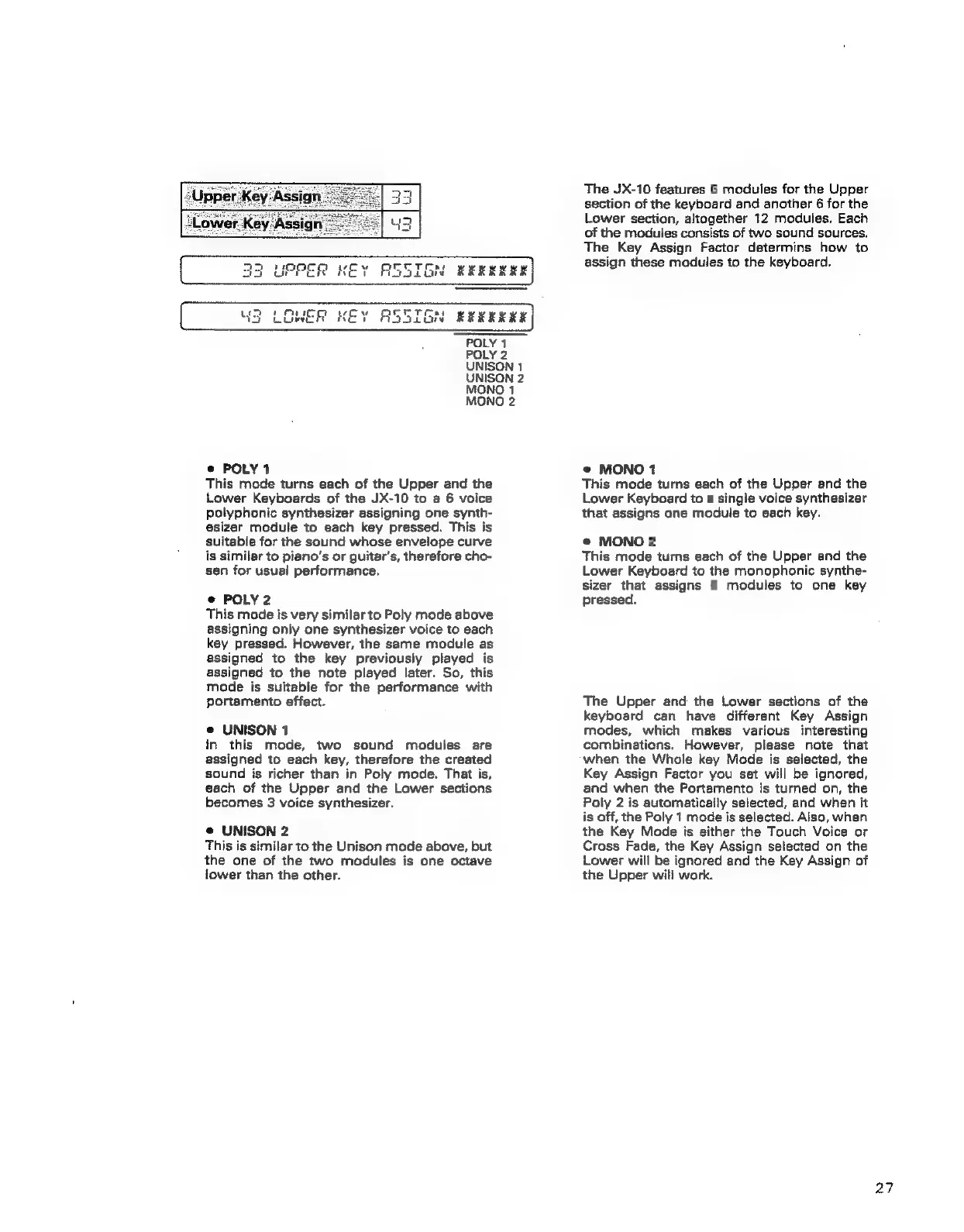
The
JX-10
features
6
modules
for
the
Upper
section
of
the
keyboard
and
another
6
for
the
Lower
section,
altogether
12
modules.
Each
of
the
moduies
consists
of
two
sound
sources.
The
Key
Assign
Factor
determins
how
to
assign
these
modules
to
the
keyboard.
13
LOWER
KEY
ASSIGN
RRRERSERK
POLY
1
POLY
2
UNISON
1
UNISON
2
MONO
1
MONO
2
@
POLY
1
This
mode
turns
each
of
the
Upper
and
the
Lower
Keyboards
of
the
JX-10
to
a
6
voice
polyphonic
synthesizer
assigning
one
synth-
esizer
module
to
each
key
pressed.
This
is
suitable
for
the
sound
whose
envelope
curve
is
similar
to
piano’s
or
guitar's,
therefore
cho-
sen
for
usual
performance.
©
POLY
2
This
mode
is
very
similar
to
Poly
mode
above
assigning
only
one
synthesizer
voice
to
each
key
pressed.
However,
the
same
module
as
assigned
to
the
key
previously
played
is
assigned
to
the
note
played
later.
So,
this
mode
is
suitable
for
the
performance
with
portamento
effect.
e
UNISON
1
in
this
mode,
two
sound
modules
are
assigned
to
each
key,
therefore
the
created
sound
is
richer
than
in
Poly
mode.
That
is,
each
of
the
Upper
and
the
Lower
sections
becomes
3
voice
synthesizer.
@
UNISON
2
This
is
similar
to
the
Unison
mode
above,
but
the
one
of
the
two
modules
is
one
octave
lower
than
the
other.
e
MONO
1
This
mode
turns
each
of
the
Upper
and
the
Lower
Keyboard
to
a
single
voice
synthesizer
that
assigns
one
module
to
each
key.
©
MONO
2
This
mode
turns
each
of
the
Upper
and
the
Lower
Keyboard
to
the
monophonic
synthe-
sizer
that
assigns
6
modules
to
one
key
pressed,
The
Upper
and
the
Lower
sections
of
the
keyboard
can
have
different
Key
Assign
modes,
which
makes
various
interesting
combinations.
However,
please
note
that
when
the
Whole
key
Mode
is
selected,
the
Key
Assign
Factor
you
set
will
be
ignored,
and
when
the
Portamento
is
turned
on,
the
Poly
2
is
automatically
selected,
and
when
it
is
off,
the
Poly
1
mode
is
selected.
Also,
when
the
Key
Mode
is
either
the
Touch
Voice
or
Cross
Fade,
the
Key
Assign
selected
on
the
Lower
will
be
ignored
and
the
Key
Assign
of
the
Upper
will
work.
27