EasyManua.ls Logo

Roland SUPER JX - Page 30

Roland SUPER JX
88 pages
Print Icon
To Next Page IconTo Next Page
To Previous Page IconTo Previous Page
Loading...
30
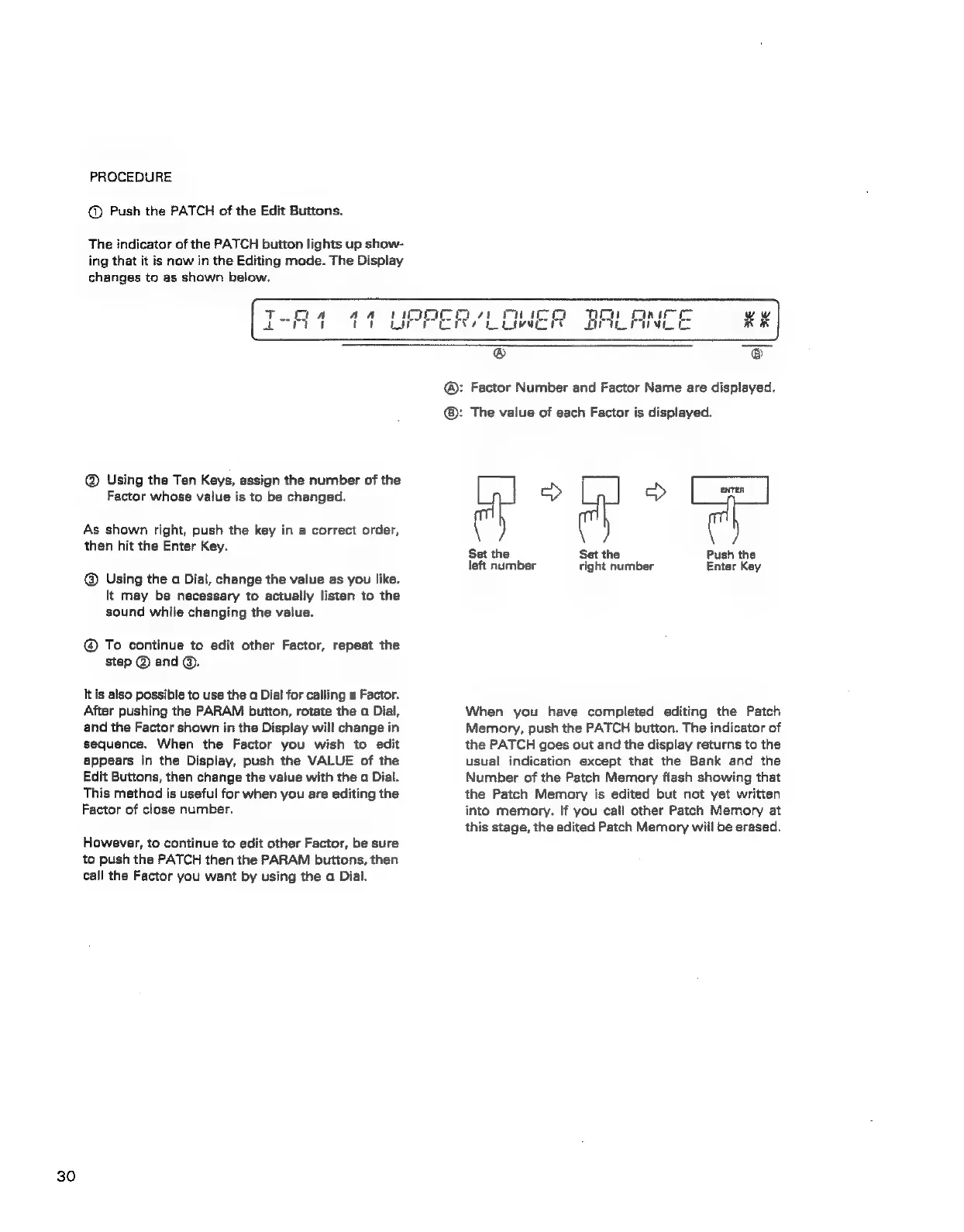
PROCEDURE
@
Push
the
PATCH
of
the
Edit
Buttons.
The
indicator
of
the
PATCH
button
lights
up
show-
ing
that
it
is
now
in
the
Editing
mode.
The
Display
changes
to
as
shown
below.
@
Using
the
Ten
Keys,
assign
the
number
of
the
Factor
whose
value
is
to
be
changed.
As
shown
right,
push
the
key
in
a
correct
order,
then
hit
the
Enter
Key.
@
Using
the
a
Dial,
change
the
value
as
you
like.
It
may
be
necessary
to
actually
listen
to
the
sound
while
changing
the
value.
@®
To
continue
to
edit
other
Factor,
repeat
the
step
@
and
@.
lis
also
possible
to
use
the
a
Dial
for
calling
a
Factor.
After
pushing
the
PARAM
button,
rotate
the
a
Dial,
and
the
Factor
shown
in
the
Display
will
change
in
sequence.
When
the
Factor
you
wish
to
edit
appears
in
the
Display,
push
the
VALUE
of
the
Edit
Buttons,
then
change
the
value
with
the
a
Dial.
This
method
is
useful
for
when
you
are
editing
the
Factor
of
close
number.
However,
to
continue
to
edit
other
Factor,
be
sure
to
push
the
PATCH
then
the
PARAM
buttons,
then
call
the
Factor
you
want
by
using
the
a
Dial.
:
Factor
Number
and
Factor
Name
are
displayed.
:
The
value
of
each
Factor
is
displayed.
ph
Set
the
Set
the
Push
the
left
number
right
number
Enter
Key
When
you
have
completed
editing
the
Patch
Memory,
push
the
PATCH
button.
The
indicator
of
the
PATCH
goes
out
and
the
display
returns
to
the
usual
indication
except
that
the
Bank
and
the
Number
of
the
Patch
Memory
flash
showing
that
the
Patch
Memory
is
edited
but
not
yet
written
into
memory.
If
you
call
other
Patch
Memory
at
this
stage,
the
edited
Patch
Memory
will
be
erased.