EasyManua.ls Logo

Roland SUPER JX - Page 74

Roland SUPER JX
88 pages
Print Icon
To Next Page IconTo Next Page
To Previous Page IconTo Previous Page
Loading...
[3]
Sending
two
different
Program
Change
numbers
separately
to
two
MIDI
Sound
Modules
by
changing
Patch
Memories
on
the
JX-10.
MIDI
THRU
MIDIIN
MIDI
Sound
Module
1
MIDI
Sound
Module
2
MIDI
CH.
sesssssscsecsnsessecssnsenss
1
MIDI
CH,
vssecsssesssesnesssceretee
2
PROGRAM
CHANGE
...
ON
PROGRAM
CHANGE
...
JX-10
MIDI
OUT
@
MIDI
setting
on
the
JX-10
[10
PATCH
MEMORY
CH
=
[20
UPPER
MIDICH
=
[30
LOWER
MIDICH
-
2)
[21
UPPROGRAMCHANGE
[31
LOPROGRAMCHANGE
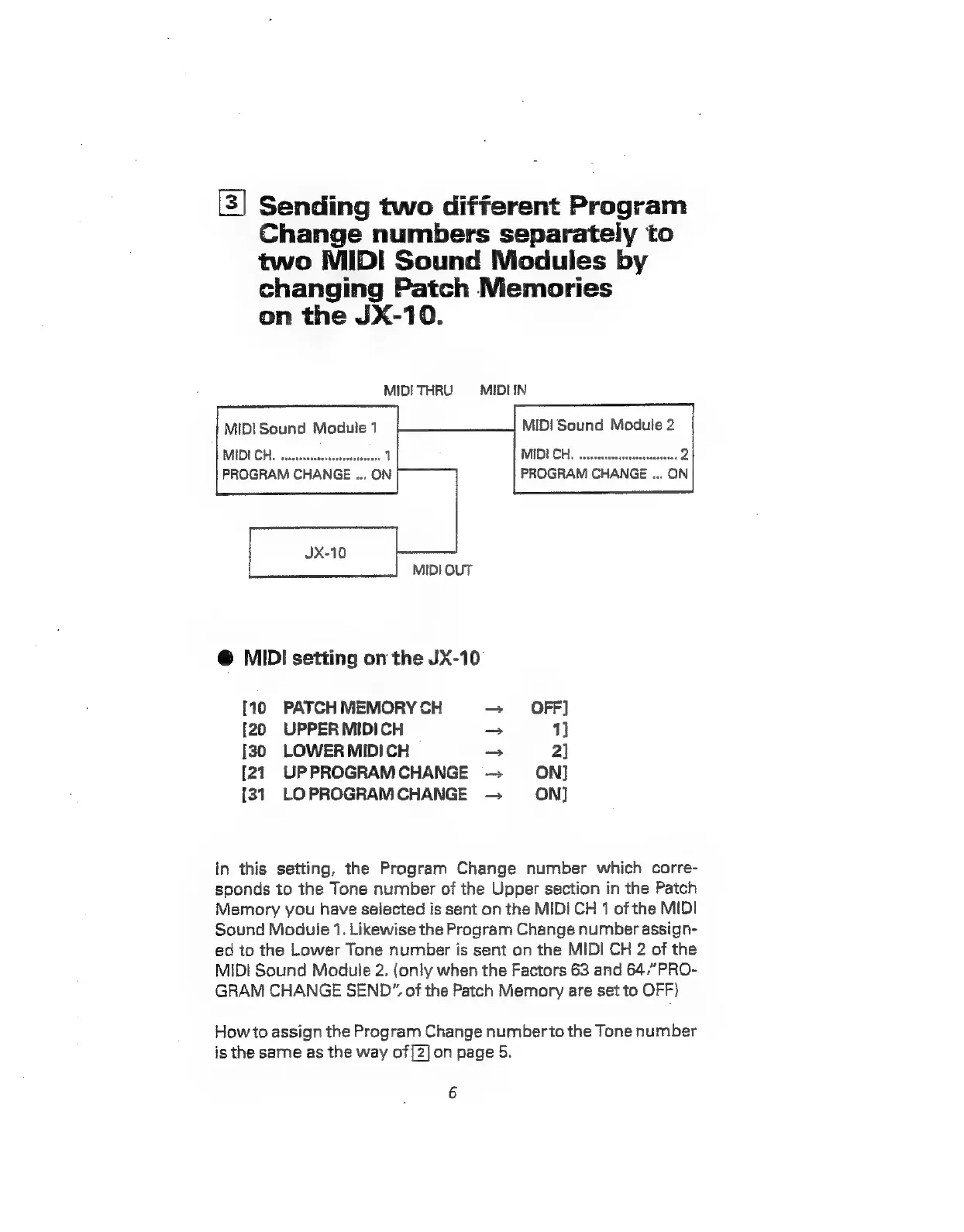
in
this
setting,
the
Program
Change
number
which
corre-
sponds
to
the
Tone
number
of
the
Upper
section
in
the
Patch
Memory
you
have
selected
is
sent
on
the
MID!
CH
1
of
the
MIDI
Sound
Module
1.
Likewise
the
Program
Change
number
assign-
ed
to
the
Lower
Tone
number
is
sent
on
the
MIDI
CH
2
of
the
MIDI
Sound
Module
2.
(only
when
the
Factors
63
and
64,”PRO-
GRAM
CHANGE
SEND”.
of
the
Patch
Memory
are
set
to
OFF)
How
to
assign
the
Program
Change
number
to
the
Tone
number
is
the
same
as
the
way
of[2]on
page
5.
6