19
Connecting External Equipment
Connecting Output Equipment
For information on the signal formats that can be output from the V-4EX, refer to “About Input/Output Formats” (p. 23).
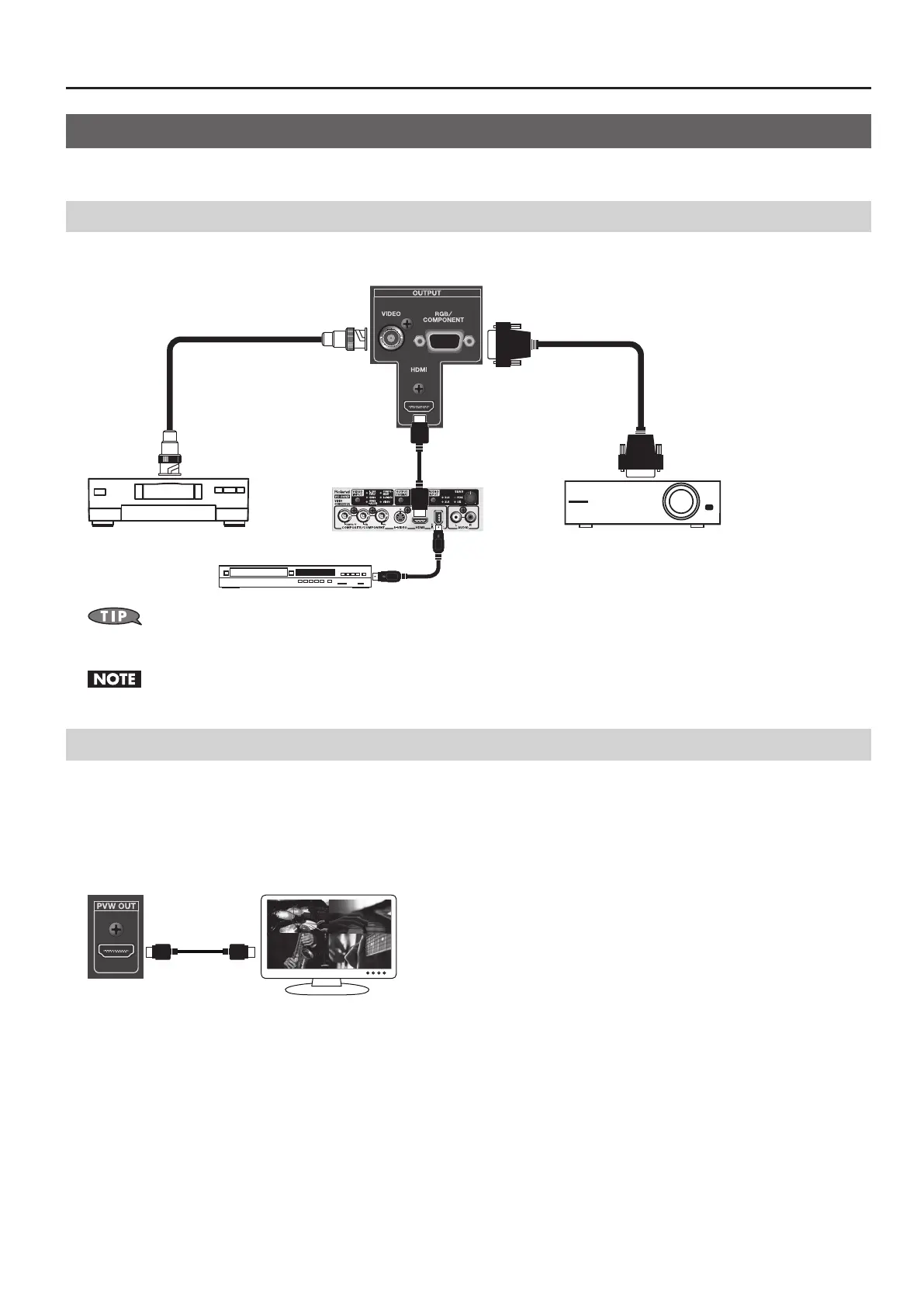
Connecting a Projector or Recording Unit
Make the connections to the [VIDEO], [RGB/COMPONENT], or [HDMI] output connectors.
g.output-connection.eps
You can connect the VC-30HD to HDMI output. Using the i.LINK output of the VC-30HD, you can connect a digital video recorder, Blu-ray Disc
recorder, or other such device.
When HDCP is turned on, composite and RGB/component output is stopped. Note, however, that HDMI output continues (p. 24).
Connecting a Preview Monitor
Connect a preview monitor to the PVW OUT connector. Output from this connector is 480/59.94p (when set to NTSC) or 576/50p
(when set to PAL). Connect a compatible monitor.
You can select the output mode from below.
• Four-way split video. Same as [INPUT] for built-in monitor.
• Final video output. Same as [OUTPUT] for built-in monitor.
g.preview-connection



 To Next Page