22
Connecting External Equipment
Checking the Connections
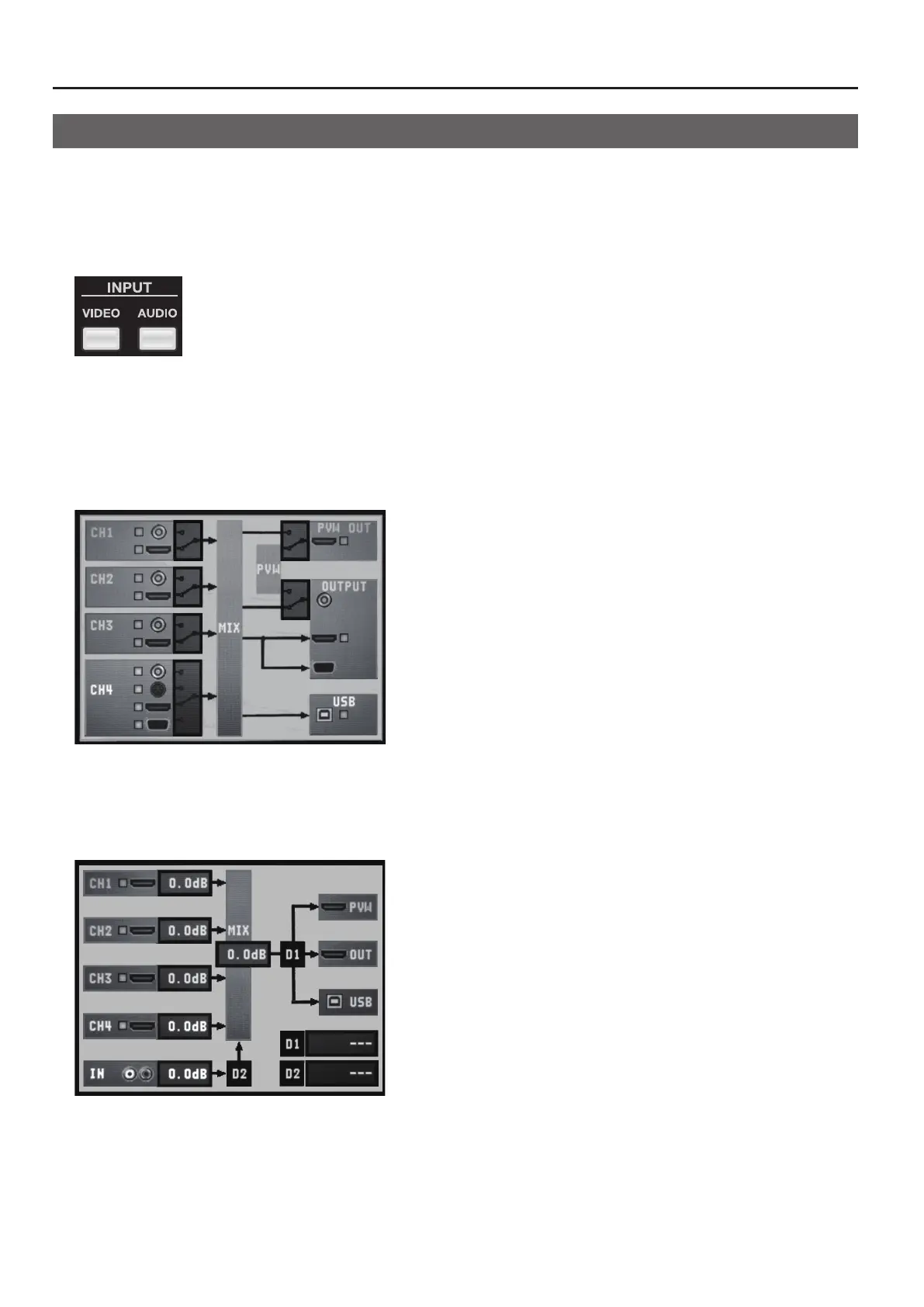
You can check the connections of input and output equipment at the screens described below. To access the checking screens,
press the [VIDEO] button or [AUDIO] button in INPUT section.
* Depending on the input and output connectors used, some connections cannot be checked.
* The checking screen is displayed over the picture on the monitor. You can hide the picture on the monitor by pressing the lighted MONITOR
button to make it go dark.
g.input-buttons.eps
Video Input/Output Equipment
Pressing the [VIDEO] button in INPUT section displays the screen shown below. A yellow box next to the icon for a connector
indicates that the connection is recognized by the V-4EX. If the box is gray, no connection is detected.
* The recognition status (grey or yellow) of CH4’s RGB/Component connector is displayed only while the connector is selected. When it is not
selected, the display is grey regardless to the recognition status.
g.video-connect-screen.eps
Audio Input/Output Equipment
Pressing the [AUDIO] button in INPUT section displays the screen shown below. A yellow box next to the icon for a connector
indicates that the connection is recognized by the V-4EX. If the box is gray, no connection is detected.
g.audio-connect-screen.eps



 To Next Page