56
Appendices
Calibrating and Changing the Installed Orientation of the Video Fader
Calibrating the Video Fader
After repeated use of the V-4EX, you may nd that 100% of the image is not output even when you’ve moved the video fader all the
way toward A-Bus or B-Bus. If this occurs, perform calibration of the video fader.
1. Move to the A-Bus end.
Move the video fader all the way toward the A-Bus position.
2. Access the SETUP menu.
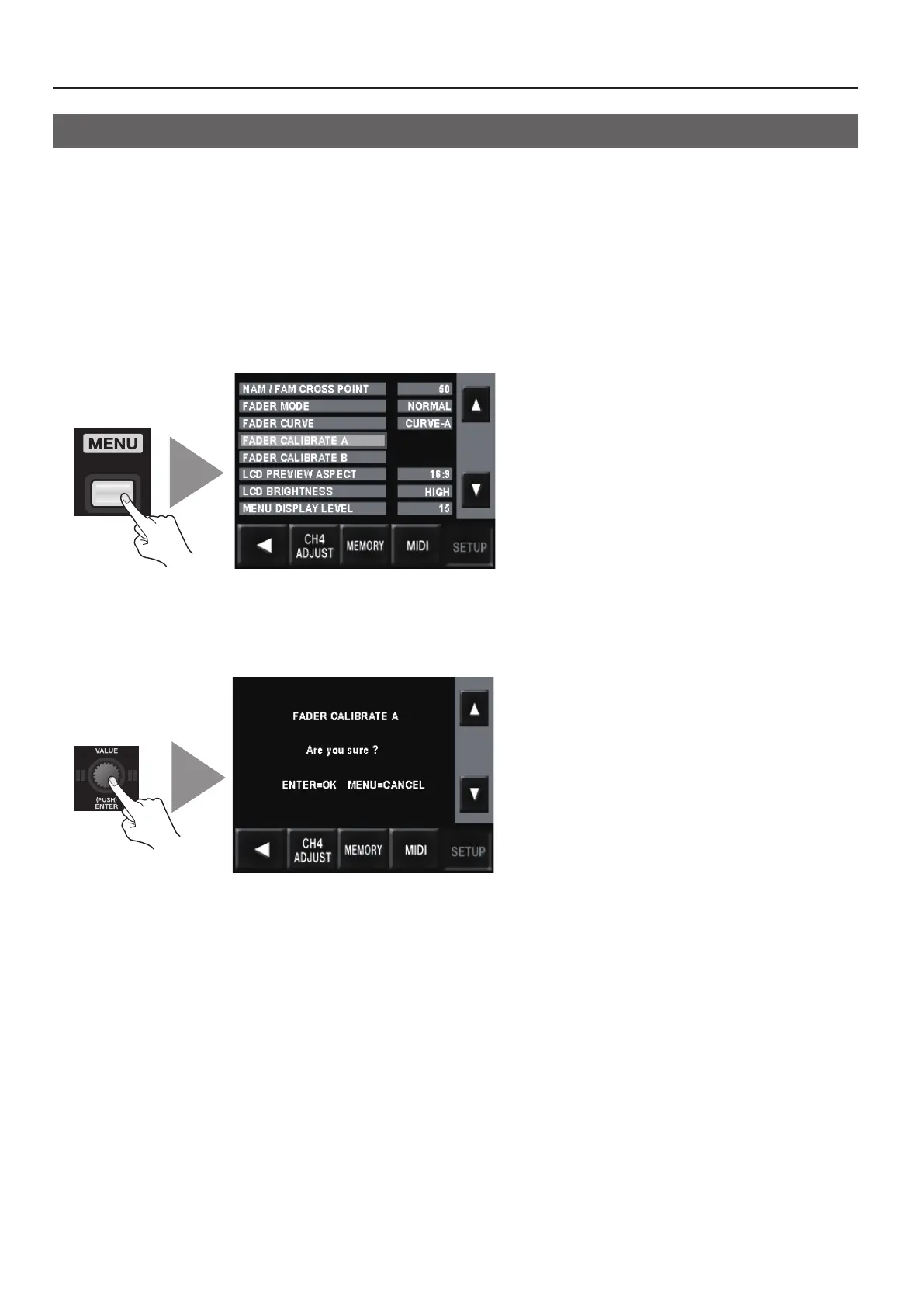
Press the [MENU] button to access the menu screen, then use the touch panel to select [SETUP].
g.utility-menu.eps
3. Calibrate the A-Bus position.
Select [Video Fader Calibrate A] and press the [VALUE] dial. The display changes to a conrmation screen. Press the [VALUE] dial
once more.
g.calibrate-menu.eps
4. Move to the B-Bus end.
Move the video fader all the way to the B-Bus position.
5. Calibrate the B-Bus position.
Select [Video Fader Calibrate B] and press the [VALUE] dial. The display changes to a conrmation screen. Press the [VALUE] dial
once more.
6. Go back to the original screen.
Press the [MENU] button several times to quit the menu screen and go back to the original screen.



 To Next Page