14
part name and function
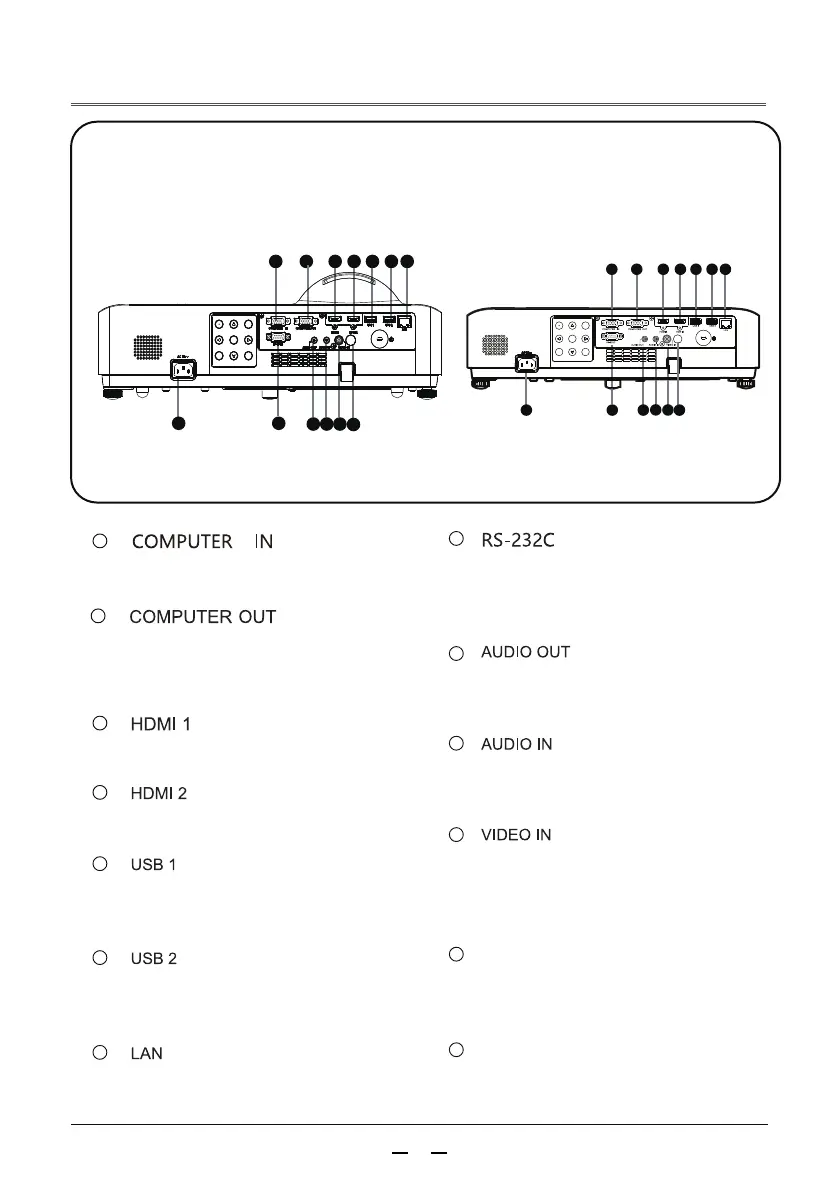
RS-232C compatible control interface.
Connect the RS-232C interface of the
computer to the RS-232C straight-through
cable.
Connect the power cord to this connector.
Connect a network cable.
8
AC IN(~)jack
When using the “USB Display” function,
connect a USB storage device to this
terminal.
Connect HDM-compatible video devices and
computers.
1
Terminal panel
3
4
10
11
12
Connect HDM-compatible video devices and
computers.
Receive remote control signals
Remote control signal receiver
13
5
6
7
When using the “USB Display” function,
connect a USB storage device to this
terminal.
Connect the computer's RGB output signal
to this terminal.
9
— This terminal is used to output from the
RGB analog signals input from VGA1 to
other displays.
Connect an external audio amplifier to this
terminal. This terminal outputs the sound
from the AUDIO IN terminal.
Connect the video output signal or
component video output to this terminal.
Connect the audio output connecting the
video device to this terminal.
2
3
4
5
6 7
1 2
8
10 11
12
9
13
8
3
4
5
2
6 7
1
10
11
9
13
12



 To Next Page