17
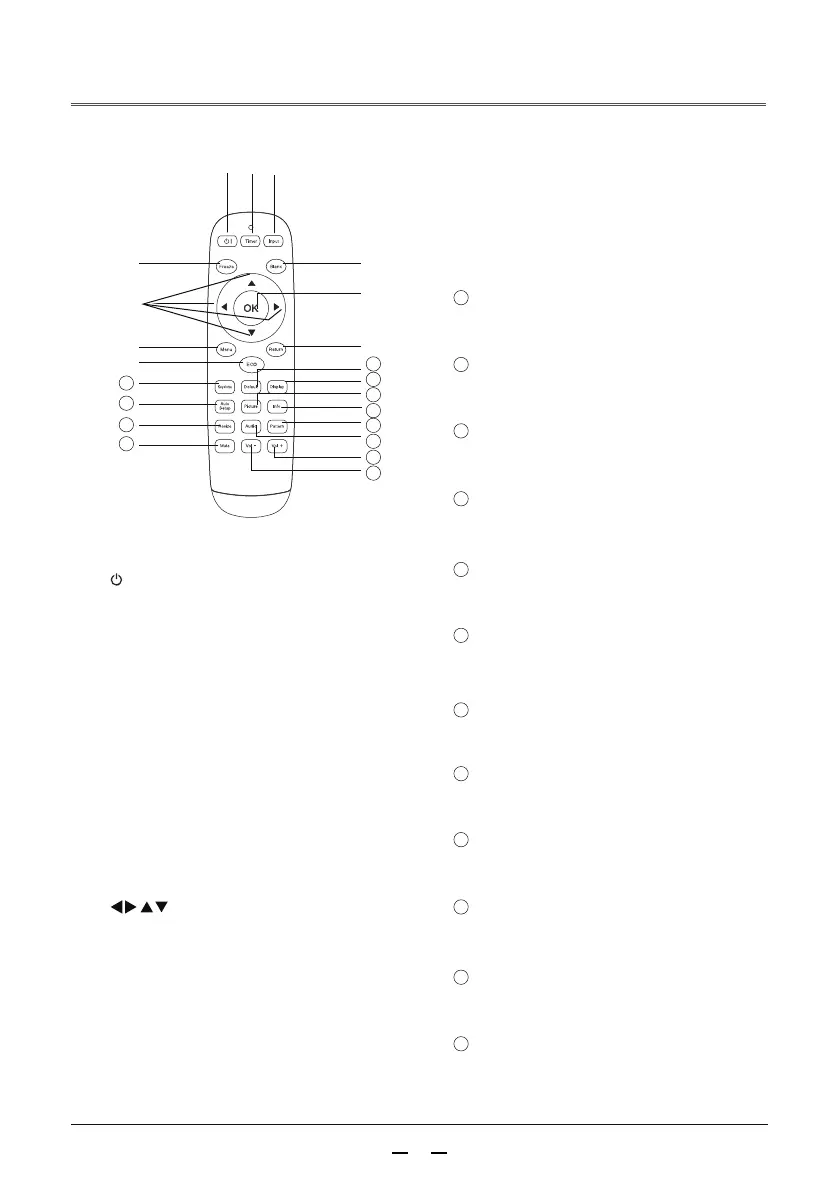
Remote
control
Turn the projector on or off.
Turn the timer on or off.
③
Input source button
Enter the input source selection.
④
Freeze button
Enter freeze mode.
⑤
Black screen button
Enter the black screen mode.
Open or close the on-screen menu.
Enter the energy saver mode.
Energy saving button
⑩
Enter the default mode.
Display the input source information.
Enter the auto setup.
Keystone correction button
11
Default setup button
12
Display the projector information
menu.
Select the aspect ratio mode.
Image mode button
15
Sound mode selection.
Info button
16
Enter test image mode.
Aspect ratio button
17
Enter the mute mode.
Sound mode button
18
Reduce the volume.
Test pattern button
19
Increase the volume.
Mute button
20
Select image mode.
Perform keystone correction.
Display button
13
Auto setup button
14
Volume -
21
Volume +
22
Return to the previous menu.
Exit button
⑨
Menu button
⑧
⑦
OK button
Enter the selected menu or execute the
selected adjustment item.
⑥
button
Select an item or adjust the data in the
on-screen menu.
②
Timer button
①
button
part name and function
13
14
①
② ③
④ ⑤
⑥
⑨
⑦
⑩
⑧
11
12
15
16
22
21
20
19
17
18



 To Next Page