52
USE PJLink Protocol operating projector
This projector is suitable PJLink 1Class standard。
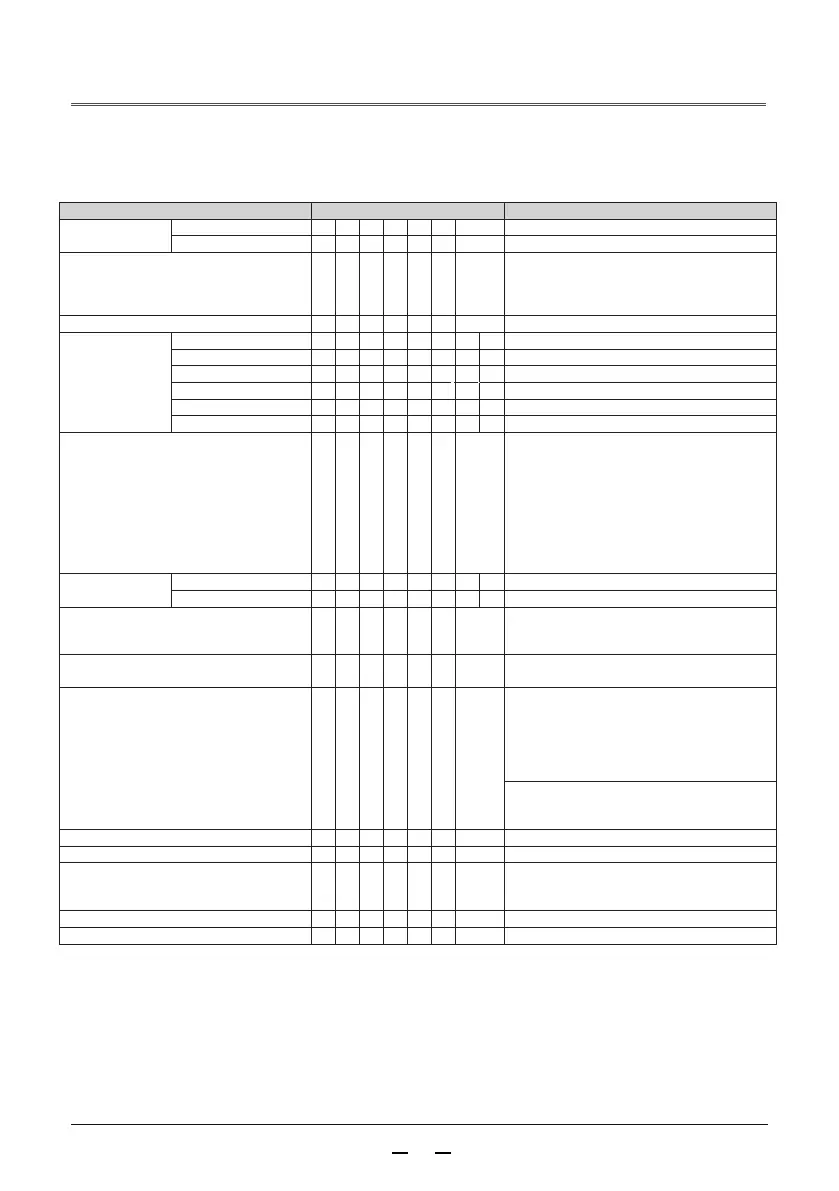
PJLink The protocol used to control the projector command is shown below.
To control the content instruct
return
power supply
control
off
P O W R _ 0
OK(correct )or ERR(mistake)3
on
P O W R _ 1
OK(correct )or ERR(mistake)3
Power status query
P O W R _ ?
0 :standby mode
1 :Power on
2 :standby mode(refrigeration)
3 :Power on(preheat)
Input list query
I N S T _ ?
“21 32 33 11 41”
The input change computer
I N P T _ 1 1
OK( correct)orERR(mistake)3
HDMI
I N P T _ 3
2 OK(correct)or ERR(mistake)3
DVI
I N P T _ 3
3 OK(correct)or ERR(mistake)3
video I N P T _ 2
1 OK(correct)or ERR(mistake)3
OK(correct)or ERR(mistake)3
USB
VIEWER I N P T _ 4 1
Input status query
I N P T _ ?
11 :computer
32 :HDMI
33 :DVI
21 :video
41 :USB VIEWER
AV Erasure
off
A V M T _ 3 0
OK(correct)or ERR(mistake)3
on
A V M T _ 3 1
OK(correct)or ERR(mistake)3
AV Mute status query
A V M T _ ?
30 :off
31 :on
or ERR(mistake)3
The light bulb query
L A M P _ ?
Number 1: light source usage time (hours)
Second number: 0: light source off 1: light source on
Error status query
E R S T _ ?
First byte: fan error state
Second byte: light source error state
Third byte: temperature error state
Byte 4: unused, returns 0
Byte 5: unused, returns 0
Byte 6: other error states
0 :No error detected
2 :Error detected
Projector name query
N A M E _ ? SHARPPJ
Manufacturer name enquiry
I N F 1 _ ? SHARP
Product name query
I N F 2 _ ?
PG-CA60U or PG-CA50U or PG-CA40U
PG-CA60W or PG-CA50W or PG-CA40W
PG-CA60X or PG-CA52X or PG-CA40X
Other information query
I N F 0 _ ? Firmware version
Category information query
C L S S _ ? 1
PJLink Authentication︰
In regard to PJLink password
PJLink compatible ︰
This product conforms to PJLink 1 Class standard that can execute all 1 Class instruction。
For details, please visit http://pjlink.jbmia.or.jp/english/
OK(correct)or ERR(mistake)3
or ERR(mistake)3



 To Next Page