Quick Start Guide
15
August 2012
Maintenance
Only use a soft brush for cleaning.
Inspection
Visually examine the 2120 for damage. If it is damaged, do not use
Ensure the housing cover, cable glands, and blanking plugs are fitted securely
Ensure the LED flash rate is 1 Hz or continually on.
(See “LED indication” on page 13)
Spare Parts
See the 2120 Product Data Sheet 00809-0100-4030 for spares and accessories
Troubleshooting
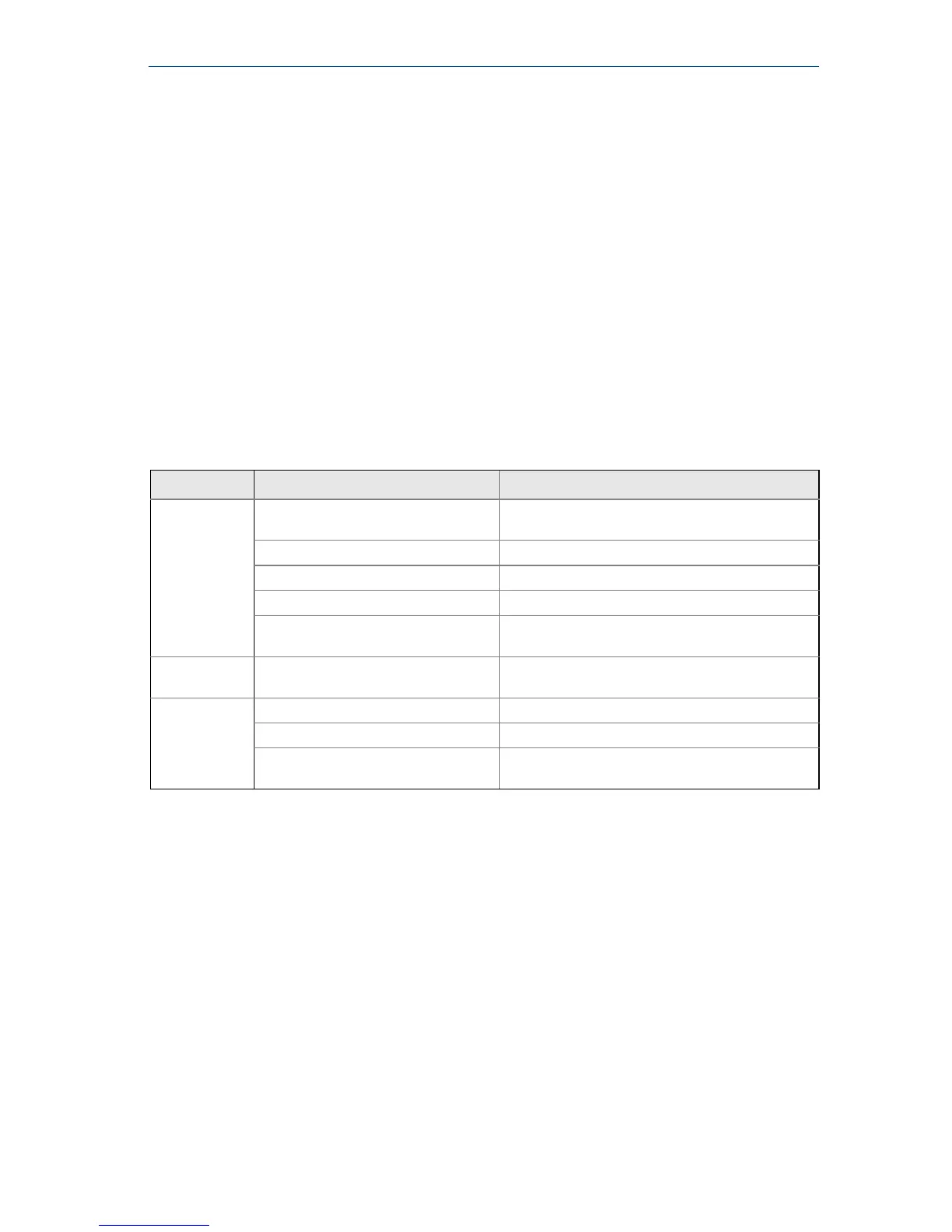
Table 2. Troubleshooting chart
Fault Symptom/Indication Action/Solution
Does not
switch
No LED; no power
Check the power supply; (check load on direct
load switching electronics model)
LED flashing See “LED indication” on page 13
Fork is damaged Replace the 2120
Thick encrustation on the forks Clean the fork with care
5 second delay when changing
mode/delay
This is normal – wait 5 seconds
Incorrect
switching
Dry = On, Wet = On set correctly Set the correct mode on the electronics cassette
Faulty
switching
Turbulence Set a longer switching time delay
Excessive electrical noise Suppress the cause of the interference
Cassette has been fitted from another
Rosemount 2120
Fit the factory supplied cassette
and then calibrate
1
1. Refer to the “Replacement and Calibration of Electronic Cassettes” section in the 2120 Reference Manual
(00809-0100-4030) or Manual Supplement (00809-0200-4030).













 To Next Page