AC750 Wireless Dual Band Gigabit Router RNX-AC750RT User Manual
- 101 -
There are two submenus under the Advanced Routing menu as shown in Figure 4-85: Static
Route List and System Routing Table. Click any of them, and you will be able to configure the
corresponding function.
4.16.1 Static Route List
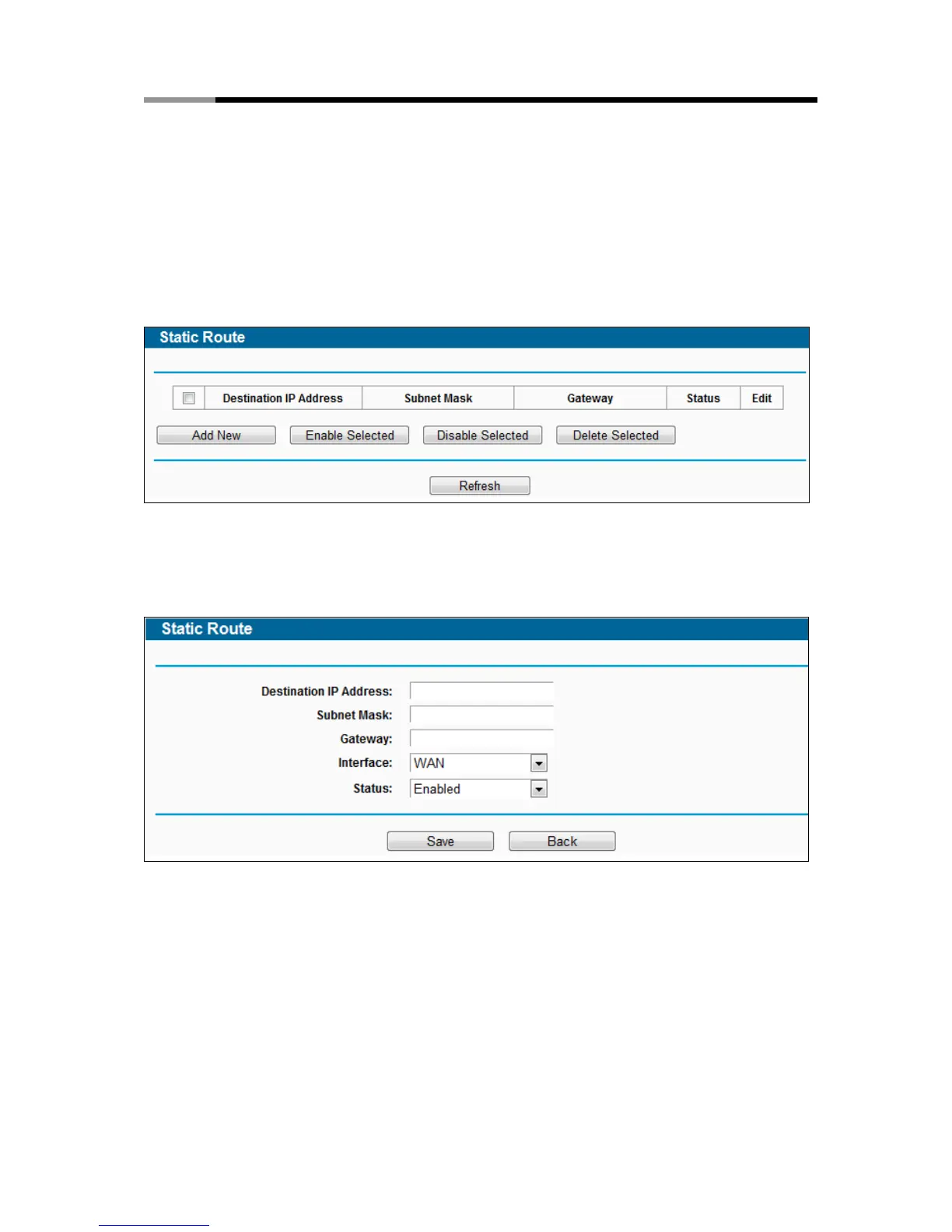
Choose menu “Advanced Routing → Static Route List”, and then you can configure the static
route in the next screen (shown in Figure 4-86). A static route is a pre-determined path that
network information must travel to reach a specific host or network.
Figure 4-86 Static Route
To add static route entries:
1. Click Add New shown in Figure 4-86, you will see the following screen.
Figure 4-87 Add or Modify a Static Route Entry
2. Enter the following data:
Destination IP Address - The Destination IP Address is the address of the network or
host that you want to assign to a static route.
Subnet Mask - The Subnet Mask determines which portion of an IP Address is the
network portion, and which portion is the host portion.
Gateway - This is the IP Address of the gateway device that allows for contact between
the router and the network or host.



 To Next Page