AC750 Wireless Dual Band Gigabit Router RNX-AC750RT User Manual
- 73 -
Click the Apply button to make the settings take effect.
4.10.4 FTP Server
Choose menu “USB Settings→FTP Server”, you can create an FTP server that can be accessed
from the Internet or your local network.
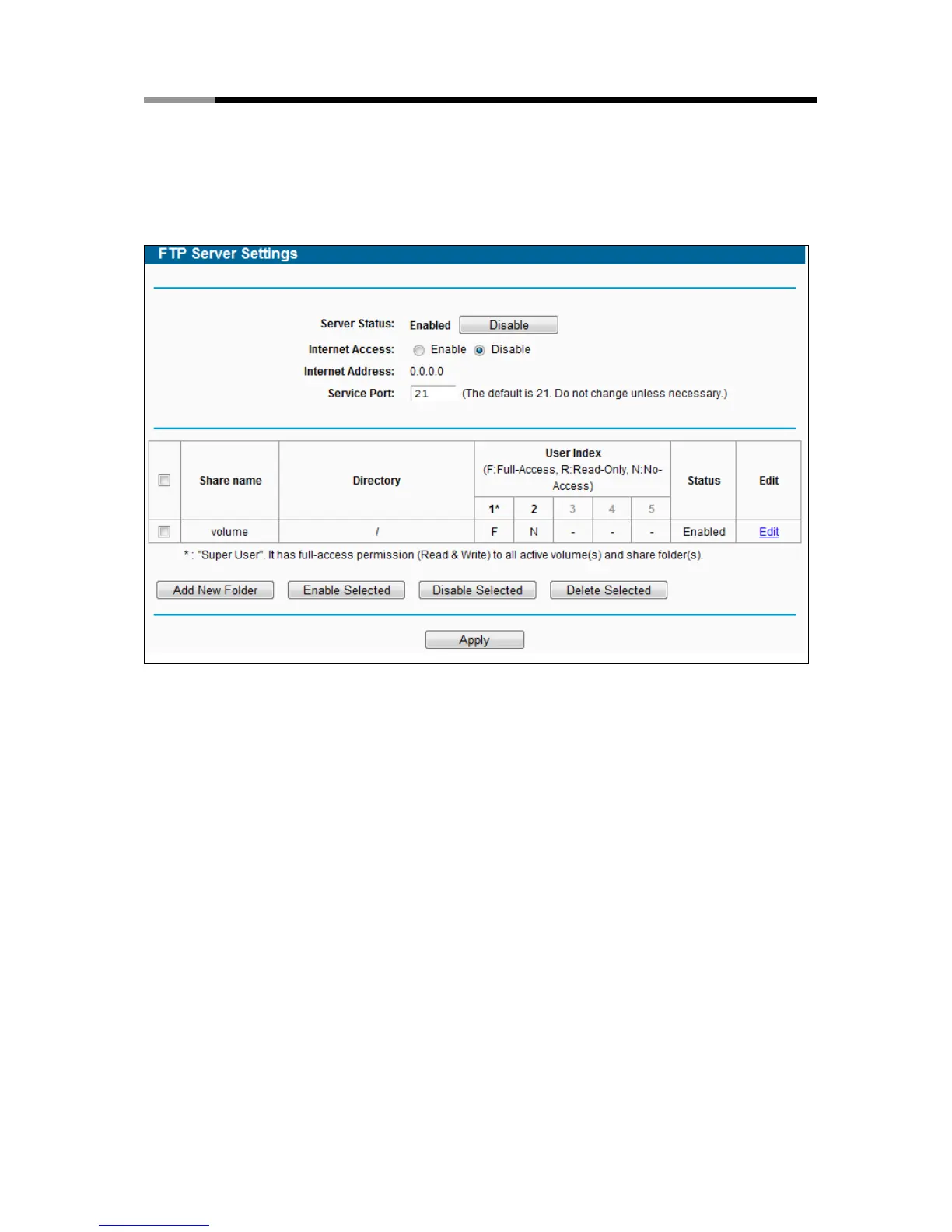
Figure 4-53 FTP Server Configuration
Server Status - Indicates the FTP Server's current status.
Internet Access - Select enable to allow access of the FTP server from the Internet.
Otherwise, select disable to only allow local network access.
Internet Address - The WAN IP address of this router,
Service Port - Enter the FTP Port number to use. The default is 21.
To set up your FTP Server, please follow the instructions below:
1. Plug an external USB hard disk drive or USB flash drive into this router.
2. Click the Enable/Disable radio box to enable/disable Internet access to FTP from WAN port.
3. Specify a port for the FTP server to use (The default port number is 21).
4. The Internet Address displays the WAN IP address of this router, so that other users can
access FTP via this address.



 To Next Page