AC750 Wireless Dual Band Gigabit Router RNX-AC750RT User Manual
- 86 -
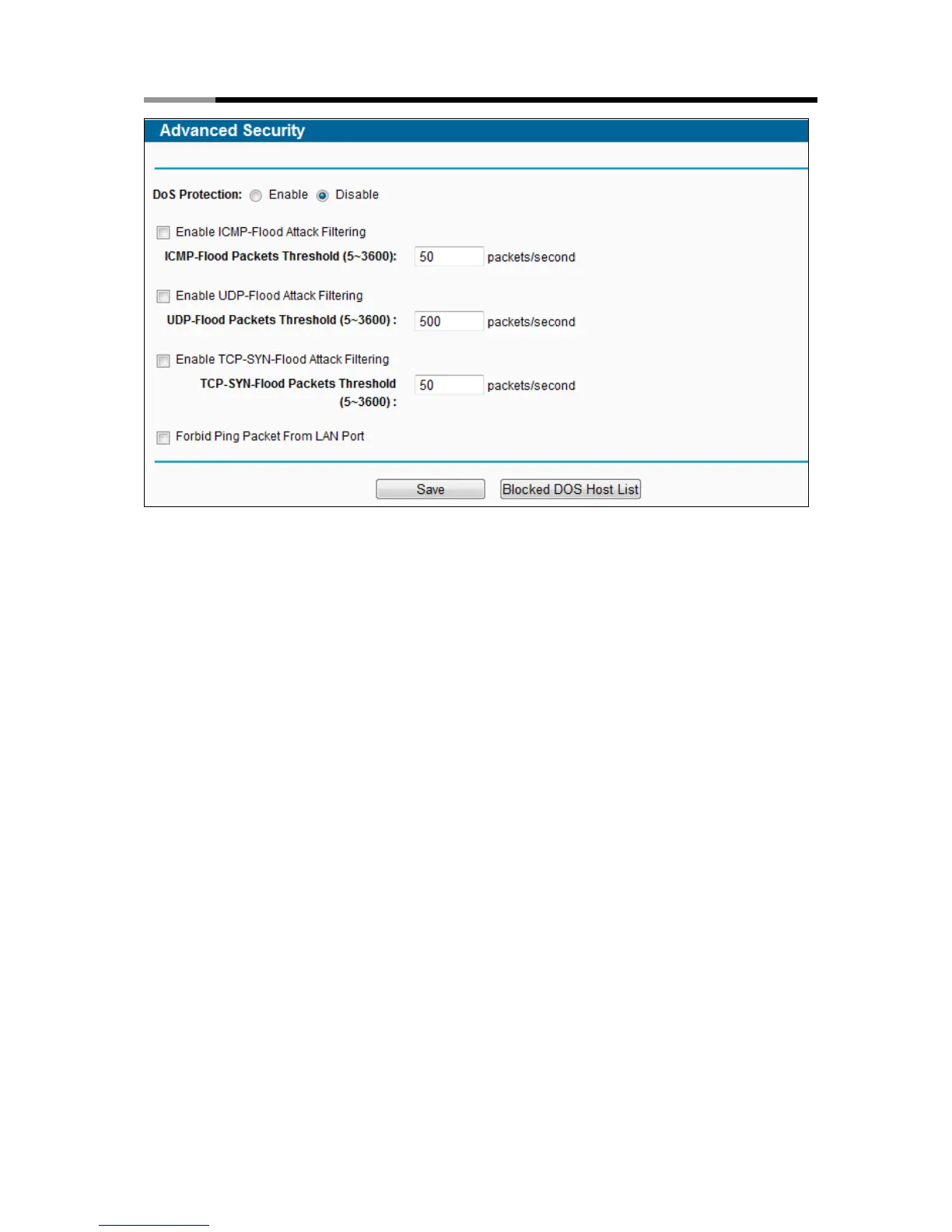
Figure 4-68 Advanced Security
DoS Protection - Denial of Service protection. Check the Enable or Disable button to
enable or disable the DoS protection function. Only when it is enabled, will the flood filters be
enabled.
Note:
Dos Protection will take effect only when the Traffic Statistics in “System Tool →
Statistics” is enabled.
Enable ICMP-FLOOD Attack Filtering - Enable or Disable the ICMP-FLOOD Attack
Filtering.
ICMP-FLOOD Packets Threshold (5~3600) - The default value is 50. Enter a value
between 5 ~ 3600. When the current ICMP-FLOOD Packets number is beyond the set value,
the router will startup the blocking function immediately.
Enable UDP-FLOOD Filtering - Enable or Disable the UDP-FLOOD Filtering.
UDP-FLOOD Packets Threshold (5~3600) - The default value is 500. Enter a value
between 5 ~ 3600. When the current UPD-FLOOD Packets number is beyond the set value,
the router will startup the blocking function immediately.
Enable TCP-SYN-FLOOD Attack Filtering - Enable or Disable the TCP-SYN-FLOOD
Attack Filtering.



 To Next Page