AY-B9350 User Manual 52
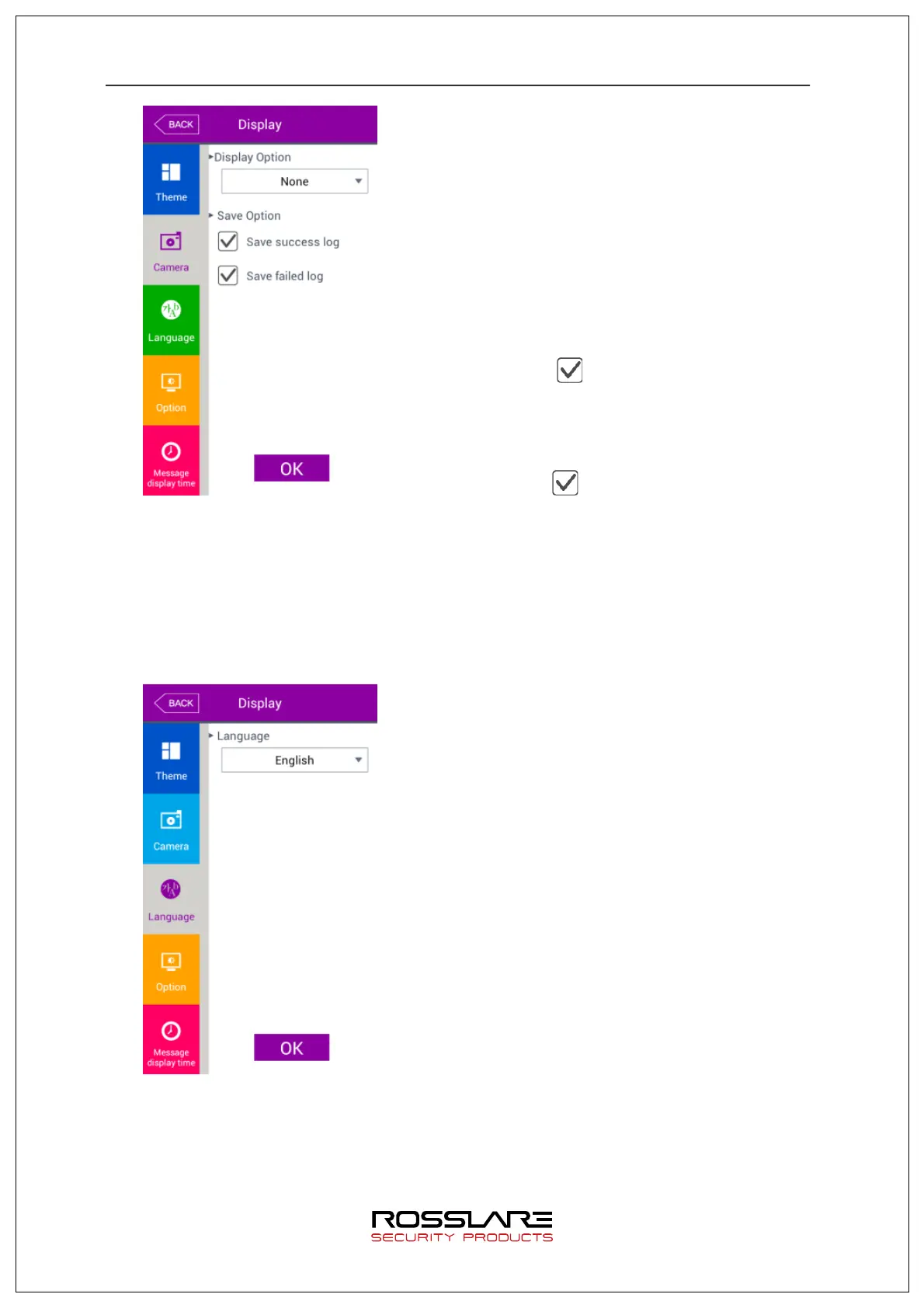
▶ Default setting: same with the setting in the left
screen
▶ Display option
This is to select image displayed in authentication
success message window.
- None
- Registered photo
▶ Save success log
If this is checked ( ), capture camera image and
save it as an image log when authentication is
successful.
▶ Save failed log
If this is checked ( ), capture camera image and
save it as an image log when authentication failed.
To appl y the setting value, press [OK] button or press [BACK] button to cancel and to
move to the upper menu.
3.8.3. Language
Select [Display]
à
[Language] in the main menu to display the screen below.
▶ Default setting: ‘English’
▶ Language
Press ‘OK’ button after changing language to
change voice message and message displayed in
the screen to the setting language.
Press [BACK] button to cancel and to move to the
upper menu.
※
Support language
English, Korean, Japanese, Portuguese, Chinese,
French, Farsi


 To Next Page
 Loading...