AY-B9350 User Manual 59
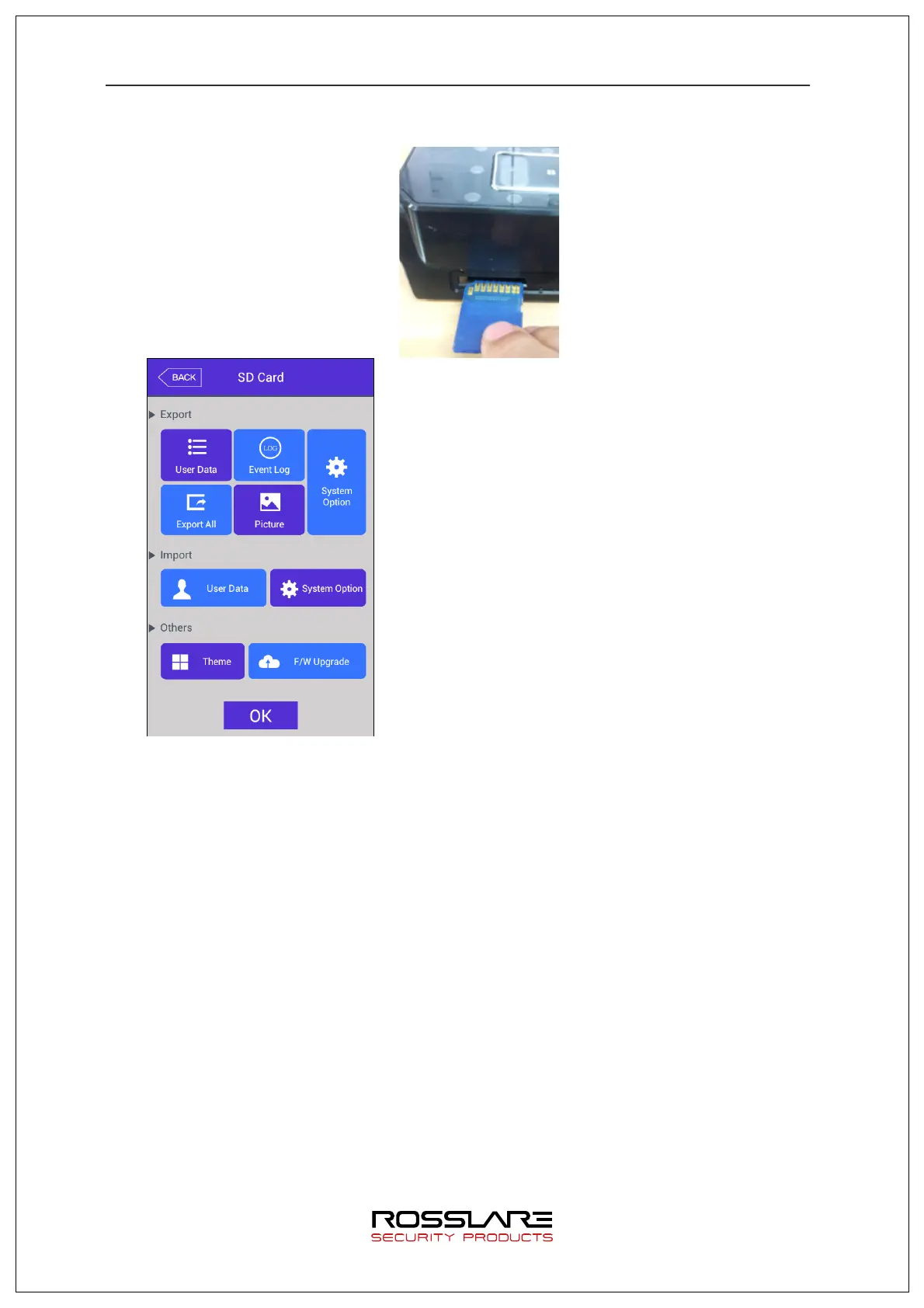
card must be over side down. (Only SD card with capacity below 32G can be used.)
This function is to backup data of the terminal using
[EXPORT]. Data backed up by [IMPORT] can be
copied back to the terminal.
▶ Export
This is to copy the relevant data from the terminal to an external SD card.
- User data: copy user DB into ‘eNBioAccessT9/terminal ID/user/today’s date’ folder in
the SD card.
- System option: Copy option setting values of the terminal into ‘eNBioAccesT9/config’
folder.
- Event log: Copy authentication log into ‘eNBioAccessT9/terminal ID/log/ today’s date’
folder in the SD card. (Do not copy image log.)
Click event log button and select period of authentication log to be
exported as shown in the image below.
- Picture data: Save image log into ‘eNBioAccessT9/terminal ID/log/today’s date /
pictures’ folder in the SD card as a .jpg file.
- Export all: Export the above user data and system option, event log, image log. In
case of export all, all of the saved event logs will be saved.
▶ Import


 To Next Page
 Loading...