LOADING PAPER
HOW
TO
LOAD PAPER
The ER
145
register uses
2'
4 dual carbonless paper to produce both a customer
receipt (outside) and a
journal
record (inside) The register
will
also accept
standard
2'
4 calculator paper for a single tape record
1 Plug
in
your
cash register
2 Cut or tear the end of the paper roll evenly for a straight even edge for
proper feeding through the
prmthead
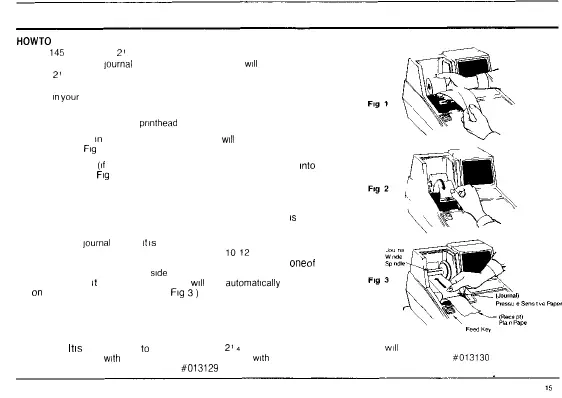
3 Place paper roll
in
paper holder so that the paper
will
feed from the bottom of
the roll (See
Fig
1 )
4 Insert both ends
(if
using dual tape) or the end of a single paper tape
into
the
paper slot (See
Fig
2 )
5 Depress the paper [FEED] key until the paper catches and advances
through the printer
6 If paper does not feed through the printer make sure the paper
is
entered
properly inspect the end of paper tape
7 To insert the
journal
winder
it
is
not necessary to remove the journal winder
spindle Simply advance the tape approximately
1012
inches by using the
[FEED] key Then slide the inside pressure sensitive tape under
one
of
the
forks that extends on either
side
of the journal winder Press the [FEED]
again and hold
it
down The journal tape
will
then
automatically
secure itself
on
the journal winder spindle (See
Fig
3)
8 Pass the outside plain tape through the receipt window of the journal
printer cover
9 Replace journal printer cover
NOTE
It
is
recommended
to
use ROYAL brand
2'4
(57mm) bond quality paper which
will
help prevent dust deposits on the printer
mechanism found
with
inexpensive paper rolls Replace
with
ROYAL brand carbonless two ply paper order
#013130
or standard bond
quality calculator paper ROYAL order
#013129



 To Next Page