TAX SHIFT — MANUAL ENTRY TAX
The tax shift keys [Tax Shift 1] and [Tax Shift 2] can be used to enter a tax that
is
different than the programmed tax for a department
In Program One
"PGM-1"
of the programming procedure the following three tax options were given
Tax Option
100
—
Non Tax
Tax Option
101
— Fixed Percentage Tax
Tax Option
102
— State Table Tax and Fixed Percentage Tax
IMPORTANT
The tax option selected
will
determine how a manual tax entry
is
to be made Follow the examples given under the tax option that has
been selected
in
your programming procedure
Tax Option
100
— Non Tax
A manual tax cannot be entered
Tax Option 101 — Fixed Percentage Tax
The [Tax Shift] key can be used to enter a manual percentage tax rate
into
a department that was programmed for Tax 1 — fixed
percentage rate
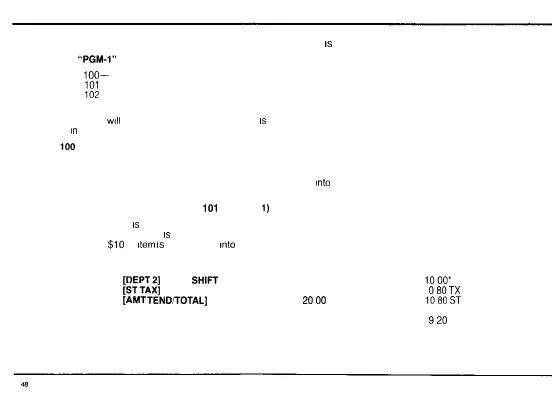
TRANSACTION EXAMPLE FOR TAX OPTION
101
(Tax Shift
1)
Register the following Tax 1
is
programmed at a fixed 7 0% rate
Department 2
is
programmed for Tax 1
$10
00
item
is
to be entered
into
Department 2 at a fixed 8 0% rate
$20 00 Cash tendered amount
PRESS DISPLAY PRINTOUT
1000
[DEPT2]
[TAX
SHIFT
1] 21 1000 2T1
1000*
80
[STTAX]
1080
080TX
2000
[AMT
TEND/TOTAL]
2000
1080ST
9 20 AT 20 00 CT
CG
920



 To Next Page