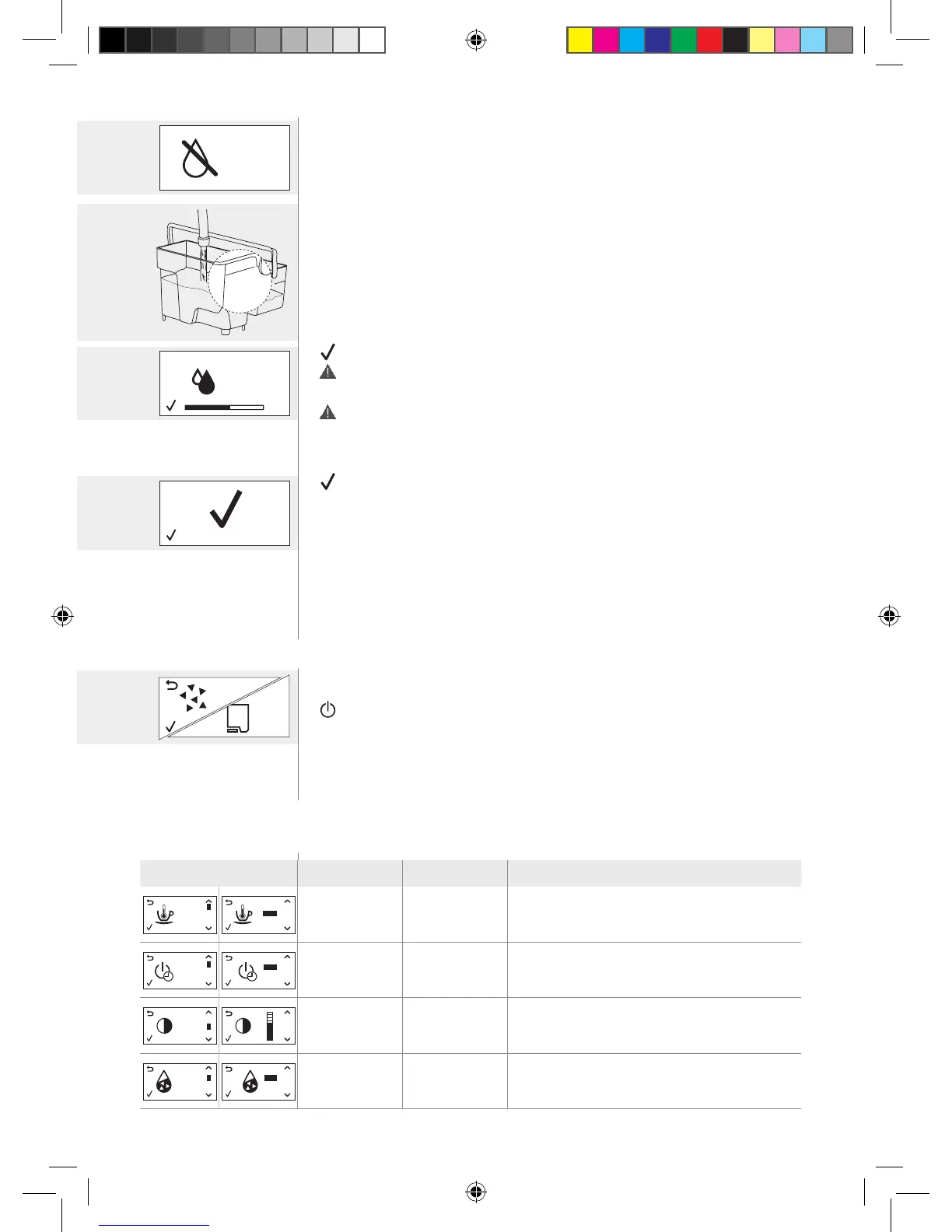
Let the water be discharged until the tank is empty.
> Remove the water tank and rinse it.
>
Fill it with fresh water to the MAX level and return it to its proper place.
>
Remove and empty the container.
Repeat the entire sequence of operations described in the “Preparation phase” above
and proceed with the “Rinsing phase”.
Rinsing phase
> Press the OK button to launch the rinse cycle.
The cycle can be paused by pressing the ESC button and restarted by pressing the OK
button. This makes it possible for the user to empty the container or leave for a while.
IfthewatertankwasnotlledtotheMAXlevel,themachinemightrequireanother
rinsecycle.Inthiscase,llthewatertanktotheMAXlevel,putitbackinthemachine
and repeat the “Rinsing phase”.
Let the product be dispensed until the process stops automatically.
>
Press the OK button to exit the descaling cycle. The machine goes through the heating
and automatic rinse process.
>
Remove and empty the container with dispensed water.
Perform the “7.4.2 Monthly cleaning of the milk frother components” procedure.
Perform the “7.2.1 Weekly brew group cleaning cycle” procedure.
>
YoucannowinstalltheAquaCleanwaterlterifused:refertothe“10.2 AquaClean
water lter” chapter.
At the end, the machine goes back to the main menu. It is recommended to perform
a “5.2.3 Manual rinse cycle”.
If necessary, place the milk frother back on the steam wand.
7.5.1 Interruption of the descaling cycle
> Once the descaling cycle has started, you must complete it till the very end without
turning off the machine.
>
In case you get stuck during the cycle or in case of power failure or accidental
disconnection of the power cord, you can exit by pressing the STAND-BY button.
>
Ifthisoccurs,emptyandrinsecarefullythewatertank,thenllituptotheCALC
CLEAN level. Follow the instructions provided in the “5.2.3 Manual rinse cycle” chapter
before brewing any product. If the cycle was not completed, the machine will require
another descaling cycle to be performed at your earliest convenience.
8. Default settings
8.1 List of default settings
Display Setting Value Description
COFFEE
TEMP
MAX
MED
MIN
Coffee
temperature
average Coffee brewing temperature setting.
STANDBY
180’
60’
30’
15’
Stand-by time 15 minutes Stand-by time setting.
DISPLAY
CONTRAST
Contrast average Display contrast setting.
WATER
HARDNESS
4
3
2
1
Water hardness
4 (very hard
water)
Water hardness setting. For further details, please
refer to the “5.3.1 Water hardness measurement and
setting” chapter.
CALC
CLEAN
red
displa




 To Next Page