25
Sage Digital ENDEC Quick Start Rev 2.0
17. Troubleshooting
17.1 Blink Errors
If an error occurs in the ENDEC that requires operator action, one or more of the front panel and remote
control LEDs will blink. To turn off the blink, correct the problem and reboot the ENDEC, or use the
TEST.RESET BLINK ERROR menu. Here is a list of all “blink” conditions:
17.1.1 Incoming Alert (IN) LED Only
If the Incoming Alert LED is blinking, there has been an error with the ENDEC’s self test. The error
message is in the MSG buffer, press the MSG softkey to read it. Power cycle the ENDEC, if the problem
recurs, call for service.
17.1.2 Outgoing Alert (OUT) LED Only
This is not an error condition. If the audio source for an alert is “console”, the Outgoing Alert LED will
blink during the audio portion of an alert. The ENDEC has dropped out of line and the station audio chain
has been restored, that is, the operator should talk now.
17.1.3 Automatic (AUTO) LED Only
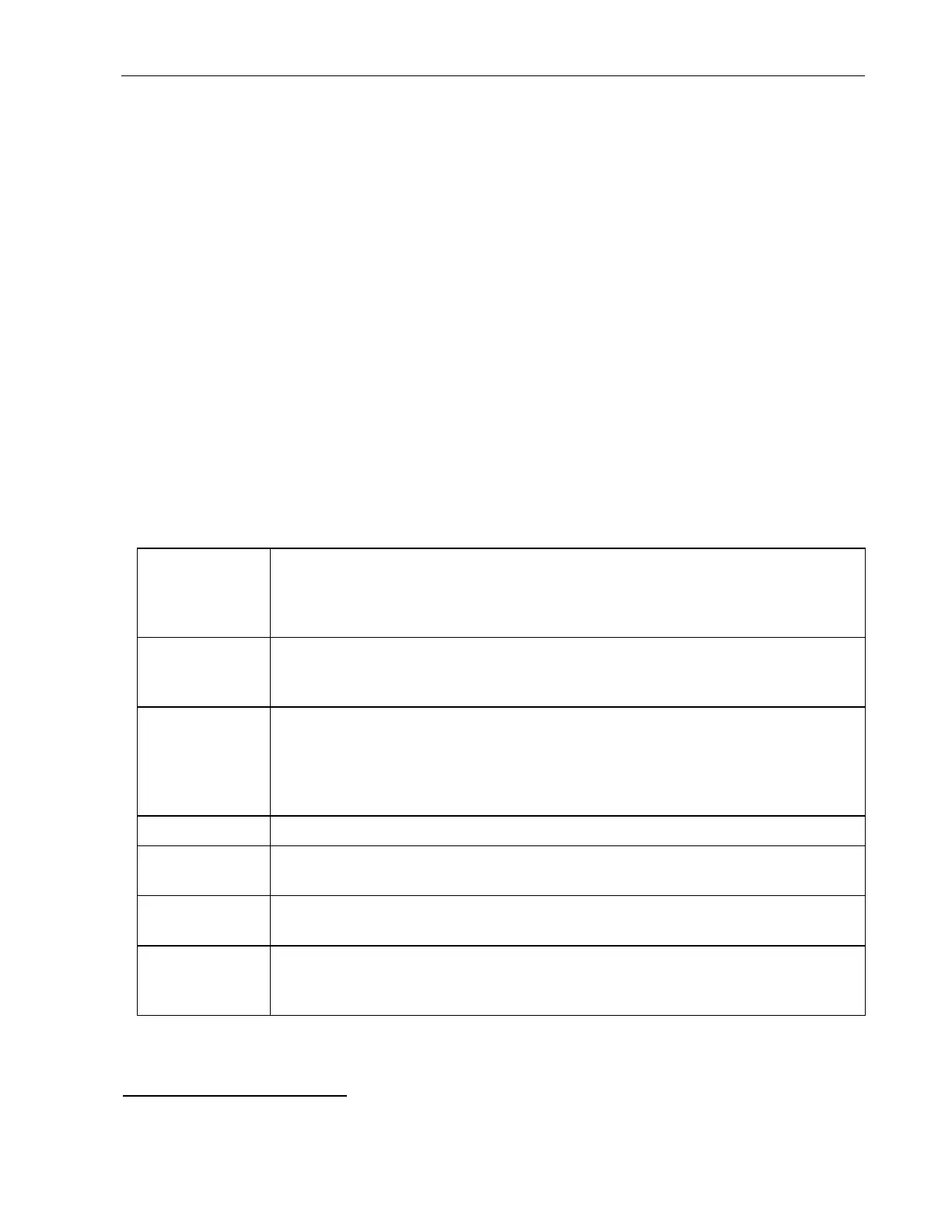
If the auto LED is blinking, an error message is in the MSG buffer, press the MSG softkey to read it.
Messages and causes are:
Time is not set The internal clock calendar chip has lost battery backup or was otherwise reset, or
the time has been set less than 2019 or greater than 2094. Fix the time and reboot
the ENDEC
2
. Note: The Digital ENDEC uses a long life battery that will last
longer than 20 years in normal use.
Configuration
file corrupted
The saved parameters have been corrupted. The default parameter settings have
been restored - you will need to setup the ENDEC again, or download saved
parameters using the ENDECSetD software.
CGEN com port
did not respond
The VDS character generator on the named Com port did not respond to commands.
This is usually a problem with the cable or the CG. Check the cables, check power
to the CG. You can test the access to the CG by using the
TEST.VDS CGEN
VERSION menu. If a version is returned, the setup is OK, if “no response” is shown
on the ENDEC display, the ENDEC and CG are not exchanging data.
No Local Area You must define a local area using the MENU.PRESETS.LOCAL AREA menu.
Validate Error An EAS header generated by the ENDEC did not pass the check for legal EAS
messages. This is an internal software error.
EEPROM-D
Corrupted
This message may also be followed by diagnostic information such as “end tag
missing”. The internal configuration file is not formatted correctly - Call for service.
CAP server is
down
One or more of your specified CAP servers can’t be reached. For details on
troubleshooting CAP, refer to FAQ page on the Sage web site, in the Task Sheets
section, CAP troubleshooting.
17.1.4 Automatic (AUTO) and Incoming Alert (IN) LEDs
This is not an error, the ENDEC is in practice mode. The next alert sent will not close the XLR relays.
2
To reboot the ENDEC, either cycle the power, or use the MENU.TEST.REBOOT menu.


 To Next Page