12
Sage Digital ENDEC Manual Rev 2.0
Item Name Description
9 Internal Speaker The internal speaker carries alert audio. You can use it to
monitor any of the incoming audio channels. It is fed from the
back panel Spkr In terminal, which is usually jumpered to the
Spkr Out terminal. You can also route it through an external
relay to allow muting.
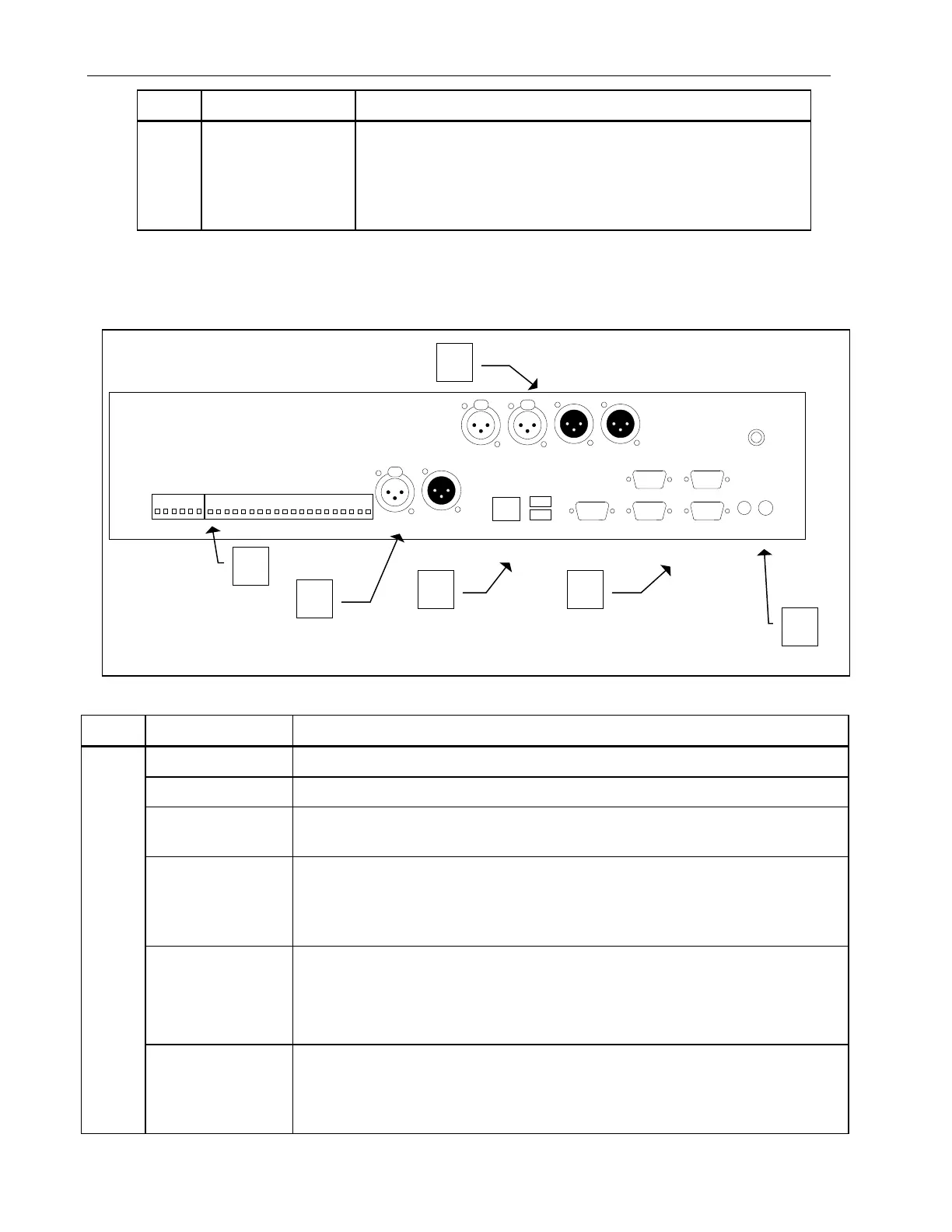
10.2 ENDEC Back Panel
Item Name Description
1
Terminal Strip The terminal strips are removable. The signals are listed below.
Rly 4 A relay that opens and closes according to an assigned program.
D in 2 through 5 A digital input that the ENDEC reads as open (floating) or closed (ground).
Used for various options such as alert hold off or sending a Weekly Test.
Attn Rly A relay that opens and closes according to an assigned program. By default,
the relay closes when it receives an Attention Signal. When closed, these two
terminals are shorted together. In the User’s Guide, see also the sections on
Relays and Relay Programming.
Enc Rly A relay that opens and closes according to an assigned program. By default,
the relay closes when an alert is being sent. When closed, these two terminals
are shorted together.
In the User’s Guide, see also the sections on Relays and Relay Programming.
Dec Rly A relay that opens and closes according to an assigned program. By default,
the relay closes when it receives an alert or is pending. When closed, these
two terminals are shorted together. In the User’s Guide, see also the sections
on Relays and Relay Programming.
LAN
10/
100
Com 5
Com 6
Com 3
Com 4
A
ttn Rly
Attn Rly
En
c Rly
Enc
Rly
Dec Rly
Dec Rly
Gnd
Mon 1
in
M
on 2 i
n
Mon 3 in
Mon 4 in
Mon 5 i
n
M
on 6 i
n
Gn
d
Gnd
Enc in
D in 1
L
ine Out
Sp
kr Out
Spkr In
.
Gnd
USB 1
USB 2
Com 2
Digital Audio
In Out
Main Audio In Main/Alert Audio Out
L R
L R
Rly 4
R
ly 4
D in 2
D in 3
D in 4
D in 5
On/Off
PWR
Figure 10-2. ENDEC Back Panel


 To Next Page