9
.
Rep
e
a
t
for the add
iti
o
nal
re
m
o
t
e
tr
an
sm
i
tt
er
s,
v
e
ri
fyi
ng
eac
h
re
mote i
s o
n a d
if
f
e
re
n
t cha
n
nel.
2.4 Display Console Set Up
1.
Move the transmitters(s)
about 1 to 3m
away
from the display
console (if
the
transmitters
are too
close, it
may
not
be
received
by the
display console).
With multiple transmitters,
make
sure
all
transmitters
are powered up and displaying different channels on the display.
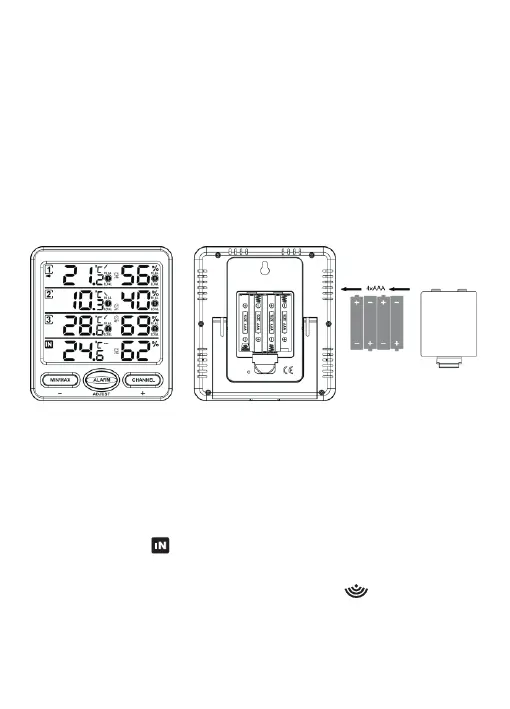
2. Remove the battery door on the back of the display
, as shown in
Figure 4.
Insert four
AAA
(alkaline
or lithium,
avoid
rechargeable)
batteries into the back of the display console.
Fig
u
re 4
All of the LCD segments will light up for a few seconds to verify all
segments are operating properly.
3. Replace
the
battery
door,
and fold
out the desk
stand
and place
the console in the upright position.
The
console will instantly display indoor
temperature
and humidity
as
designated by the
icon.
The
remote temperature and
humidity
will
update on the
display within
a
few minutes
on
the
appropriate
channel.
While in the search mode, the remote search icon will be constantly
displayed.
If
you
have
more than three remote
sensors
(additional channels
4-8
are
supported), the display
will
automatically
toggle
between
sensors
until all sensors have reported in.
-21-



 To Next Page