Do not touch any
buttons until all
of the
remote
sensors have
reported
in, or
the radio
search icon
is no longer
on, otherwise
the
remote
sensor search mode will be terminated. When the remote sensors have
been received,
the
console
will
automatically
switch
to
the
normal
mode, and all further settings can be performed.
If the
remotes do
not
update,
please reference the
troubleshooting
guide in Section 8.
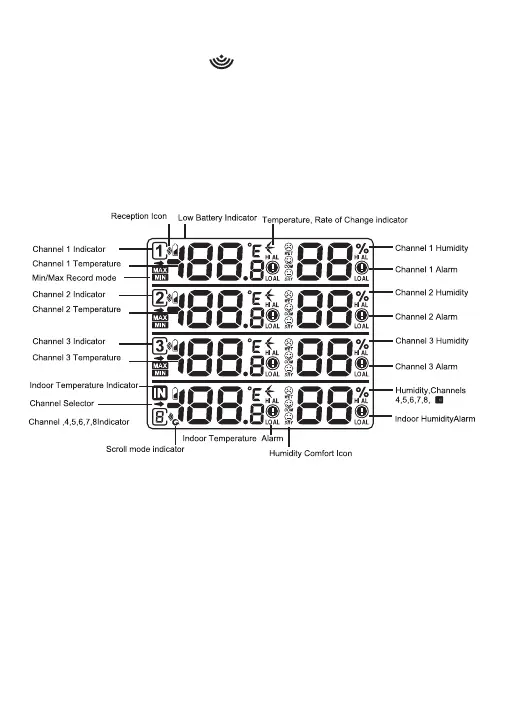
2.4.1 Display Console Layout
Fig
ure
5
2.4.2 Sensor Operation V
erification
V
erify
the
humidity
sensors match
closely with
the
console
and
the
sensors are in the same location (about 1-3 meters apart).
The sensors
should
agree within
10% (the accuracy
is ± 5%).
Allow about 30
minutes
for all sensors to
stabilize.
The humidity
can
be
adjusted
or
calibrated later to match each other a known source.
V
erify
the
temperature sensors match
closely
with
the console and
sensor
array in
the
same
location (about 1-3
meters apart).
The
sensors
should
be
within
2°C (the
accuracy is
± 1°C).
Allow
about 30
-22-



 To Next Page