20
4. The pairing processes of the iT500 devices
4.1 Pairing iT500TR with iT500RX receiver
FAILSAFE MODE: In the event of RF signal loss, your system will be switched on for 4 minutes, then o for 11 minutes. If you want to disable
FAILSAFE MODE when RF link has been lost then move the slide switch on iT500RX to either the Manual or O position.
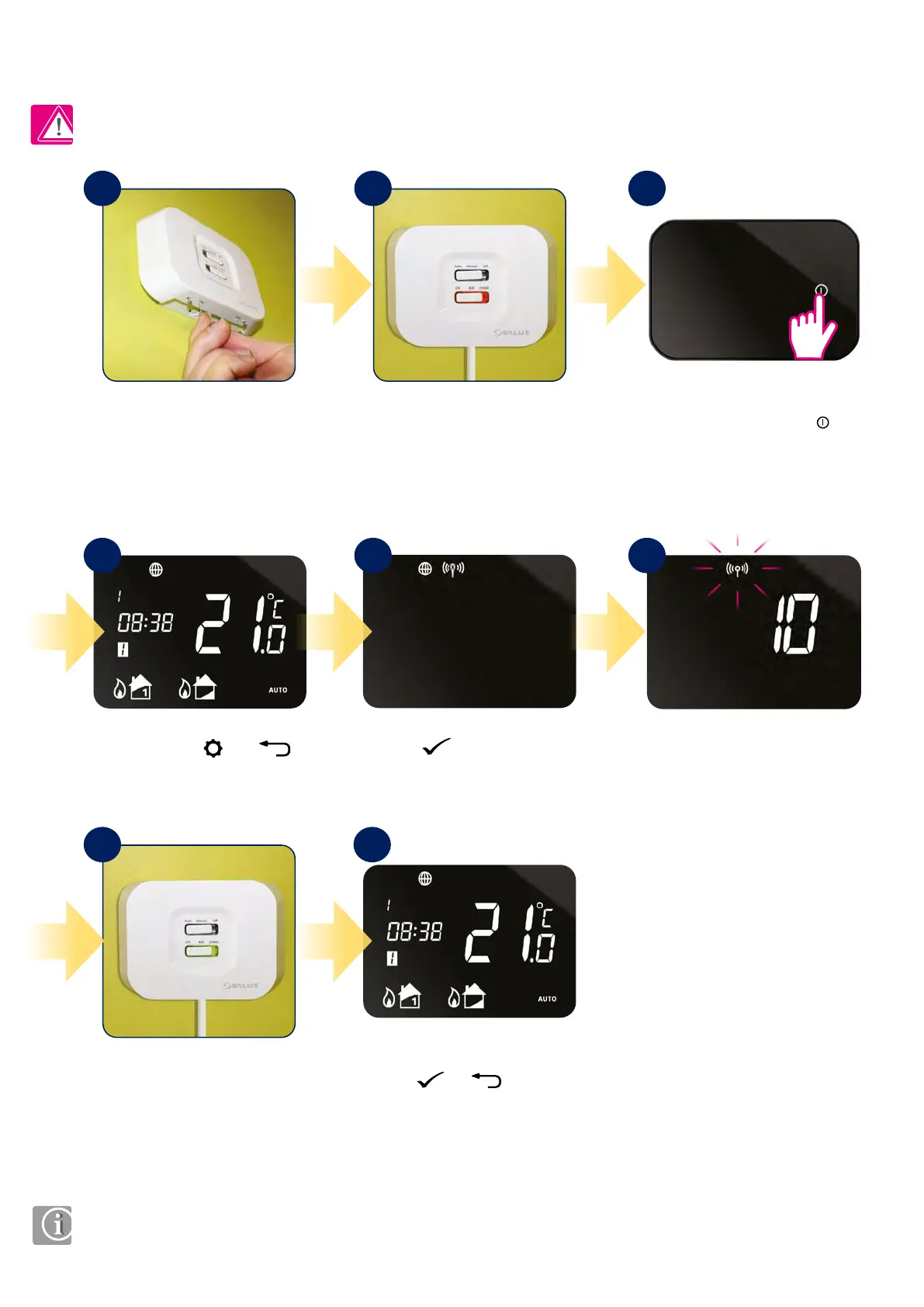
When iT500RX receiver and
iT500TR thermostat are paired
then the light will be green.
Use a thin object (such as a paper
clip) to press and hold the SYNC
button on the bottom of the
iT500RX receiver for 5 seconds.
Press
button to launch
pairing process.
The bottom switch will show a
constant red light when iT500RX
receiver is ready to pair. Now go
to iT500TR thermostat.
Press the power button
to highlight the display.
Pairing process can take up to 10
minutes.
Press and hold and
buttons for 3 sec.
Press
or to return
to the home screen.
1
4
7 8
5 6
2 3
PLEASE NOTE!
iT500TR THERMOSTAT IS NOT FACTORY PAIRED WITH THE iT500RX RECEIVER!



 To Next Page