44
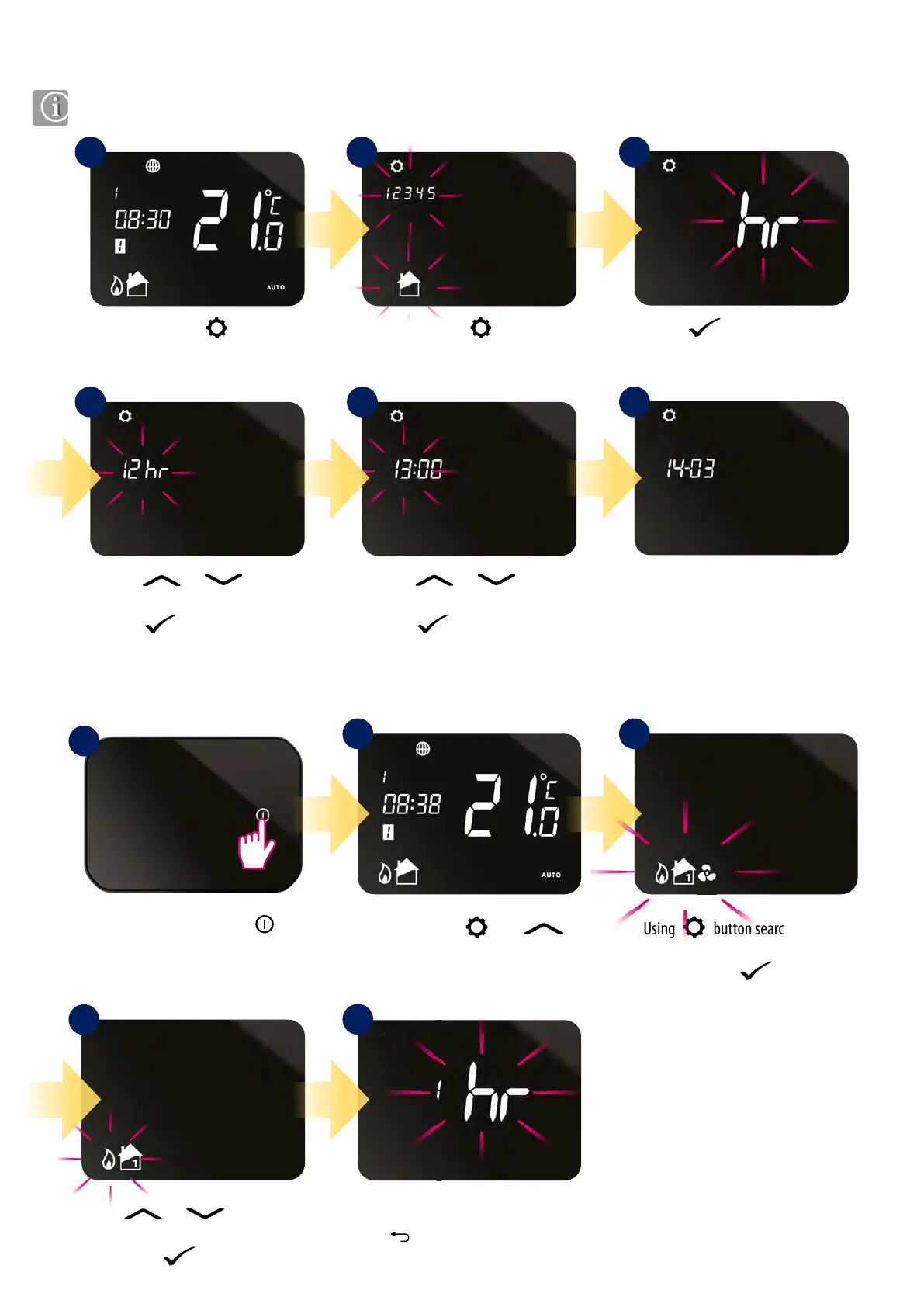
Press or button
to set the hour.
Press button to conrm.
Press or button
to set 12 or 24 hour format.
Press button to conrm.
8.6 User settings
8.6.2 Heat/Cool mode change
8.6.1 Setting the time and date
Press the power button
to highlight the display.
1
4
Press and hold and
buttons for 3 sec.
Using button search heat/cool
mode option.
Conrm by button.
Use
or buttons to
change mode. Conrm selected mode
by button.
Thermostat will go to the next setting.
Hold button to exit to main screen.
2 3
When connected to the internet, the iT500 will set time and date automatically. However this can also be set manually.
Press and hold button.
Press again
button
to change value.
Press
button to conrm.
Follow the same steps to set
the minutes, day, month
and year.
1
4 5 6
2 3
5
iT500TR thermostat can work in heating or cooling mode. To set thermostat operating mode please follow steps below:



 To Next Page