EasyManua.ls Logo

Samsung BD-E5700 - Appendix: Troubleshooting Network and Repairs; AllShare and BD-LIVE Service Troubleshooting; Information on Obtaining Repair Service

Samsung BD-E5700
89 pages
Print Icon
To Next Page IconTo Next Page
To Previous Page IconTo Previous Page
Loading...
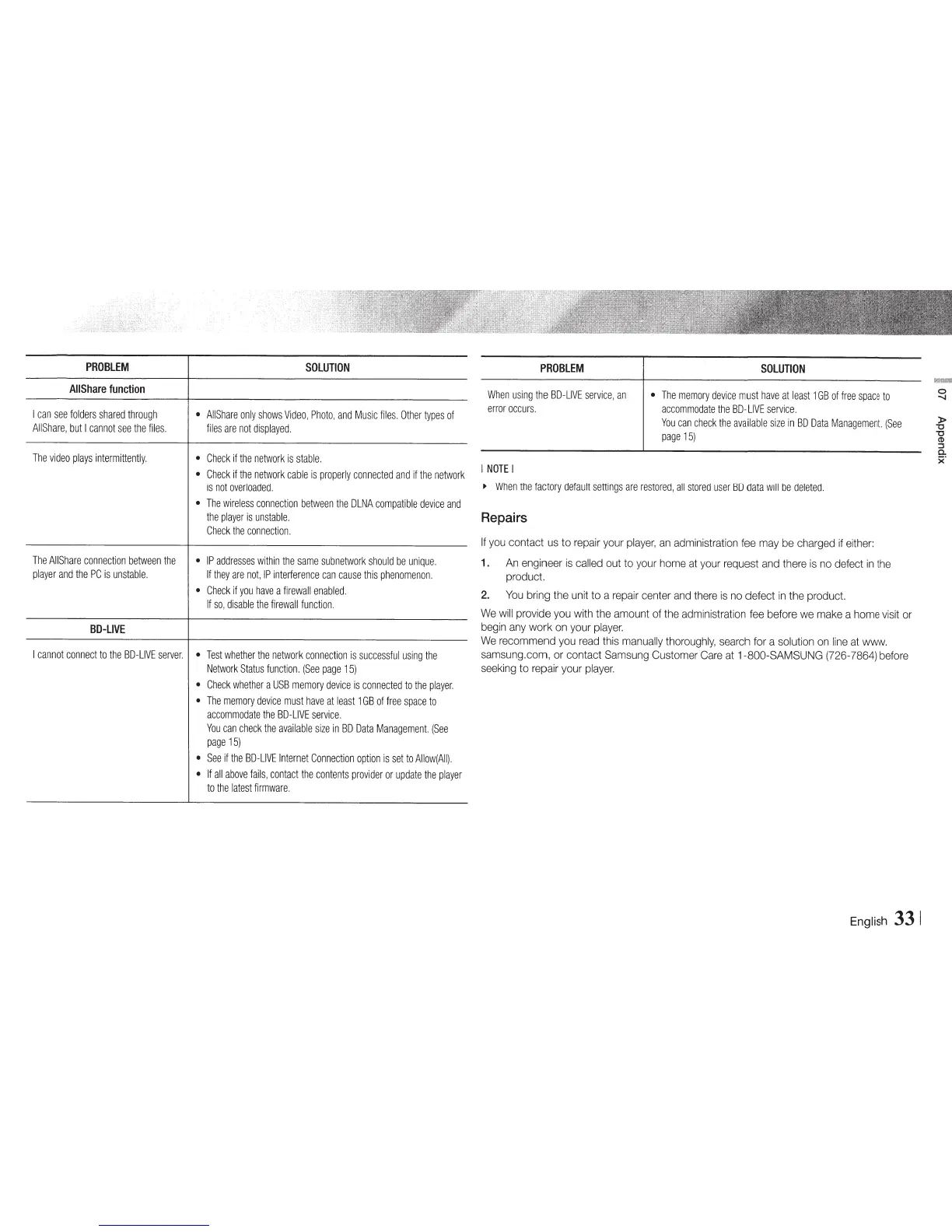
PROBlEM
SOlUTION
AIIShare
function
I
can
see
folders
shared
through
AIIShare
only
shows
Video,
Photo
,
and
Music
files.
Other
types
of
All
Share,
but
I
cannot
see
the
files.
files
are
not
displayed.
The
video
plays
intermittently
.
Check
if
the
network
is
stable.
Check
if
the
network
cable
is
properly
connected
and
if
the
network
is
not
overloaded.
The
wireless
connection
between
the
DLNA
compatible
device
and
the
player
is
unstable.
Check
the
connection.
The
AIIShare
connection
between
the
IP
addresses
within
the
same
subnetwork
should
be
unique.
player
and
the
PC
is
unstable.
If
they
are
not
,
IP
interference
can
cause
this
phenomenon.
Check
if
you
have
a
firewall
enabled
.
If
so,
disable
the
firewall
function
.
BD-UVE
I
cannot
connect
to
the
BD-LIVE
server.
Test
whether
the
network
connection
is
successful
using
the
Network
Status
function.
(See
page
15)
Check
whether
a
USB
memory
device
is
connected
to
the
player.
The
memory
device
must
have
at
least
1GB
of
free
space
to
accommodate
the
BD-LIVE
service
.
You
can
check
the
available
size
in
BD
Data
Management.
(See
page
15)
See
if
the
BD-LIVE
Internet
Connection
option
is
set
to
Allow(AII).
If
all
above
fails
,
contact
the
contents
provider
or
update
the
player
to
the
latest
firmware
.
PROBlEM
When
using
the
BD-LIVE
service,
an
error
occurs.
I
NOTE
I
SOLUTION
The
memory
device
must
have
at
least
1
GB
of
free
spac
e
to
accommodate
the
BD-
LIVE
service.
You
can
check
the
available
size
in
BD
Data
Management.
(See
page
15)
~
When
the
factory
default
settings
are
restored
,
all
stored
user
BD
data
will
be
deleted
.
Repairs
If
you
contact
us
to
repair
your
player,
an
administration
fee
may
be
charged
if
either:
1.
An
engineer
is
called
out
to
your
home
at
your
request
and
there
is
no
defect
in
the
product.
2.
You
bring the
unit
to a
repair
center
and
there
is
no
defect
in
the
product.
We
will
provide
you
with
the
amount
of
the
administration
fee
before
we
make
a
home
visit
or
begin
any
work
on
your
player.
We
recommend
you
read
this
manually
thoroughly,
search
for
a
solution
on
line
at
www.
samsung.com,
or
contact
Samsung
Customer
Care
at
1-800-SAMSUNG (726-7864)
before
seeking
to
repair
your
player.
English
33
1
)>
"0
"0
CD
::J
0.
)('

Other manuals for Samsung BD-E5700

Related product manuals