25
INSTALLATION
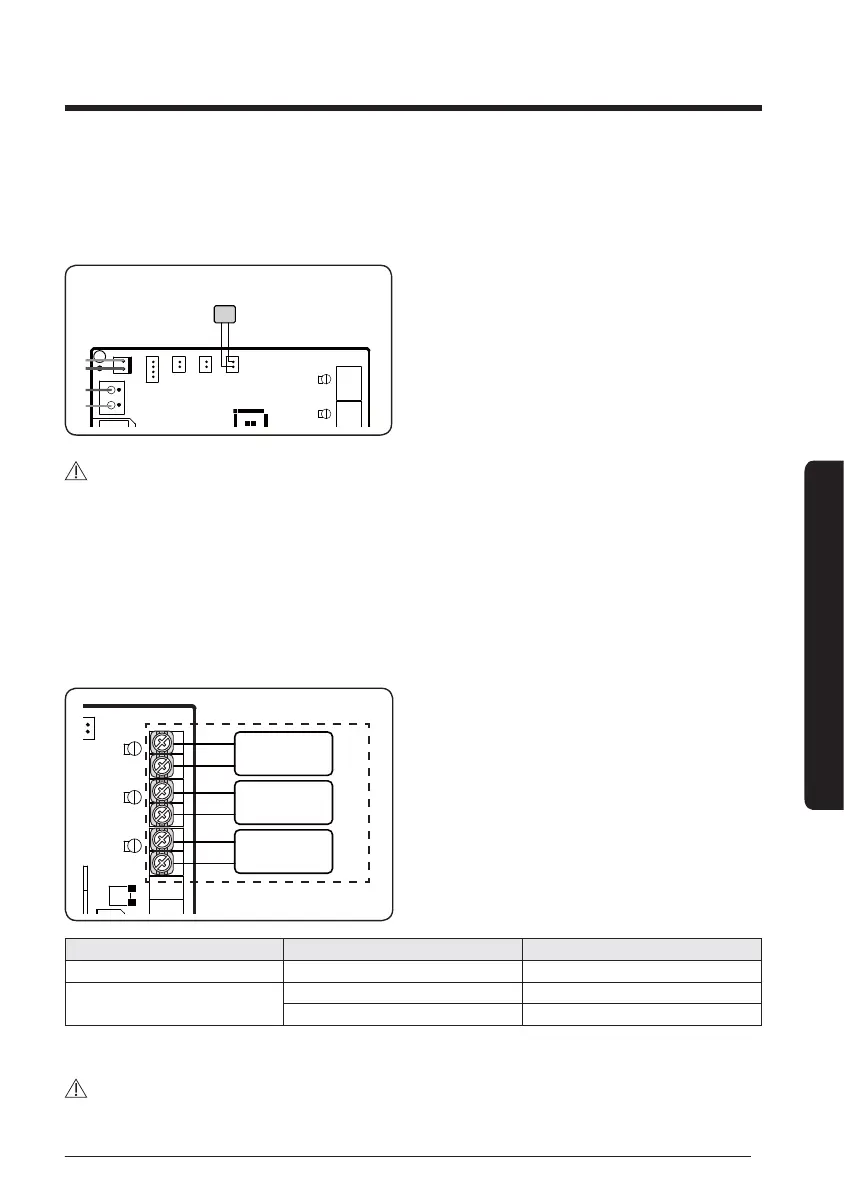
5 Option room sensor (Model: MRW-TA)
y
In case of installing room sensor as option, set installation option according to the table.
(05series, SEG24 = 1)
Room sensor (optional)
CAUTION
y
Use either wired remote controller with built-in room sensor or external room sensor
(MWR-TA) must be installed.
6 Controlling the BLDC Fan and Modulating Valve
y
When you have installed BLDC fan and modulating valve, set SEG8 for the 02 series installation
option.
y
When you set the modulating valve and BLDC valve to USE, the Fan Motor power step and water
valve do not operate.
BLDC Fan
Control
*
Modulating
Valve 2
Modulating
Valve 1
*DC power source
Pipe Type Operating mode Valve
2-Pipe Cooling / Heating Modulating Valve 1
4-Pipe
Cooling Modulating Valve 1
Heating Modulating Valve 2
y
When using 4-pipe system, set SEG14 of 05 series installation option as 1.
CAUTION
y
As the area marked with an asterisk is for DC power output, do not connect to an AC power source.





 To Next Page