34
SETTING
Setting address (MAIN/RMC) of FCU KIT
1 Check if power is supplied to FCU KIT.
y
When the power is not supplied to FCU KIT, there should be additional power supply to
it.
2 Remote controller receiver of wireless remote controller is included in FCU KIT PBA.
3 Depending on the installation condition of FCU KIT, address (MAIN/RMC) to each FCU KIT
should be set.
4 Set the FCU KIT address (MAIN/RMC) by using a remote controller.
y
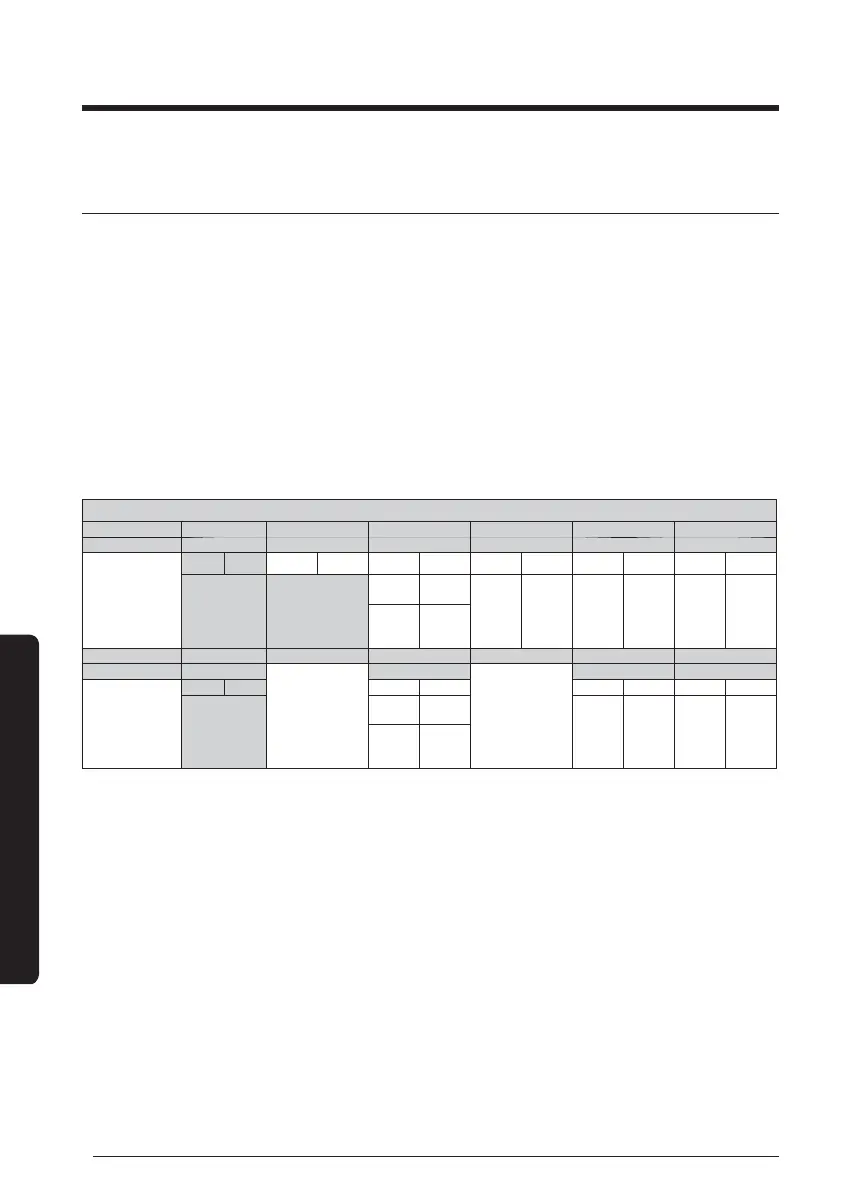
The default setting value of the FCU KIT address (MAIN/RMC) is "0A0000-100000-
200000-300000".
Option No. : 0AXXXX-1XXXXX-2XXXXX-3XXXXX
Option SEG1 SEG2 SEG3 SEG4 SEG5 SEG6
Description Page Mode Setting main address Hundreds digit of address Tens digit of address Ones digit of address
Display/detail
Display Detail Display Detail Display Detail Display Detail Display Detail Display Detail
0A
0
No main
address
0
Hundreds digit
0~9 Tens digit 0~9 Ones digit
1
Address
setting
mode
Option SEG7 SEG8 SEG9 SEG10 SEG11 SEG12
Description Page
No function
Setting RMC address
No function
Group channel(*16) Group address
Display/detail
Display Detail Display
Detail
Display Detail Display Detail
1
0
No main
address
RMC1 0~F RMC2 0~F
1
Address
setting
mode
Setting address of FCU KIT and installation option





 To Next Page