15
INSTALLATION
Wiring work
Connecting a power cable and communication cable
y
Make sure to cut-off the power before connecting the power cable.
y
The power cable and communication cable of FCU KIT should be within 10% of the
maximum allowable length of the cable or voltage drop.
y
Install circuit breaker (ELCB) concerning total power consumption of connected FCU KIT.
y
Connect F3, F4 of FCU KIT terminal block to communication terminal block (F3, F4) of
wired remote controller. (Refer to page 19.)
y
Use appropriate tools to connect the cables rmly within rated torque range so that it
can withstand external forces, and arrange the cables neatly so that cover or any other
parts won't get loose. If the cable is connected loosely, overheat, electric shock or re
may occur.
y
Install the power and communication cable in a protection tube to protect them from
water or external shock.
y
Connect power cable to ELCB.
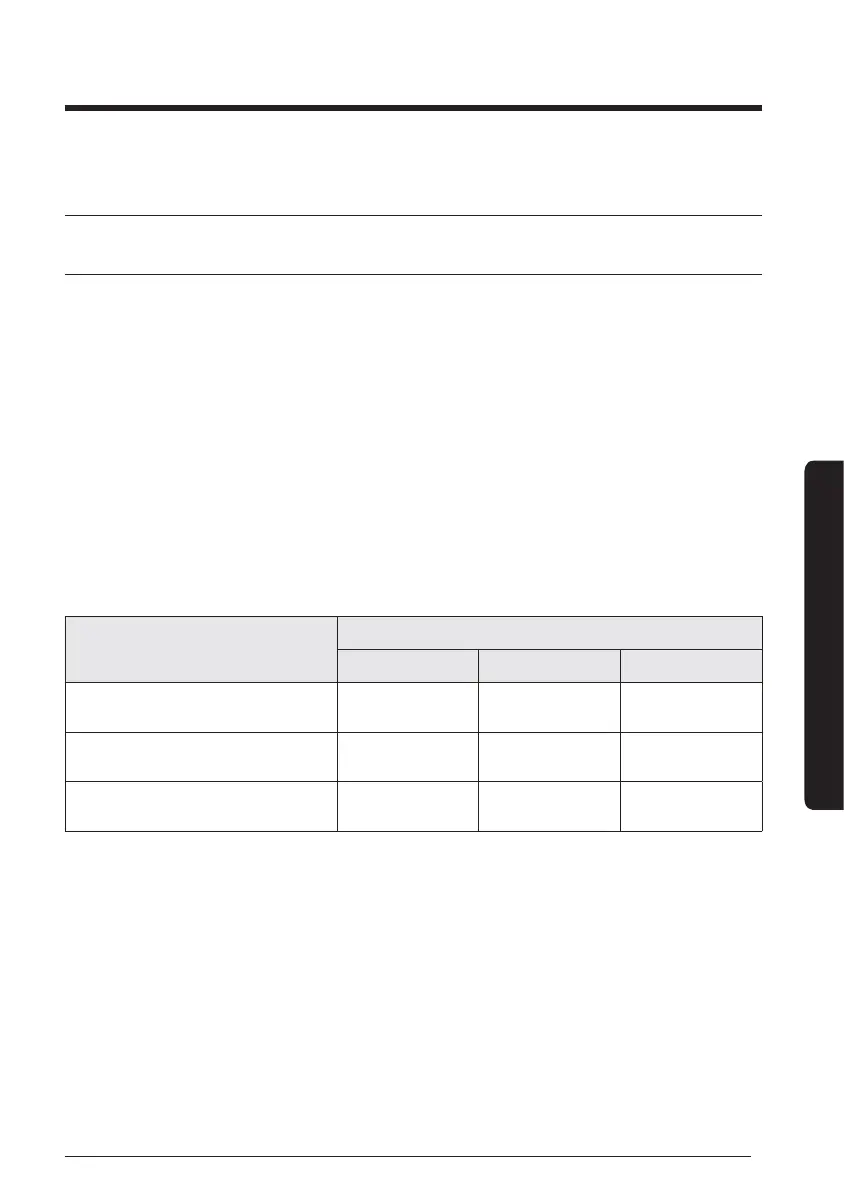
Tightening part
Tightening torque
N·m lbf·ft
Interface module, wired remote
controller connection
M3 0.5 ~ 0.75 0.37 ~ 0.55
AC FAN, 2/3 WAY VALVE
connection
M3.5 0.8 ~ 1.2 0.59 ~ 0.89
2P TERMINAL BLOCK for power
supply
M4 1.2 ~ 1.8 0.89 ~ 1.33





 To Next Page