14
INSTALLATION
FCU KIT installation
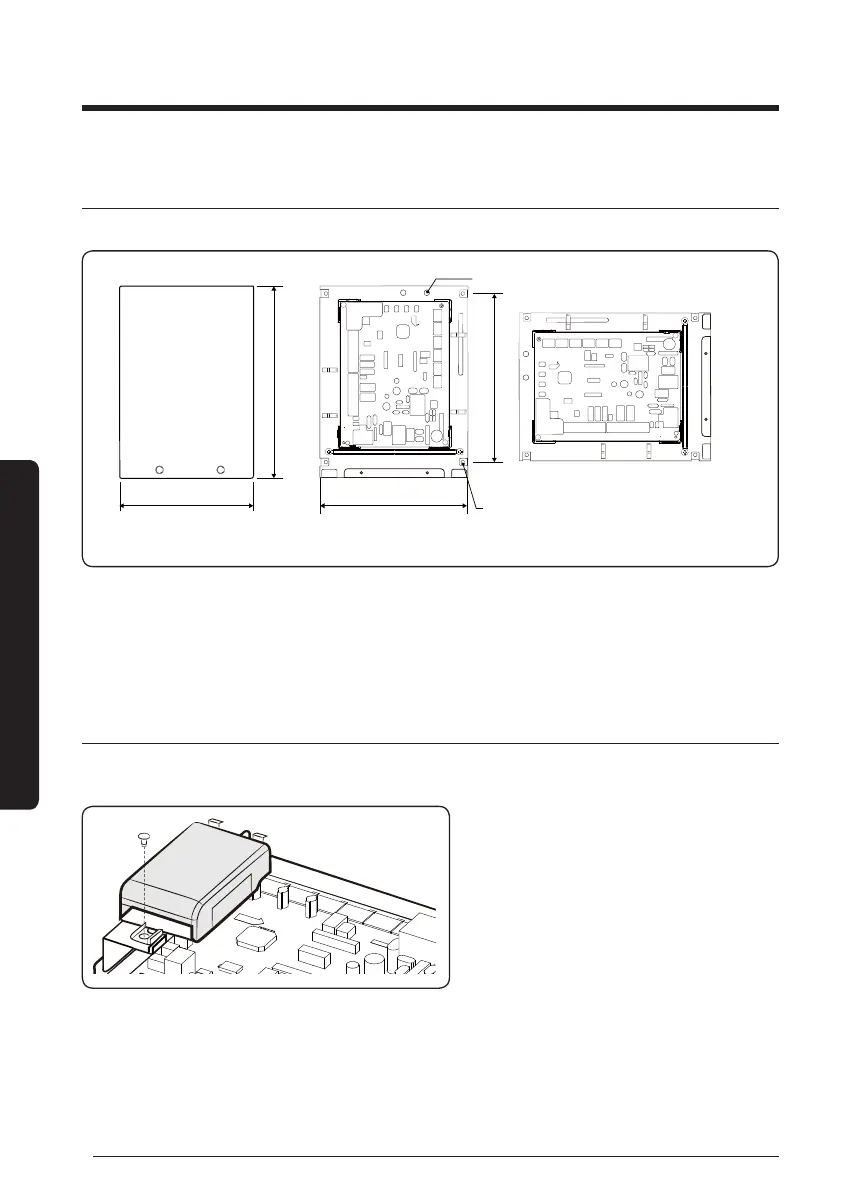
Install FCU KIT where the weight load of the product can be supported.
200(7.87)
270(10.62)
225(8.85)
200(7.87)
FCU interface module xing holes
<Vertical installation>
<Horizontal installation>
FCU KIT xing holes (4 holes)
1
Unscrew 2 screws of FCU KIT cover, and separate cover.
2
Fix the FCU KIT on the wall by 4 screws.
y
FCU KIT may be installed vertically or horizontally as shown in the gure.
– When installing horizontally, install FCU KIT at right angles to prevent entering water.
FCU interface module installation
Before installing the FCU interface module, complete connecting DC power and
communication of FCU interface module and sensor cables of FCU KIT.
1
Fix the case with one screw.
FCU KIT installation





 To Next Page