29
SETTING
Step 2. Procedure of option setting
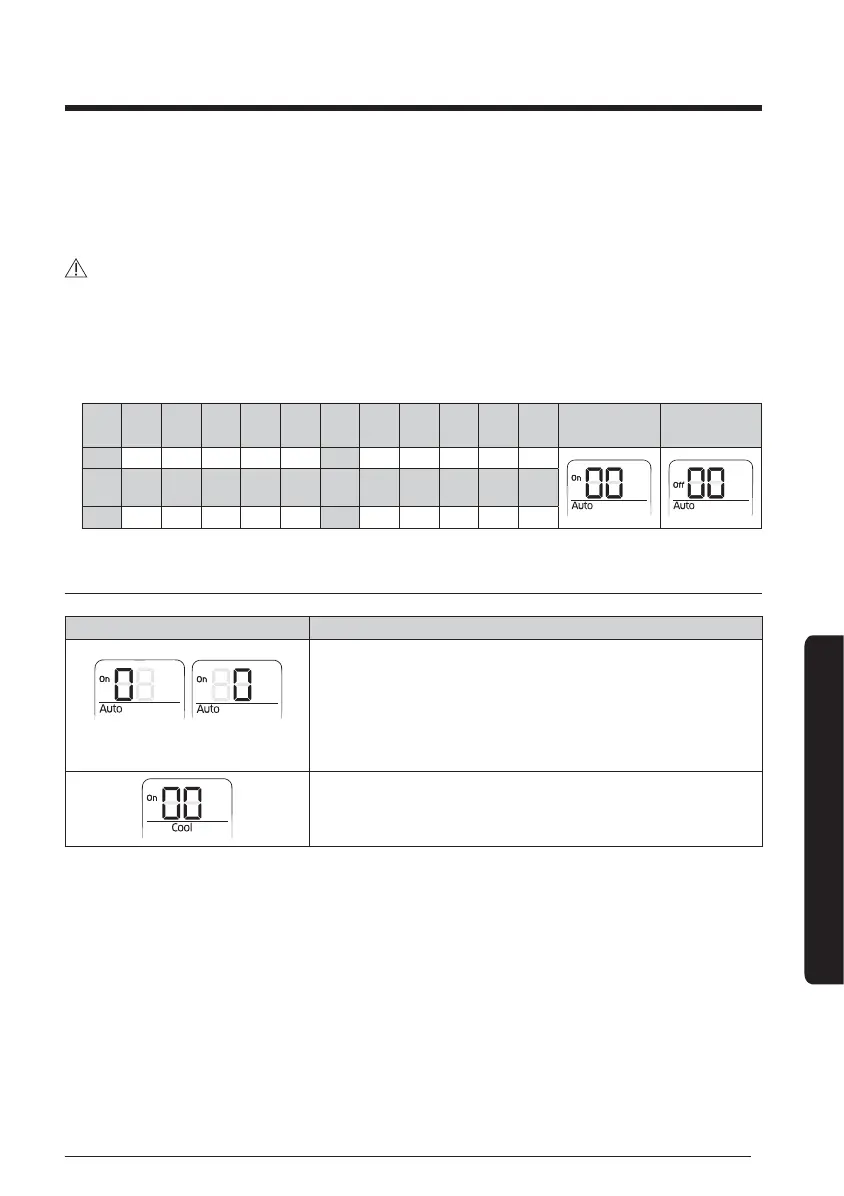
After entering the option setting stage, select the option as shown below.
CAUTION
• 24 digits are available to be input for the option setting.
• SEG1, SEG7, SEG13, and SEG19 are page display option so they do not need to be set.
• Set the SEG2~SEG6, SEG8~SEG12 in 'ON' status and SEG14~18, SEG20~24 in 'OFF'
status.
SEG1 SEG2 SEG3 SEG4 SEG5 SEG6 SEG7 SEG8 SEG9 SEG10 SEG11 SEG12 ON (SEG1 ~ SEG12)
OFF (SEG13 ~
SEG24)
0XXXXX1XXXXX
SEG13 SEG14 SEG15 SEG16 SEG17 SEG18 SEG19 SEG20 SEG21 SEG22 SEG23 SEG24
2XXXXX3XXXXX
Setting an option
Status Setting an option
SEG2 SEG3
1 Setting SEG2, SEG3 option
Press [Fan
∨
] button to enter SEG2 value.
Press [Fan
∧
] button to enter SEG3 value.
Each time you press the button, [SEG image] will be
selected in rotation.
2 Setting Cool mode
Press [Mode] button to change to Cool mode in the On
status.





 To Next Page