9
Memory Card
Your device supports removable microSD or microSDHC
memory cards with maximum capacities of 64 GB
(depending on the memory card manufacturer and type).
Memory cards are used to store music, photos, videos, and
other files.
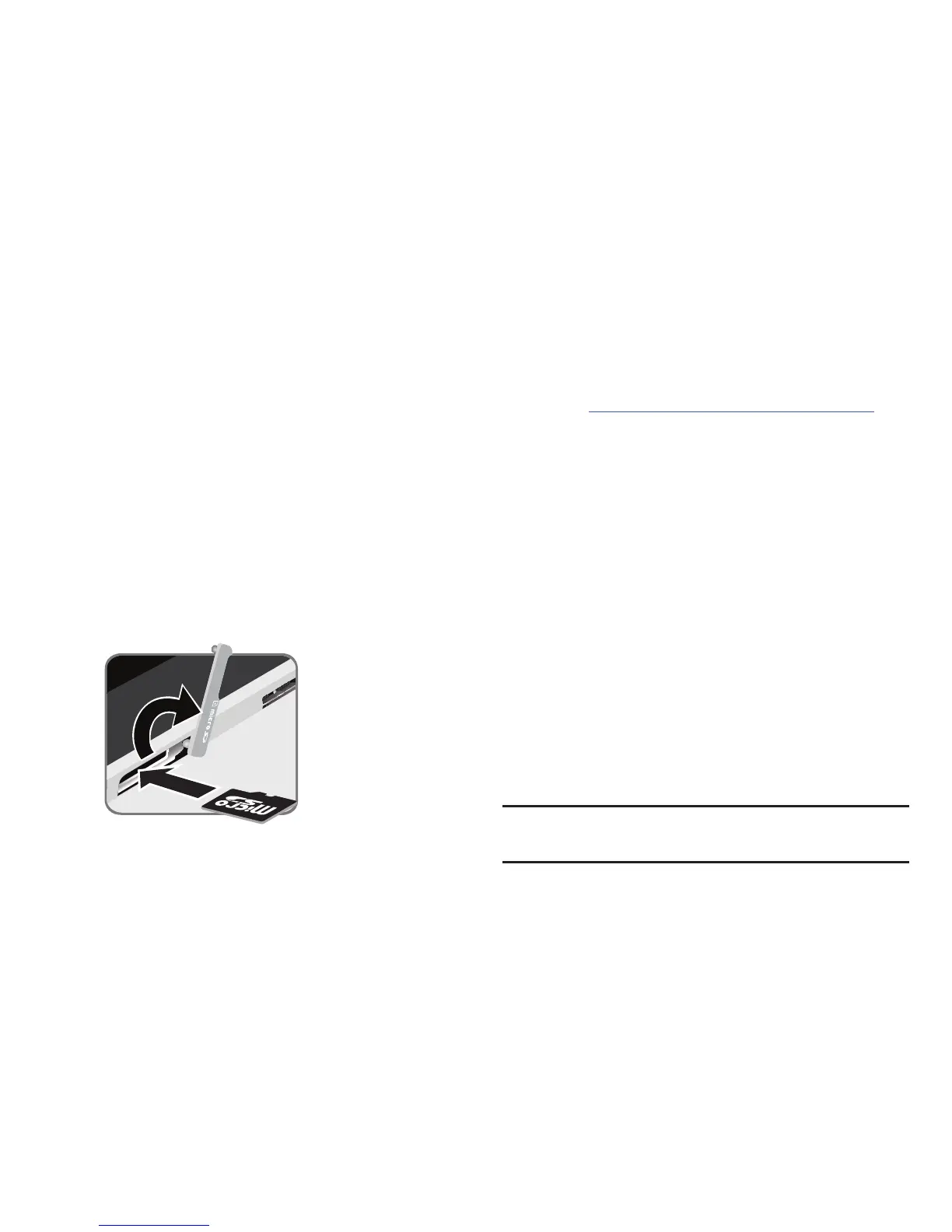
Installing a Memory Card
1. Open the memory card slot cover and turn to expose
the slot.
2. With the gold contacts facing down, carefully slide the
memory card into the slot, pushing gently until it clicks
into place.
3. Close the Memory Card Slot cover.
Galaxy Tab Accessories
To find accessories for your Galaxy Tab:
1. Go to
samsung.com/us/mobile/galaxy-tab-accessories
.
2. Use your model number to find compatible
accessories.
Securing Your Device
By default, the device locks automatically when the screen
times out or you can lock it manually.
Unlock the tablet by swiping your finger across the screen.
This is the default Screen lock (Swipe), and offers no
security.
Prevent others from using or accessing personal data
and information stored in the device by using a secure
Screen Lock.
For more information about creating and enabling a secure
Screen Lock, see “Lock Screen” on page 125.
For other settings related to securing your device, see
“Security” on page 152.
Note:
Unless stated otherwise, instructions in this User Manual
start with the device unlocked, at the Home screen.














 To Next Page