4.Troubleshooting
4.3.Buyer-RegionCodeSettingMethod
4.3.1.InsertingtheRegionCodeafterreplacingtheMainPCB
NOTE
•AfterreplacingtheMainPCBandSystemMicom(IC23),theregioncodeshouldbeinserted.
•Theunitwillnotworkproperlyifyoudonotinsertthecorrectregioncode.
•Youmustusetheremotecontrol.
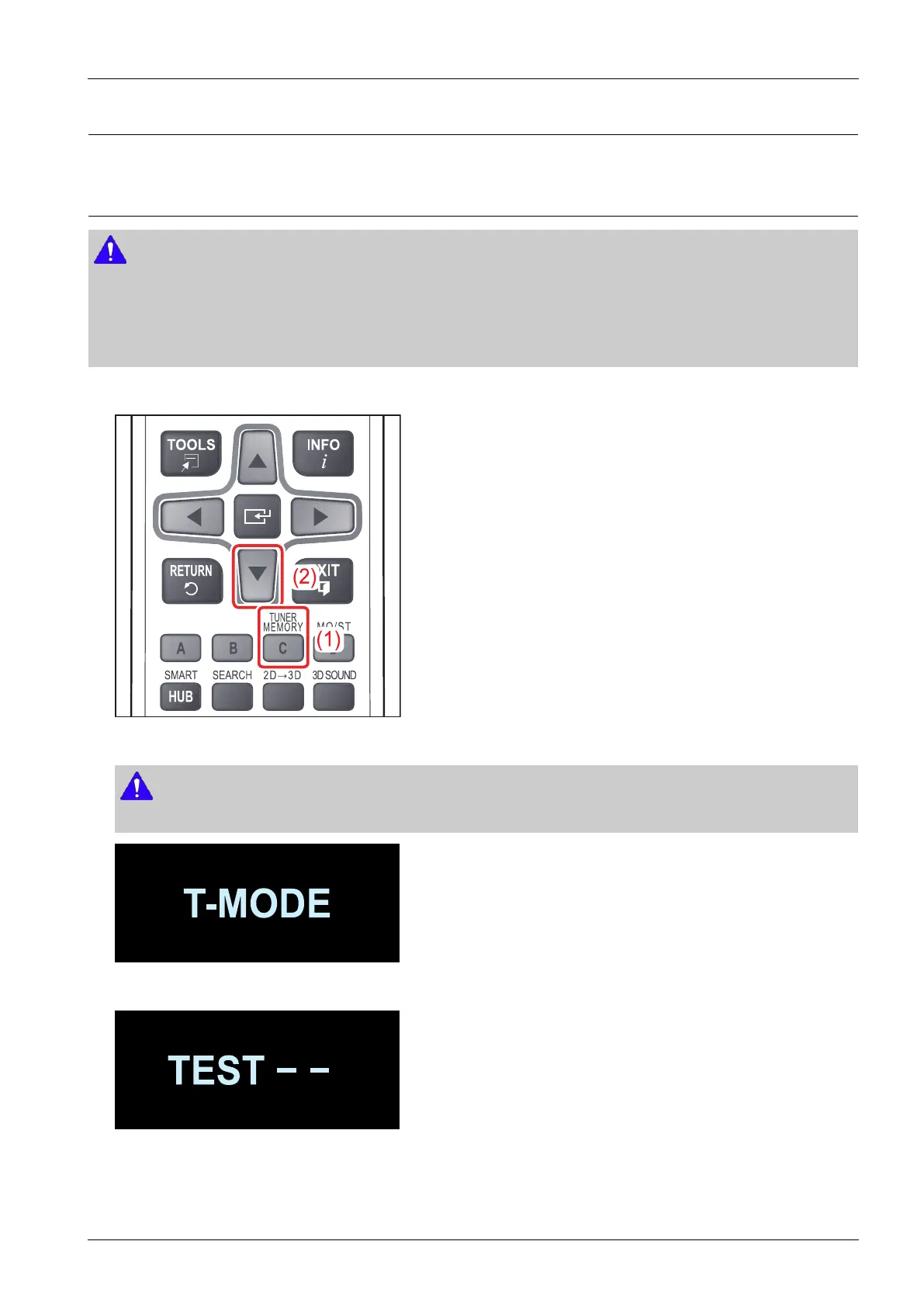
1)Selectthe"AUX"modeandthenpressthe"TunerMemory"buttonontheremotecontrolfor4-5seconds.
2)Y oushouldseethe“T-MODE”messagedisplayontheVFD.Pressthe“▼”directionbuttonduringthismessage.
NOTE
The“T-MODE”indicatorontheVFDonlyappearsforaveryshorttime.
3)Y oucansee“TEST−−”ontheVFD.Insertthenumber“46”toselecttheRegionCode.
Copyright©1995-2012SAMSUNG.Allrightsreserved.4-30


 To Next Page