42
Composite shooting
Effect : Fun
O You can use the Zoom W / T button during the composite shooting.
O If you press the Play mode button or rotating the mode dial during the
composite shots, each camera working mode is executed. The images
captured before will be deleted.
INFORMATION
Q You can combine 2-4 different shots in a still image.
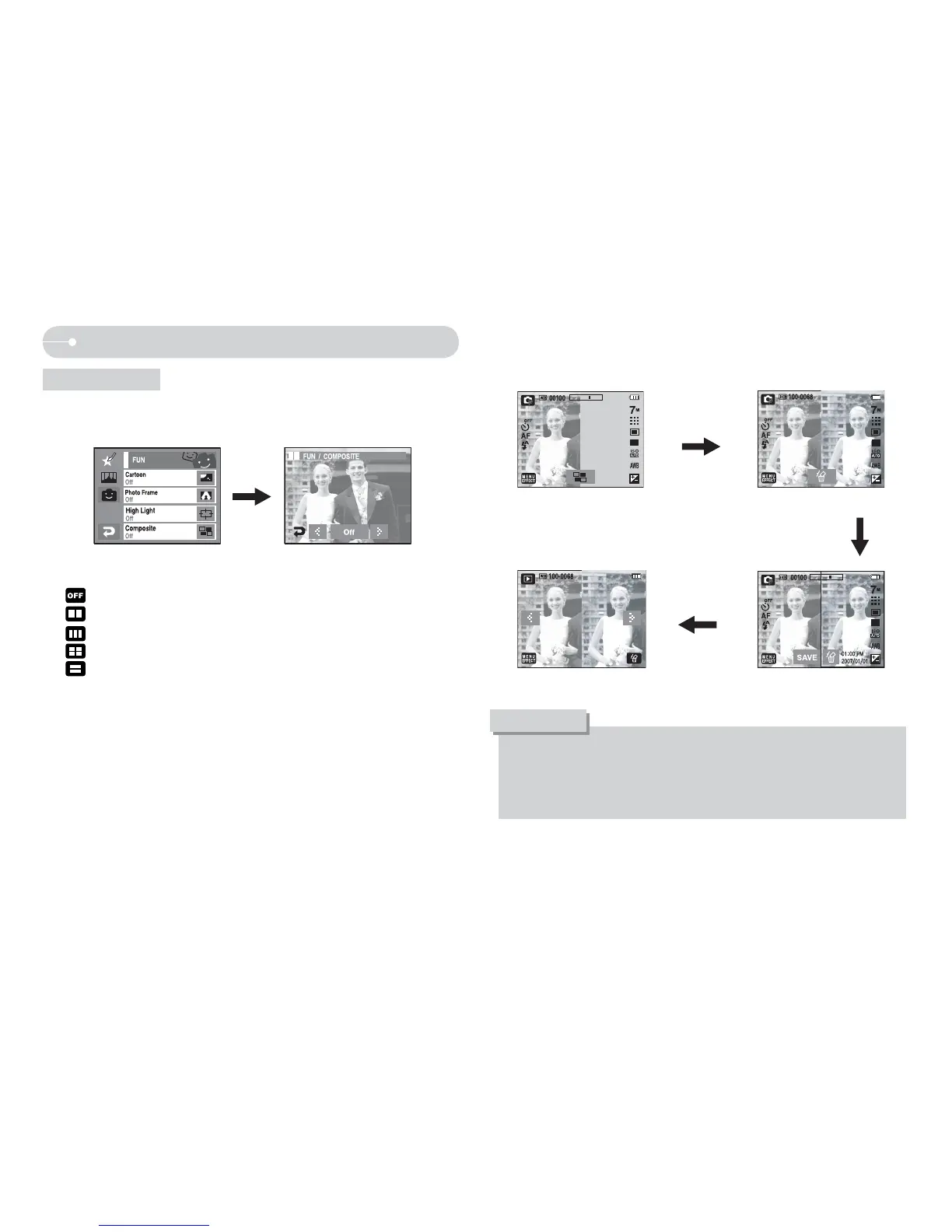
O Select the [EFFECT] menu in the available recording mode.
Select a desired menu by pressing W X icon and press the OK icon.
- : Cancels the composite shooting.
-
: 2 different shots are combined in a still.
-
: 3 different shots are combined in a still.
-
: 4 different shots are combined in a still.
-
: 2 different panorama shots are combined in a still image.
After selecting a desired menu, press the Shutter button to take a picture.
[Ready for taking] [First shot]
Press the shutter
button
Press [Save] icon on
LCD monitor
[The final picture] [Second shot]
Press the shutter
button
Ú Selecting 2 composite shots.


 To Next Page