75
PictBridge
O
Setting up the camera for connection to the printer
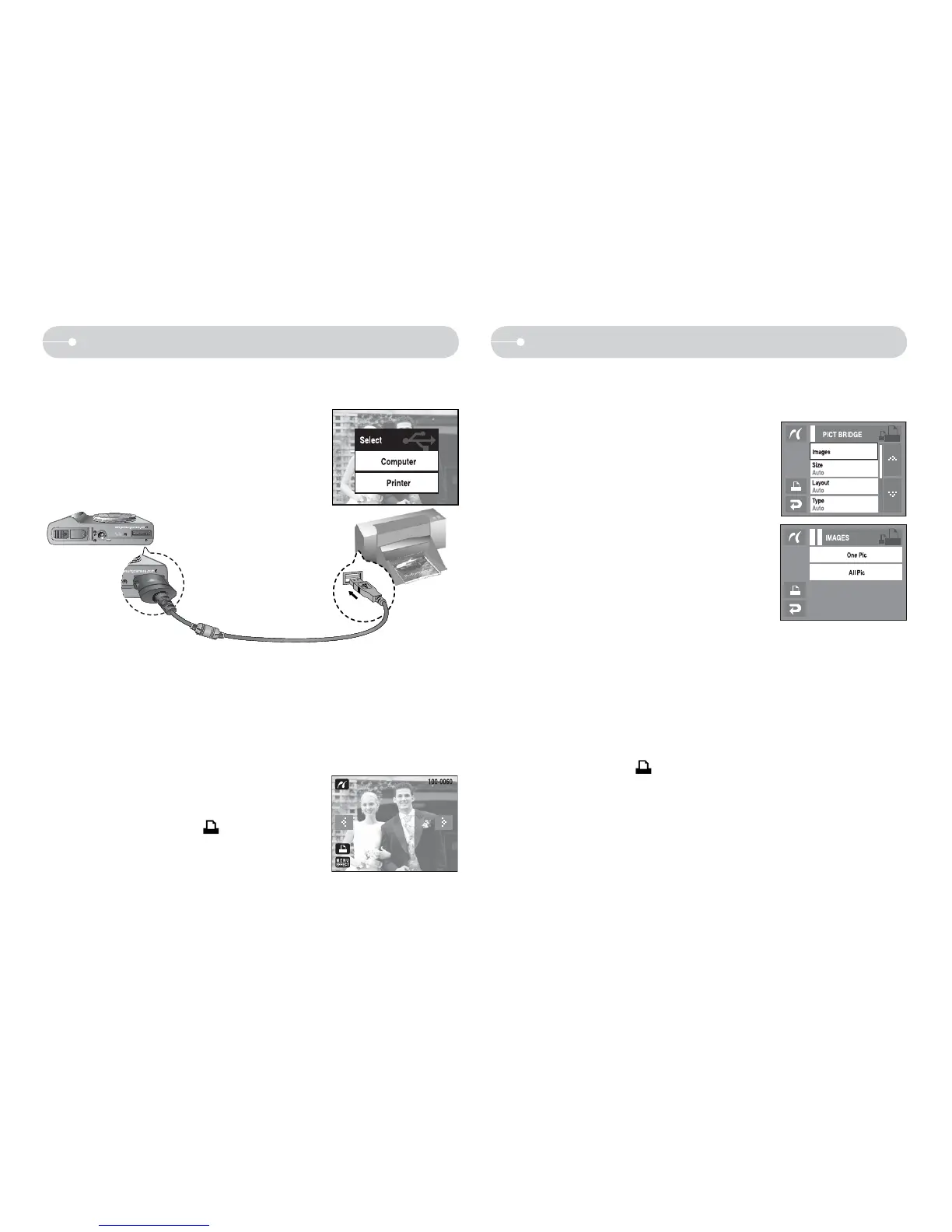
1. Connect the camera and printer with USB cable.
2. Select the [Printer] menu.
Q You can use the USB cable to connect this camera to a printer that supports
PictBridge (sold separately) and print the stored images directly. Movie clips
and voice files cannot be printed.
Ú If the [USB] menu is set to the [Computer], you cannot connect a Pictbridge
compatible printer to the camera through USB cable with [Connecting
Computer] message. In this case, remove the cable and do the step 1, 2
again.
Ú You can print the images by pressing the print button at the back of camera.
PictBridge : Picture Selection
Q You can select images you want to print.
O Setting the Number of Copies to Print
1. Press the Menu icon and the PictBridge menu
will display.
2. Select the [Images] menu.
3. Select a desired sub menu.
- Select [One Pic] or [All Pics]. A screen where
you can set the number of copies to print will
appear as shown below.
- Press the ST icon to select the number of
prints.
- When [One Pic] is selected : Use the WX
icon to select another picture.
After selecting another picture, select the
number of prints for another picture.
- When [All Pic] is selected, All images are printed as the number of
prints set.
- After setting the number of prints, press the OK icon to save.
- Press the Shutter button to return to the menu without setting the
number of prints.
4. Press the Print icon (
) and images will be printed.
Q Easy printing
O When you connect the camera to printer in the
Play back mode, you can print a picture easily.
- Pressing the printer (
) icon :
Currently displayed image will be printed
with the printer’s default setting.
- Pressing the WX icon : Selects a previous / next image



 To Next Page