67
Sound Menu
Effect : Fun
Ú Icons of the Image Board
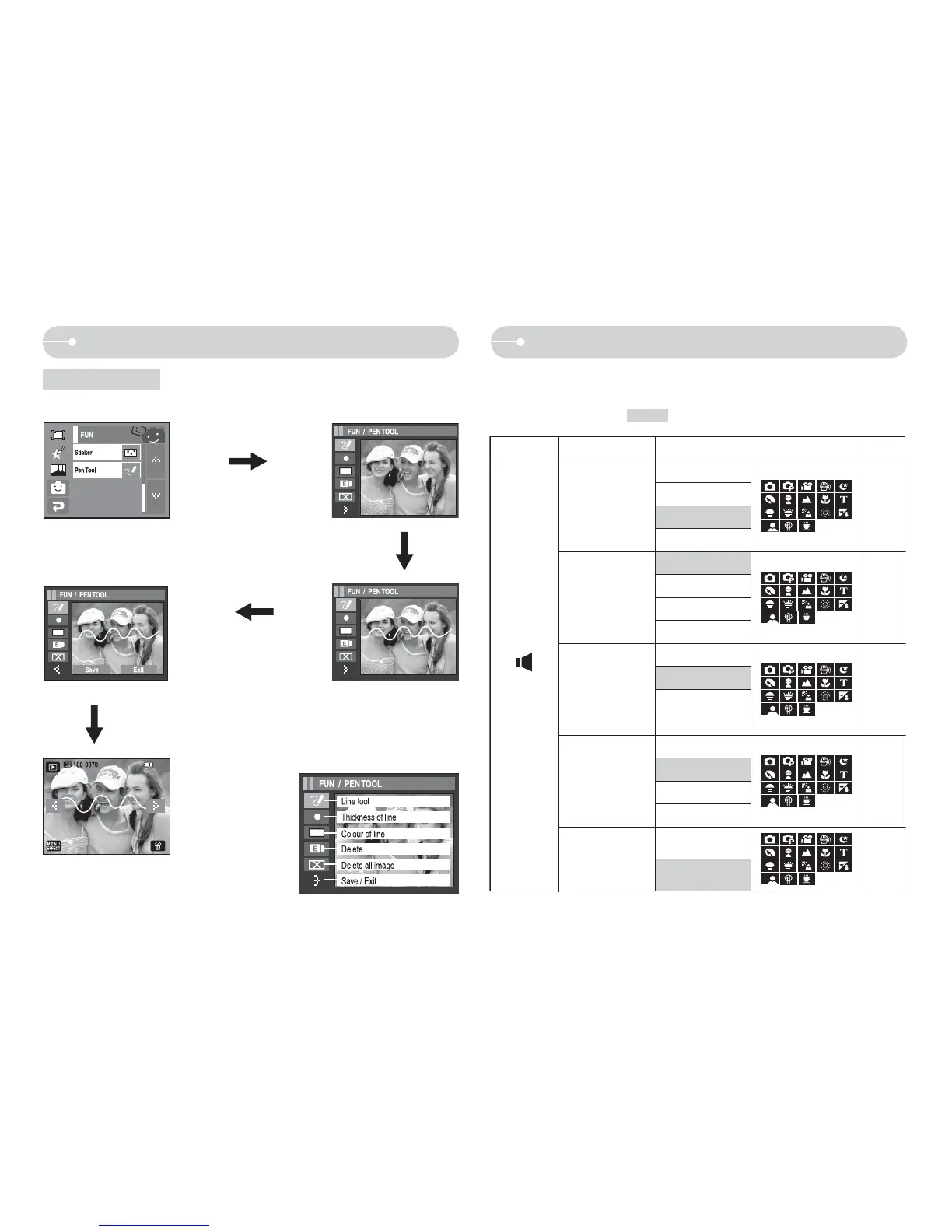
Pen Tool
Q You can add a text or line on the saved image with the Touch Pen.
Make a text or line with the
Touch Pen
Press the X
icon.
Press the SAVE icon and a
confirmation window will appear.
Press the [Yes] icon and the image is
saved as a new file name.
Mode
Menu Sub Menu Available Mode
Page
(Sound)
Volume
Off
p. 68
Start Sound
Shutter Sound
Beep Sound
AF Sound
Low
Medium
High
Off
Sound 1
Sound 2
Sound 3
Off
Sound 1
Sound 2
Sound 3
Off
Sound 1
Sound 2
Sound 3
Off
On
p. 68
p. 68
p. 68
p. 68
Q In this mode, you can set up sound settings. You can use the setup menu in
all camera modes, except Voice Recording mode.
Q The items indicated by are default settings.



 To Next Page