57
Effect : Image Edit
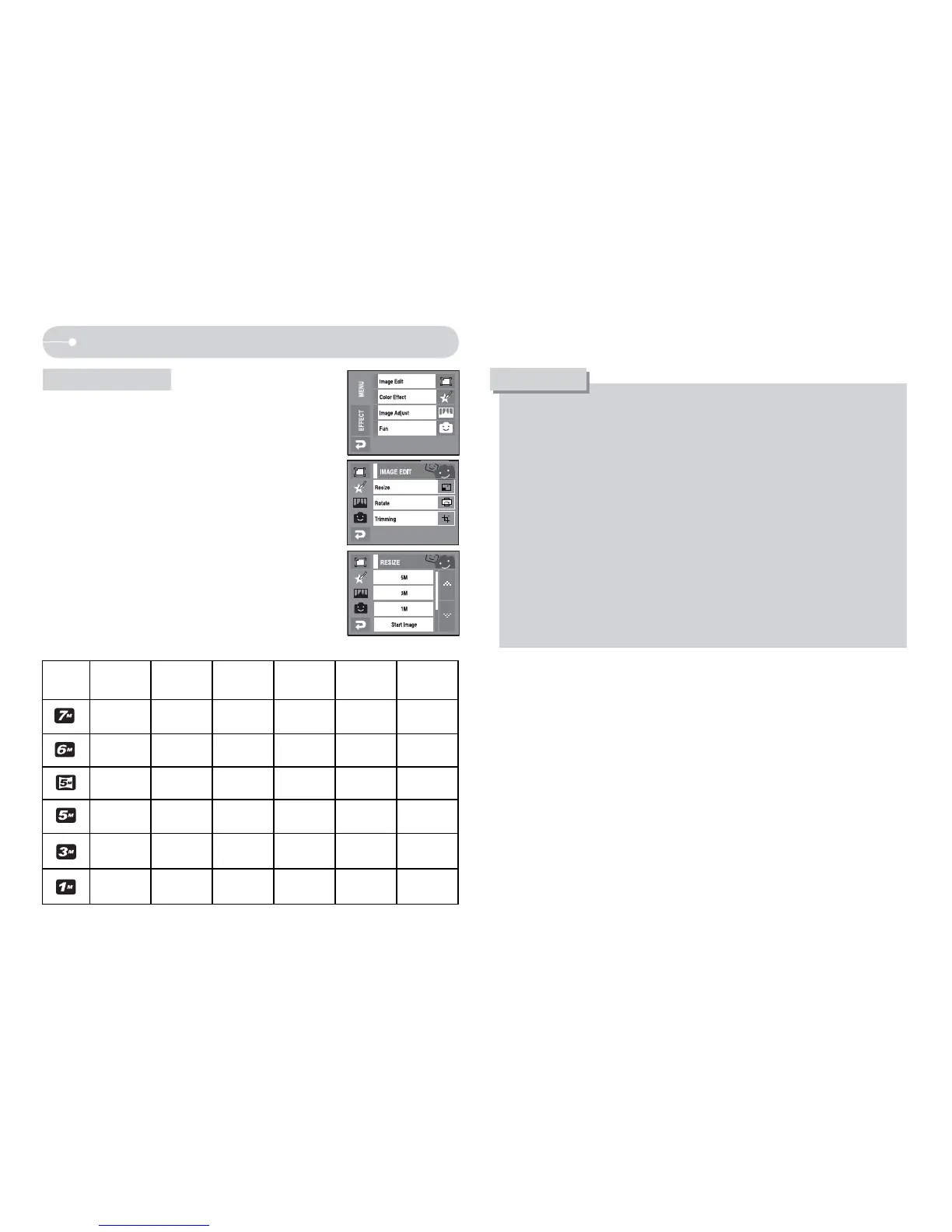
Q Change the resolution (size) of pictures taken.
Select [Start image] to save an image to be the
start-up image. The resized image will have a new
file name.
1. Select the [Image Edit] menu.
2. Select the [RESIZE] menu.
3. Select a desired size.
O A large sized image can be resized to a smaller sized image, but not
vice versa.
O Only JPEG images can be resized. Movie clip (AVI), Voice recording
(WAV) files can’t be resized.
O You can change the resolution of only those files compressed in the
JPEG 4:2:2 format.
O The resized image will have a new file name. The [START IMAGE]
image is stored not on the memory card but on the internal memory.
O Only one [START IMAGE] image can be saved. If you save a new
[START IMAGE], the existing start up image will be deleted.
O If the memory capacity is insufficient to store the resized image, a
[Memory Full!] message will display on the LCD monitor and the resized
image will not be stored.
INFORMATION
Resize
O Image Resize Type O : User Selectable)
Size
3072
X 2304
3072
X 2048
3072
X 1728
2592
X 1944
2048
X 1536
Start
Image
OOOOOO
OOOO
OOO
OOO
OO
O


 To Next Page